.png)
ISG Tanium Package Deployment
This guide includes the key steps for deploying the specific content created by ISG to leverage the capabilities of Tanium to perform a cryptographic inventory at scale.
Prerequisites
To start the deployment of the ISG Tanium Content, you will need to receive the download link from ISG. If you don't have the download link, please reach out to ISG support. This guide is designed for the following versions of the Products:
Tanium Version Build. 7.5.x
Tanium Version Console. 3.4.x
ISG Sensor Tanium Content. 3.4.x
ISG AgileSec Analytics Unified Sensors for Tanium. 3.4.0
Other version of Tanium may have different import process.
The guide applies for another version of Tanium with minor differences in the import process.
Roles
Tanium Admin Role
The Tanium Admin role is the person who will load the package from ISG into Tanium and provide access to the Crypto Operational Role. The following actions are considered::
Download ISG packages from the link provided by ISG
Create ISG Content Set
Load ISG Actions and Packages
Load ISG Sensors
Load ISG Saved Questions
Load ISG Connect Jobs after modification of URLs
Assign a set of Hosts to Crypto Operational Role
Assign a set of rights to Crypto Operation Role
Crypto Operational Role
The Crypto Operational role is the person who will manually execute the different sensors and actions from Tanium to trigger the cryptographic inventory. It is recommended to provide the following rights to the person that will be assigned with the crypto operational role:
Right to run objects available in ISG Content Set
Right to Run ISG Actions on authorized hosts
Right to Create New Saved Questions
Right to Run Saved Questions
Right to Create New Connect Jobs
Right to Run Connect Jobs
ISG Tanium Content
Download File
The ISG Tanium Content is provided in a single archive. The archive is provided separately through a secure download link by ISG.
ISG-Sensor-3.4.0-Tanium.zip
Key components
The ISG Tanium Content archive contains the following key components:
ISG Tanium Package. Used to deploy ISG discovery capabilities to end-points through Tanium Agent.
ISG Tanium Sensors. Used to query cryptographic findings from ISG packages.
ISG Tanium Saved Questions. Used to leverage a set of pre-built saved questions.
ISG Tanium Connect Jobs. Used to export cryptographic findings to an external source.
ISG Scripts/Executables. Used to perform the deploy, discovery and removal action.
Installation Package Structure
The ISG Tanium Content Archive contains the following files.
- ISG-Tanium Connect-3.4.0.json                > Connect jobs to load into Tanium manually
- ISG-Tanium-Saved-Questions-3.4.0.json        > Saved Questions to load into Tanium
- ISG-Tanium-Sensors-3.40.json                > Sensors to load into Tanium manually
- ISG-Tanium-Packages-3.4.0.json               > Packages to load into Tanium manually


- ./Packages-Executables                         > Executables to load in packages
    - ./ISG-Deploy-Linux
       - ./isg_sensor_3.4.0-py.zip             > Common Python Scripts
       - ./isg_sensor_linux_3.4.0.zip          > ISG Sensor Executable
       - ./isg_ds_deploy.py                    > Deploy Script

    - ./ISG-Deploy-Windows
       - ./isg_sensor_3.4.0-py.zip             > Common Python Scripts
       - ./isg_sensor_windows_3.4.0.zip        > ISG Sensor Executable
       - ./isg_ds_deploy.py                    > Deploy Script

    - ./ISG-Discover-Linux
       - ./isg_ds_discover.py                  > Discovery Script

    - ./ISG-Discover-Windows
       - ./isg_ds_discover.py                  > Discovery Script

    - ./ISG-Run-Linux
       - ./isg_ds_run.py                       > Run Script

    - ./ISG-Run-Windows
       - ./isg_ds_run.py                       > Run Script

    - ./ISG-Undeploy-Linux
       - ./isg_ds_undeploy.py                  > Undeploy Script

    - ./ISG-Undeploy-Windows
       - ./isg_ds_undeploy.py                  > Undeploy Script
ISG Sensors
ISG-Tanium-Sensors-3.4.0.json
The following sensors will be loaded in Tanium. The sensors will be used to interact with the ISG packages and query specific cryptographic information. The sensors are usually divided into 2 groups, 1) the file level sensors which return information about the location plus the metadata of the associated cryptographic object and 2) detailed information about the cryptographic object. As Tanium limits the number of events that can be returned by Sensors by hosts, ISG implemented specific parameters that allow sensors to return only a subset of information.
Name | Type | Comment |
|---|---|---|
ISG - Algorithm Files | Algorithms | Get files containing cryptographic algorithms |
ISG - Algorithm Summary | Algorithms | Get the summary of cryptographic algorithms |
ISG - Certificate Algorithms | Certificates | Get algorithms used by Certificates |
ISG - Certificate Encoded | Certificates | Get certificates in PEM-encoded format |
ISG - Certificate Files | Certificates | Get files containing certificates. |
ISG - Certificate Info | Certificates | Get files and certificate metadata |
ISG - Certificate Summary | Certificates | Get the summary of certificates |
ISG - JCA Files | Algorithms JCA | Get files containing JCA (java) calls |
ISG - JCA Summary | Algorithms JCA | Get the summary of JCA (java) calls |
ISG - Key Files | Keys | Get files containing cryptographic keys |
ISG - Key Summary | Keys | Get the summary of cryptographic keys |
ISG - Keystore Files | Keystores | Get files containing keystores |
ISG - Keystore Summary | Keystores | Get the summary of keystores |
ISG - Library Files | Crypto Libraries | Get files containing cryptographic libraries |
ISG - Library Summary | Crypto Libraries | Get the summary of cryptographic libraries |
ISG - Status Deploy | Status | Get status of the ISG sensor deployment |
ISG - SSH Protocol Event | SSH Keys | Get keys used by network interfaces |
ISG - SSH Key Summary | SSH Keys | Get keys used by network interfaces |
ISG - TLS Certificate Summary | Certificate | Get certificates used by network interfaces |
ISG Packages
ISG-Tanium-Packages-3.4.0.json
ISG packages are used to deploy the ISG discovery plugin via the Tanium infrastructure. The packages are split into 3 main categories, including:
1) the deployment of the ISG package
2) the execution of the ISG package (discover and run packages)
3) the removal of the ISG package. The following packages are provided.
Name | Type | Comment |
|---|---|---|
ISG - Deploy [Linux] | Deploy | Deploy ISG Sensor on targeted Linux Machines |
ISG - Deploy [Windows] | Deploy | Deploy ISG Sensor on targeted Windows Machines |
ISG - Discover [Linux] | Discover | Run ISG Sensor locally on targeted Linux Machines |
ISG - Discover [Windows] | Discover | Run ISG Sensor locally on targeted Windows Machines |
ISG - Run [Linux] | Run | Run ISG Sensor on targeted Linux Machines |
ISG - Run [Windows] | Run | Run ISG Sensor on targeted Windows Machines |
ISG - Undeploy [Linux] | Undeploy | Undeploy ISG Sensor on targeted Linux Machines |
ISG - Undeploy [Windows] | Undepoy | Undeploy ISG Sensor on targeted Windows Machines |
ISG Saved Questions
ISG-Tanium-Saved-Questions-3.4.0.json
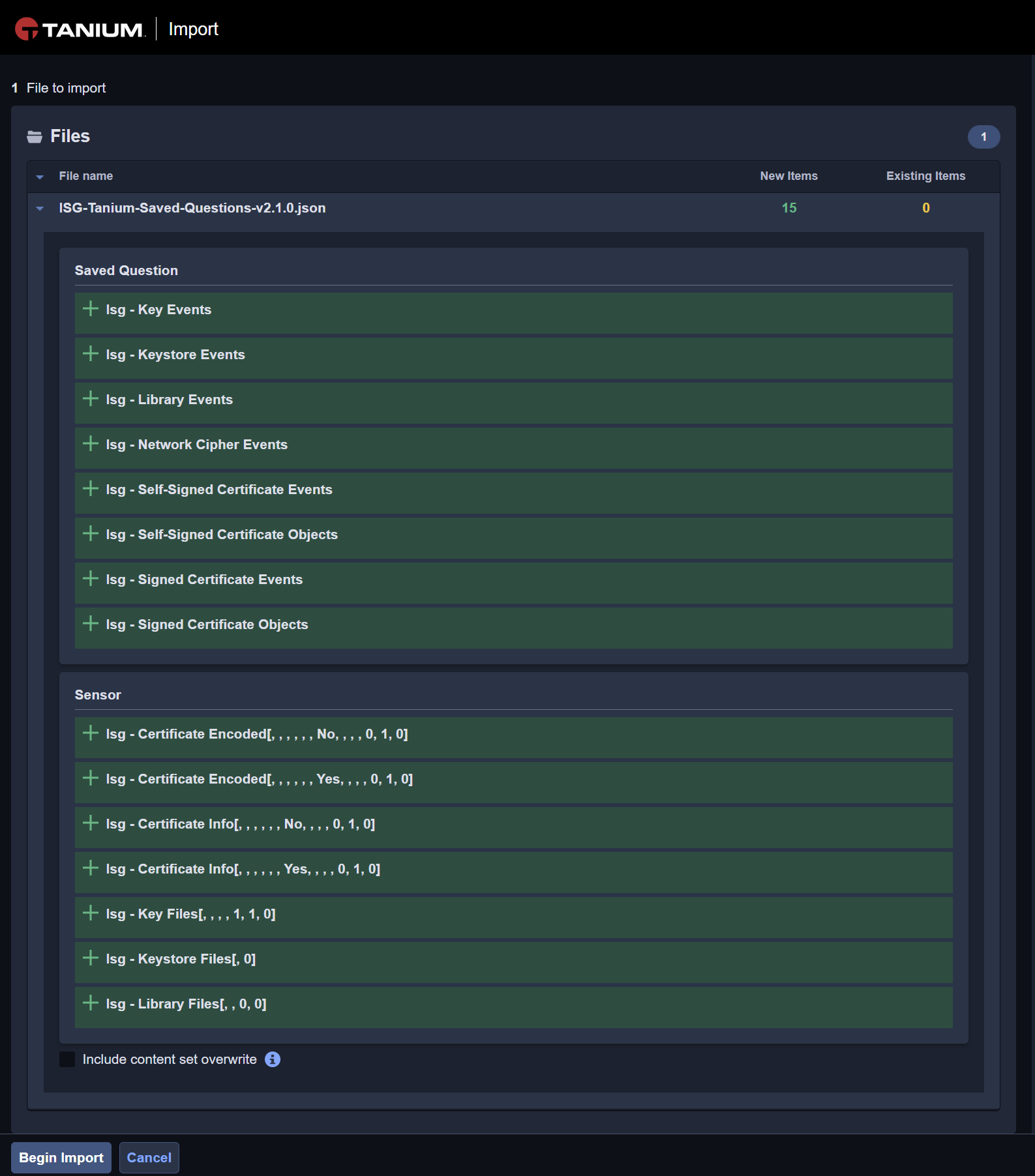
ISG saved questions are pre-built questions that leverage the ISG sensors. The default saved questions have been designed to split queries returning a large amount of data into isolated queries, such as queries related to X.509 certificates. The saved questions include the 1) Event Saved questions aiming to return the location of cryptographic objects associated with the associated metadata 2) Objects that return detailed information about the related cryptographic objects (especially for X509 certificates that contain several useful information).
Name | Type | Comment |
|---|---|---|
ISG - Key Events | Key | Query key events |
ISG - Keystore Events | Keystore | Query keystore events |
ISG - Library Events | Library | Query cryptographic library events |
ISG - Network Cipher Events | Network | Query network cipher events |
ISG - Self-Signed Certificate Events | Certificate | Query self-signed certificate events |
ISG - Self-Signed Certificate Objects | Certificate | Query self-signed certificate objects |
ISG - Signed Certificate Events | Certificate | Query signed certificate events |
ISG - Signed Certificate Objects | Certificate | Query signed certificate objects§ |
ISG - TLS Certificates Events | Certificate | Query Certificates used by Network Interfaces |
ISG - SSH Key Events | Certificate | Query SSH Keys used by Network interfaces |

Custom sensors are created to return only specific information to ISG backend or when a sensor returns more items by host than allowed by Tanium.
Tanium Connect
ISG-Tanium-Connect-3.4.0.json
The Tanium connect jobs are matching the ISG Saved Question to export the result of saved questions to the ISG backend Server. The following Tanium connect jobs are available by default.
Name | Type | Comment |
|---|---|---|
ISG - Export Key Events | Key | Export key events to ISG Server |
ISG - Export Keystore Events | Keystore | Export keystore events to ISG Server |
ISG - Export Library Events | Library | Export cryptographic library events to ISG Server |
ISG - Export Network Cipher Events | Network | Export network cipher events to ISG Server |
ISG - Export Self-Signed Certificate Events | Certificate | Export self-signed certificate events to ISG Server |
ISG - Export Self-Signed Certificate Objects | Certificate | Export self-signed certificate objects to ISG Server |
ISG - Export Signed Certificate Events | Certificate | Export signed certificate events to ISG Server |
ISG - Export Signed Certificate Objects | Certificate | Export signed certificate objects to ISG Server |
ISG - Export TLS Certificates Events | Certificate | Export TLS Certificates found in network to ISG Server |
ISG - Export SSH Key Events | Key | Export SSH keys found in network to ISG Server |
1. Step: Create ISG Content Set
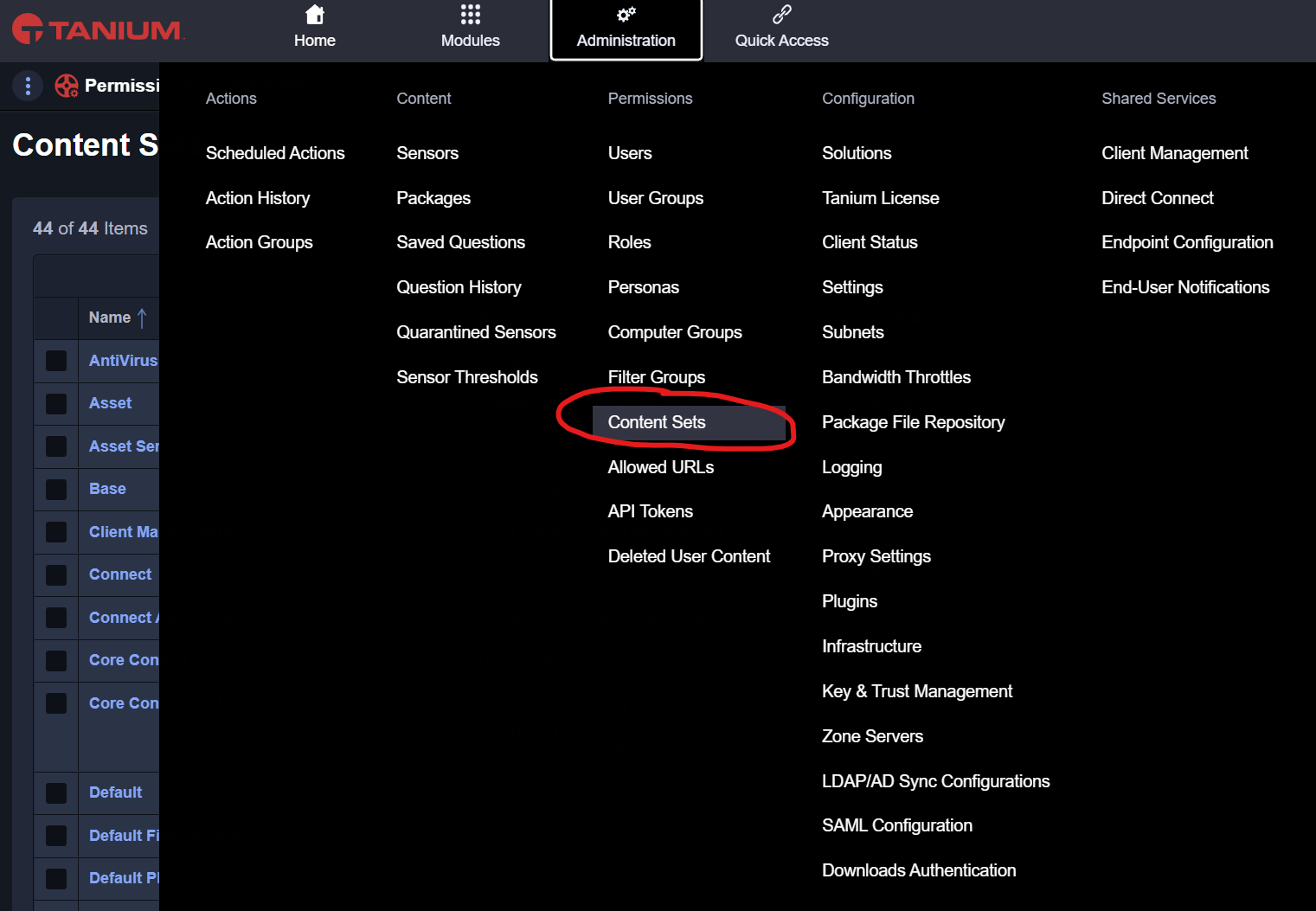
1A. Go to content Set
To create the ISG AgileSec Analytics content set, you shall go to administration>content sets menu in Tanium.
1B. Create ISG - AgileSec Analytics Content Set
When in Content Sets, you shall create a new content set. You must use the following name: ISG - AgileSec Analytics. Using a different name will lead to an error when loading the ISG Tanium packages.
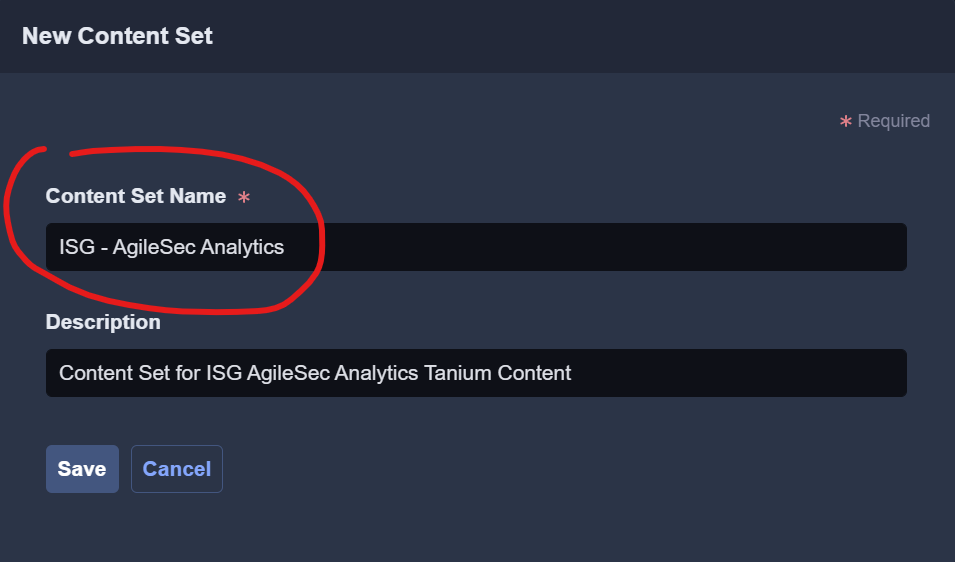
The Content Set Name must exactly (key sensitive) match the name ISG - AgileSec Analytics.
1C. Save Content Set Changes
Modifications to the content set must be confirmed and saved prior applied. You shall therefore correctly save the modification made on the content set.
This step is mandatory. Ensure to confirm and save to apply the changes.
2. Step: Load ISG Packages
This chapter presents how to load the ISG Packages within Tanium. The packages contain ISG executables that will be controlled by the Tanium Agent. The Packages allow deploying the ISG plugin for Tanium endpoints, executing the cryptographic discovery and run processes on endpoints, and removing any packages.
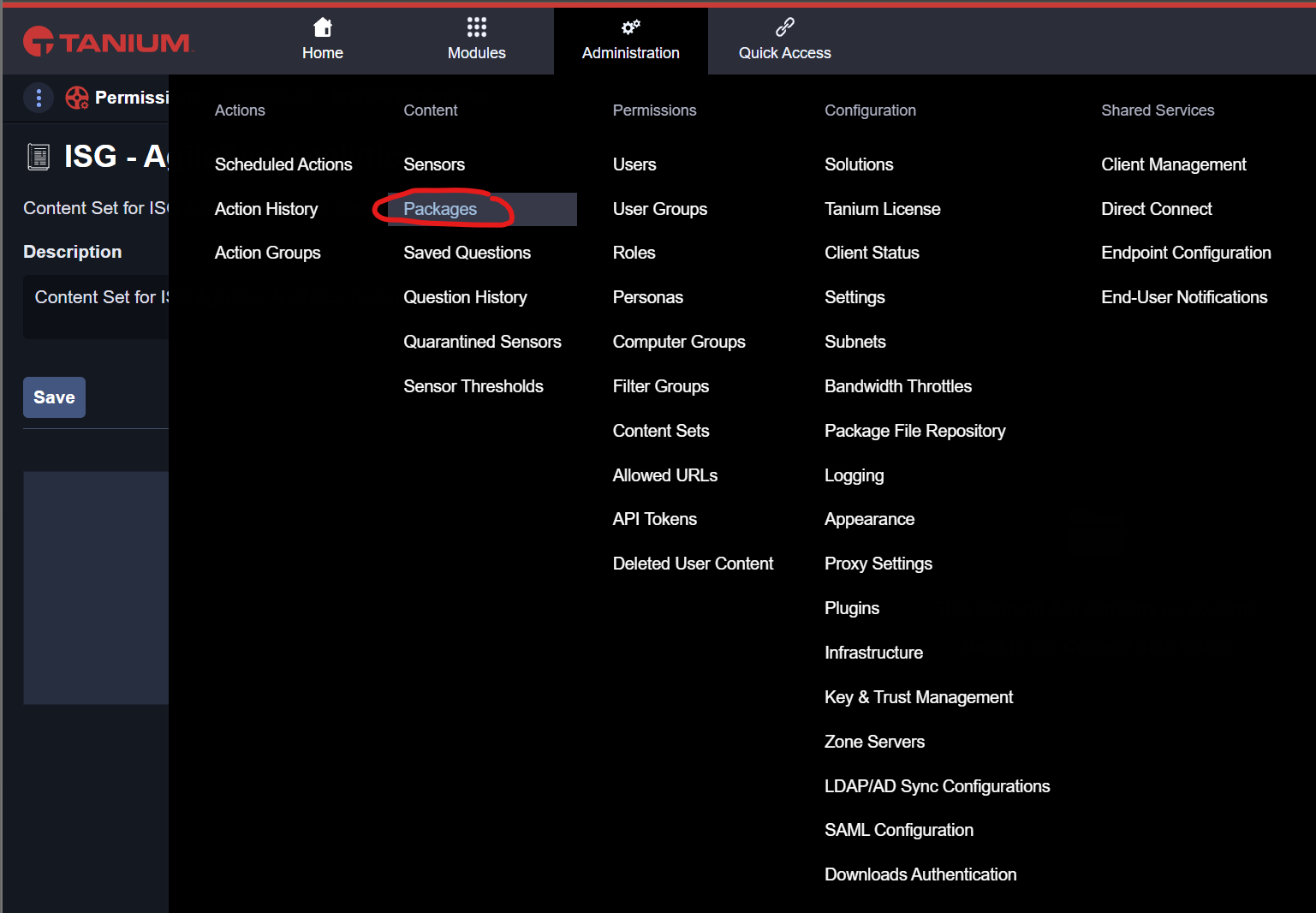
2A. Go to Packages
To load new packages, you shall go to administration>packages menu in Tanium.
2B. Import ISG Tanium packages
In the package menu, you can click on import new content and select the file ISG-Tanium-Packages-version.json provided by ISG to load the ISG AgileSec Analytics Packages.

The following Packages shall become available for import. You can Begin the Import.
After successful import, the ISG Tanium Packages shall be available.
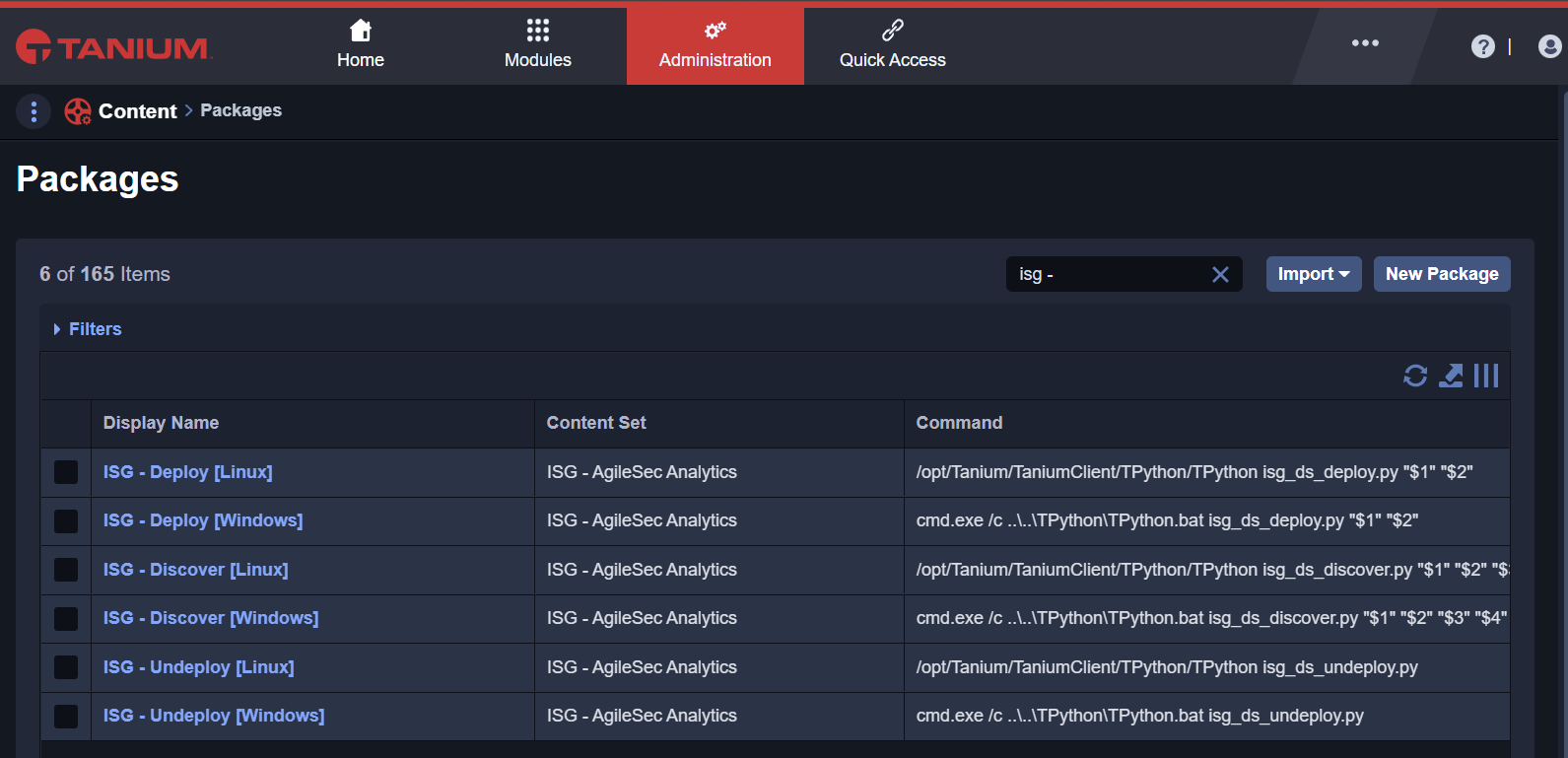

The packages loaded do not include the files and executable of ISG. These must be loaded separately as defined in the next step.
If you are upgrading to a newer version of ISG Tanium Content, also update the Exectuables in the ISG Packages manually following the next steps.
2C. Load ISG Executables to Packages
Click on the 1st Package ISG - Deploy [Linux] To access the edit and preview mode of the package. Enter the Edit mode.
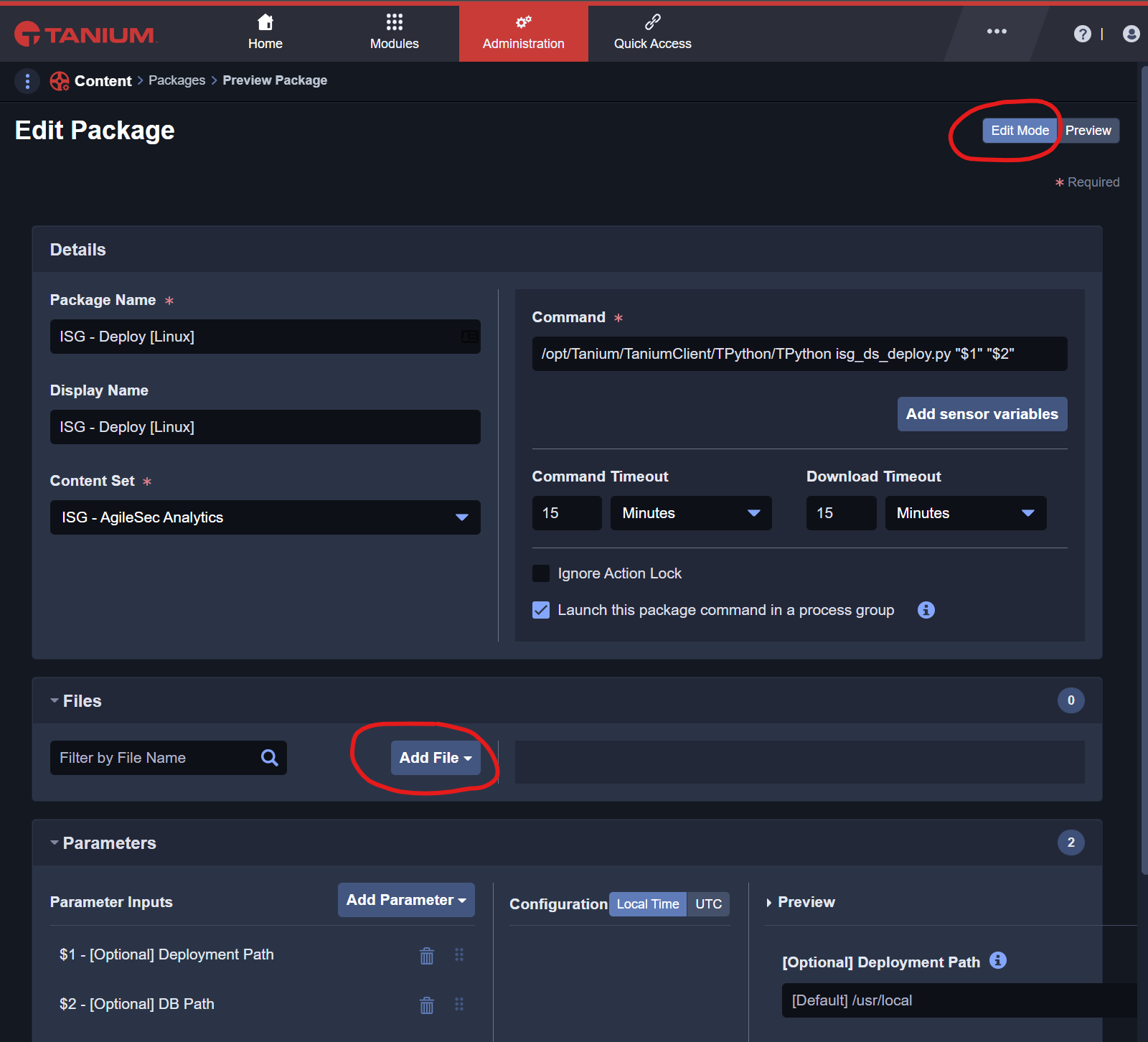
Then manually add the following files to the package.
Load file from directory ./ISG-Deploy-Linux/isg_sensor_3.40-py.zip
Load file from directory ./ISG-Deploy-Linux/isg_sensor_linux_3.4.0.zip
Load file from directory ./ISG-Deploy-Linux/isg_ds_deploy.py
and save the updated package.

2D. Load ISG Executables for all packages
You shall now continue loading the ISG executables for the different packages as follows:
ISG - Deploy [Linux]
For ISG - Deploy [Linux] load the following packages
Load file from directory ./ISG-Deploy-Linux/isg_sensor_linux_3.4.0.zip
Load file from directory ./ISG-Deploy-Linux/isg_sensor_3.4.0-py.zip
Load file from directory ./ISG-Deploy-Linux/isg_ds_deploy.py
ISG - Deploy [Windows]
For ISG - Deploy [Windows] load the following packages
Load file from directory ./ISG-Deploy-Windows/isg_sensor_3.4.0-py.zip
Load file from directory ./ISG-Deploy-Windows/isg_sensor_windows_3.4.0.zip
Load file from directory ./ISG-Deploy-Windows/isg_ds_deploy.py
ISG - Discover [Linux]
For ISG - Discover [Linux] load the following packages
Load file from directory ./ISG-Discover-Linux/isg_ds_discover.py
ISG - Discover [Windows]
For ISG - Discover [Windows] load the following packages
Load file from directory ./ISG-Discover-Windows/isg_ds_discover.py
ISG - Run [Linux]
For ISG - Run [Linux] load the following packages
Load file from directory ./ISG-Run-Linux/isg_ds_run.py
ISG - Run [Windows]
For ISG - Run [Windows] load the following packages
Load file from directory ./ISG-Run-Windows/isg_ds_discover.py
ISG - Undeploy [Linux]
For ISG - Undeploy [Linux] load the following packages
Load file from directory ./ISG-Undeploy-Linux/isg_ds_undeploy.py
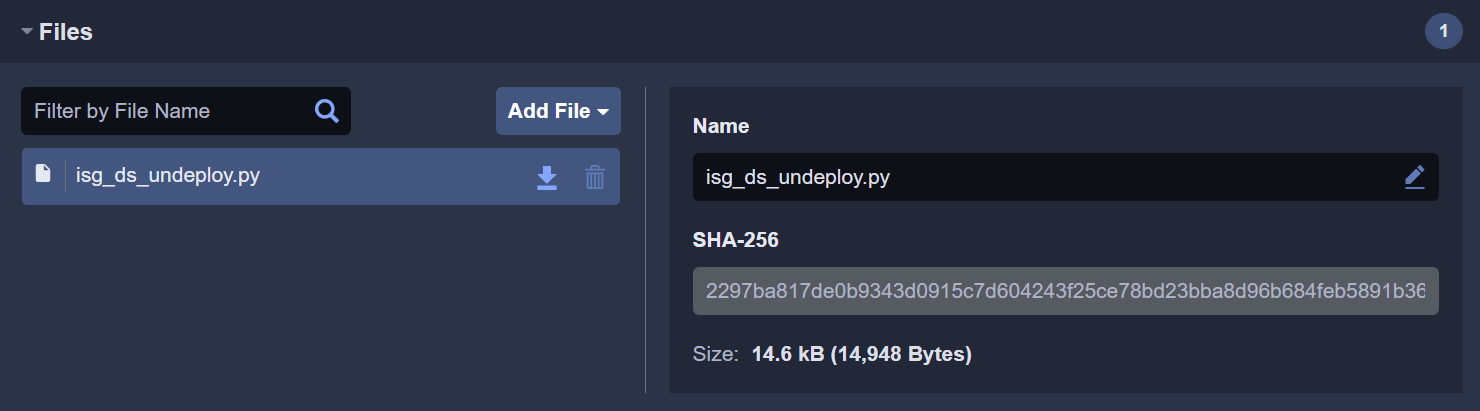
ISG - Undeploy [Windows]
For ISG - Undeploy [Windows] load the following packages
Load file from directory ./ISG-Undeploy-Windows/isg_ds_undeploy.py
2E. Verify ISG Executables
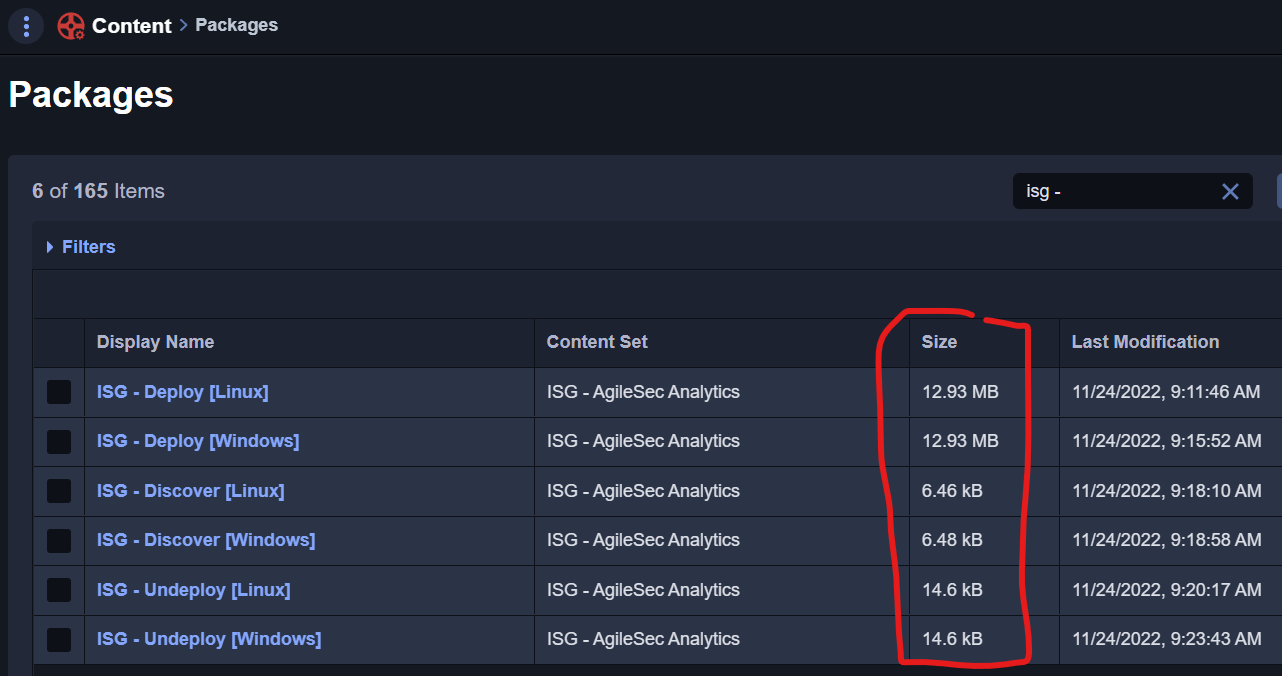
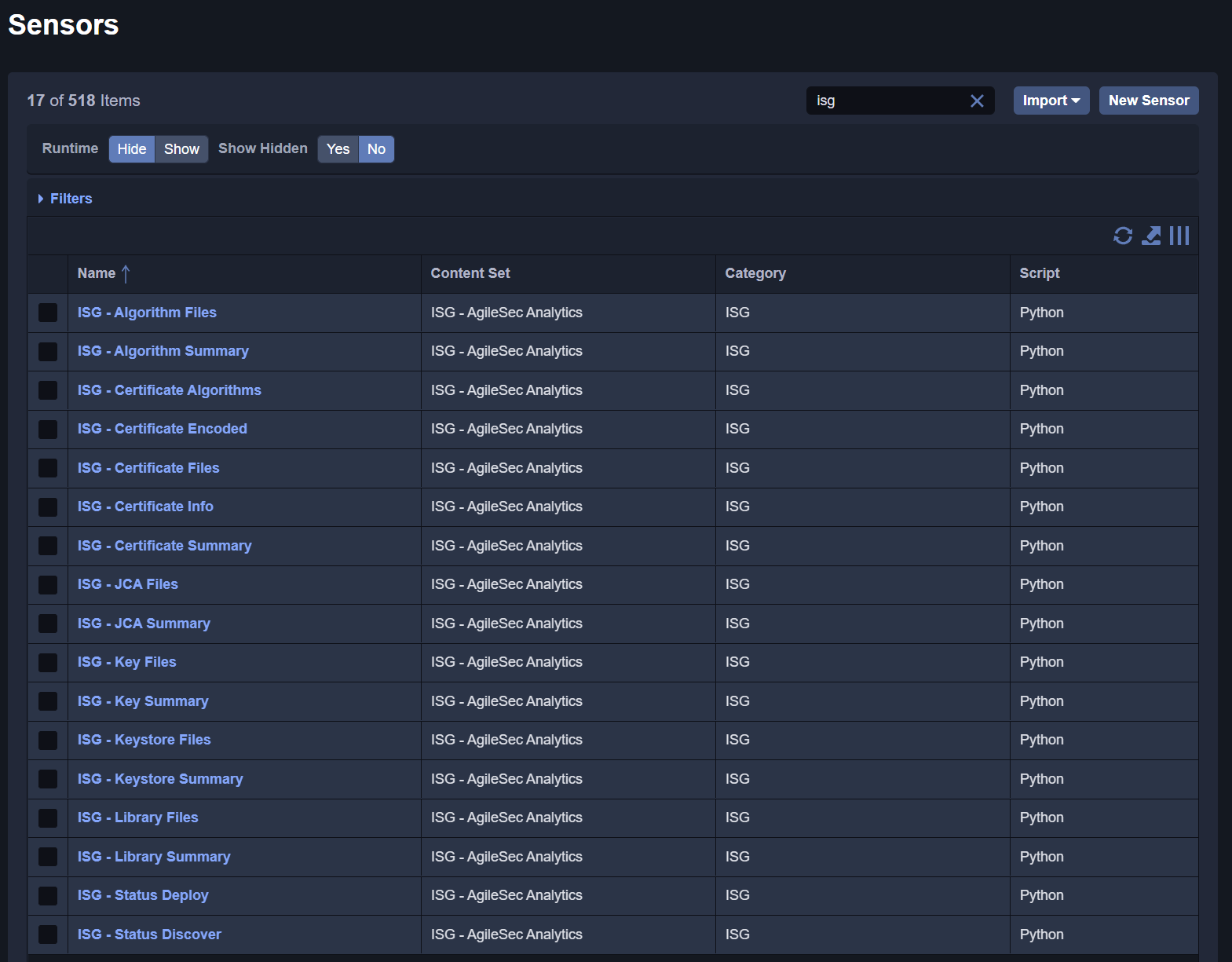
You can verify that all the executables have been correctly deployed by searching for the ISG sensors. The following list shall be displayed with a valid Size in MB for each package.
3. Step: Load ISG Sensors
This chapter presents how to load the ISG Sensors within Tanium. The sensors are used to query information from the endpoints. ISG has created individual sensors to limit the information returned by query according to Tanium best practices. The sensors are used by the ISG Saved Questions.
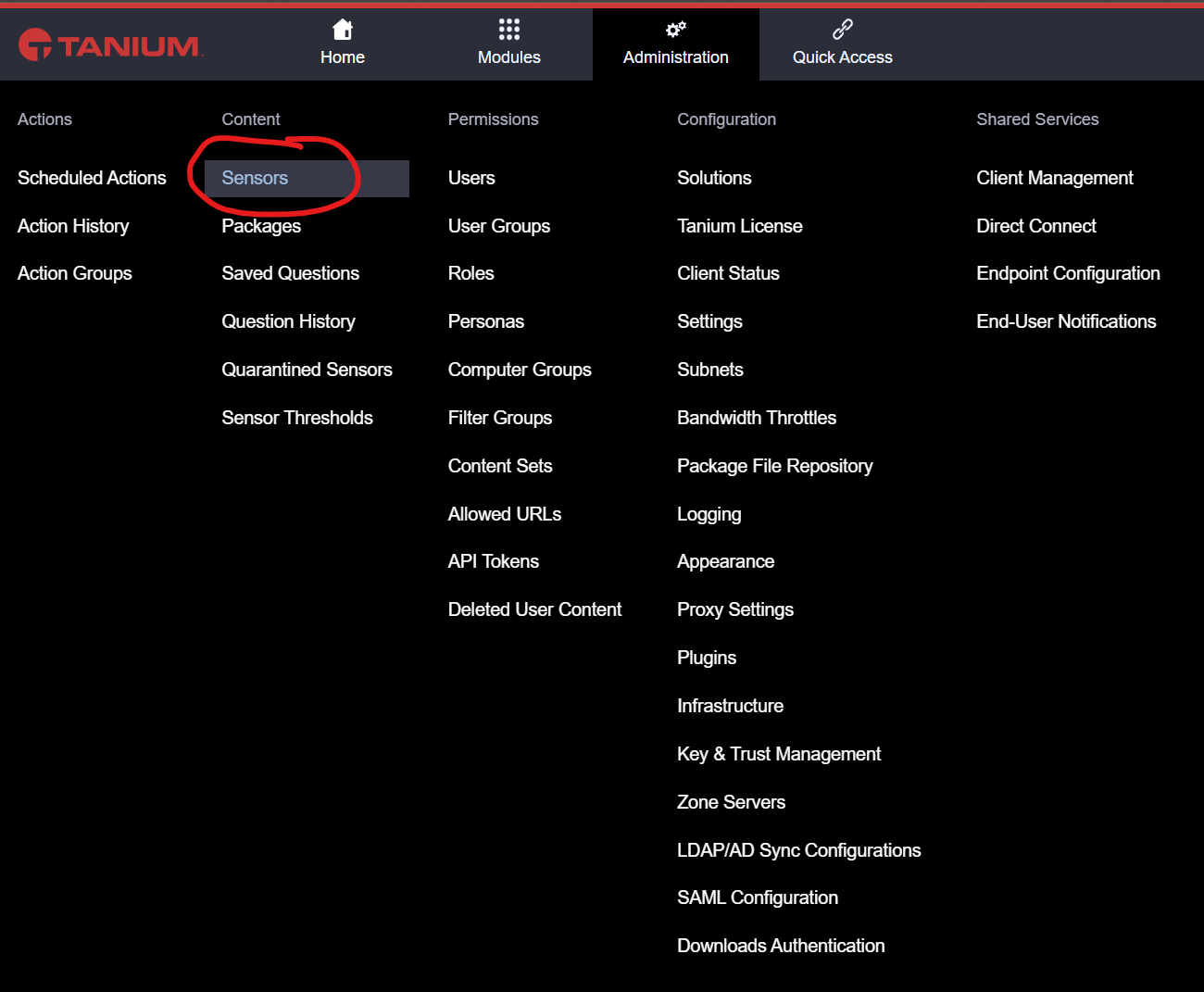
3A. Go to Sensors
To load new sensors, you shall go to administration>sensors menu in Tanium.
3B. Import ISG Tanium Sensors
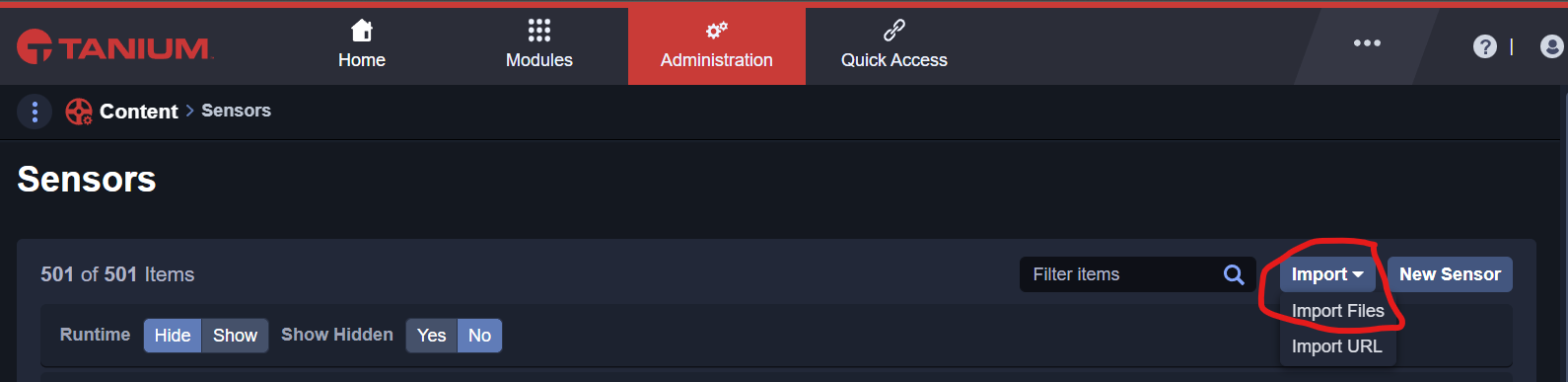
In the sensor menu, you can click on import new content and select the file ISG-Tanium-Sensors-3.40.json provided by ISG to load the ISG AgileSec Analytics Sensors.
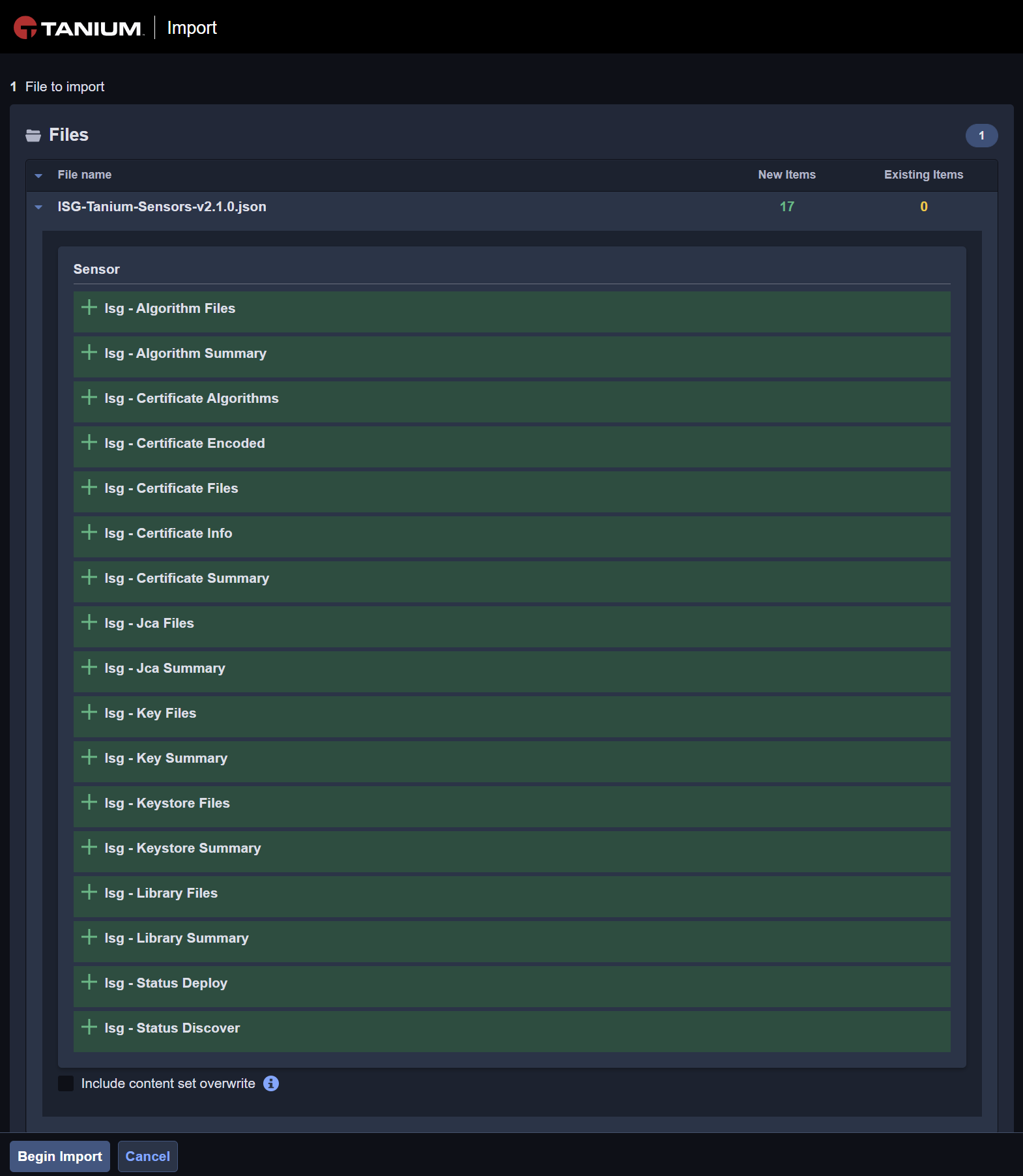
The following Sensors shall become available for import. You can Begin the Import.
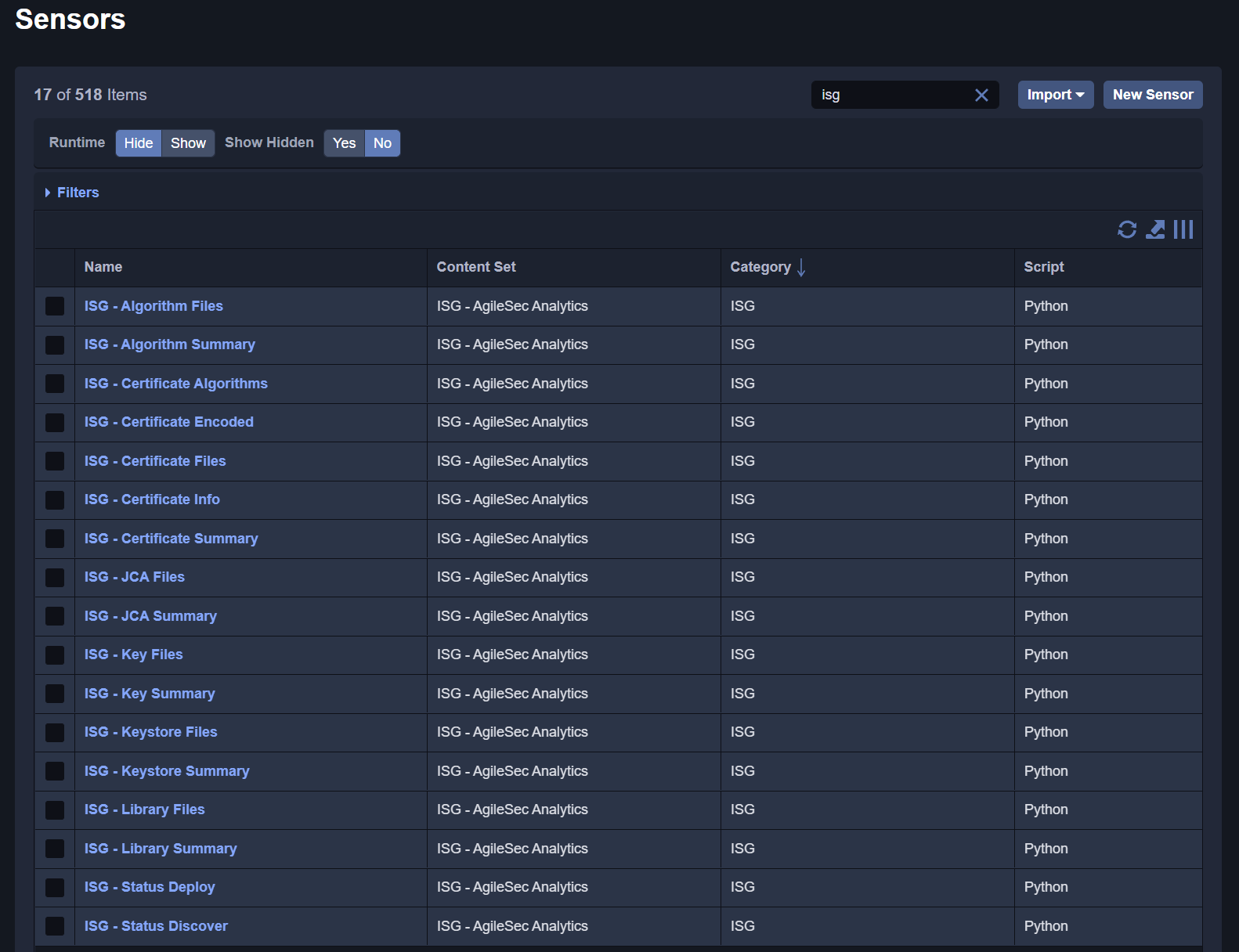
After successful import, the ISG Tanium Sensors shall be available.
4. Step: Load ISG Saved Questions
This chapter presents how to load the ISG Saved Questions within Tanium. The saved questions are pre-defined questions that use different sensors from Tanium and ISG. The saved questions are also used by Tanium Connect to export results to the ISG Backend Server.
4A. Go to Saved Questions
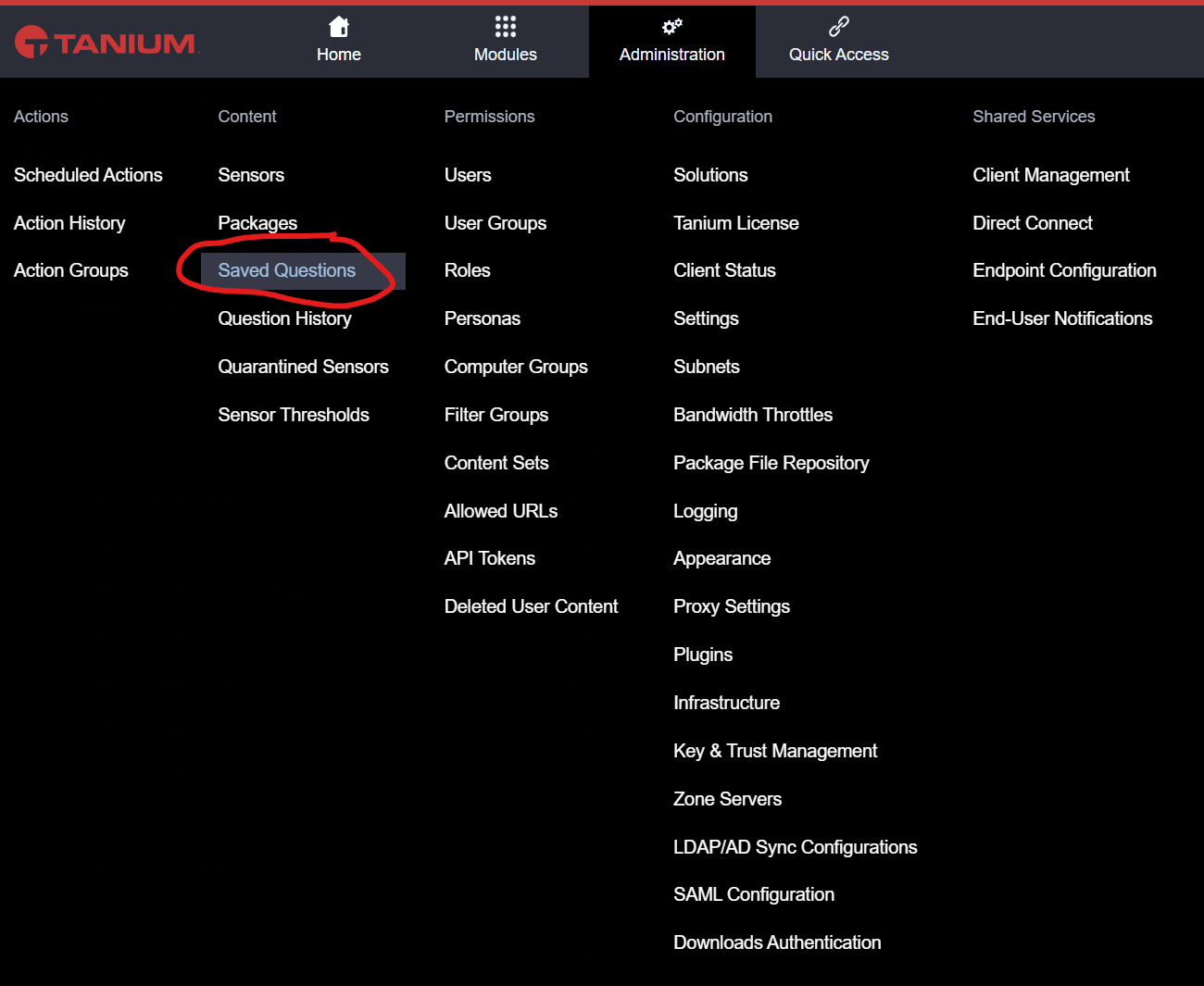
To load new saved questions, you shall go to administration>saved questions menu in Tanium.
4B. Import ISG Saved Questions
In the saved question menu, you can click on import new saved questions and select the file ISG-Tanium-Saved-Questions-3.4.0.json provided by ISG to load the ISG AgileSec Analytics Sensors.
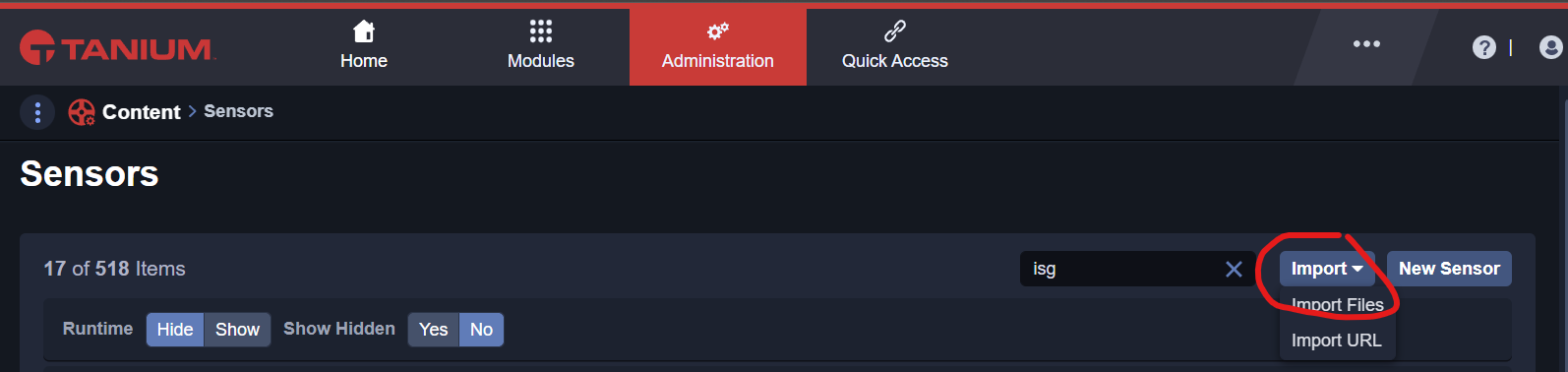
The following saved questions shall become available for import. You can Begin the Import.
After successful import, the ISG Tanium Saved Questions shall be available.
5. Step: Load ISG Tanium Connect Jobs
This chapter presents how to load the ISG Tanium Connect Jobs within Tanium. The Tanium Connect Jobs use the ISG Saved Questions to export findings to the ISG Server.
5A. Configure Tanium Connect JSON files
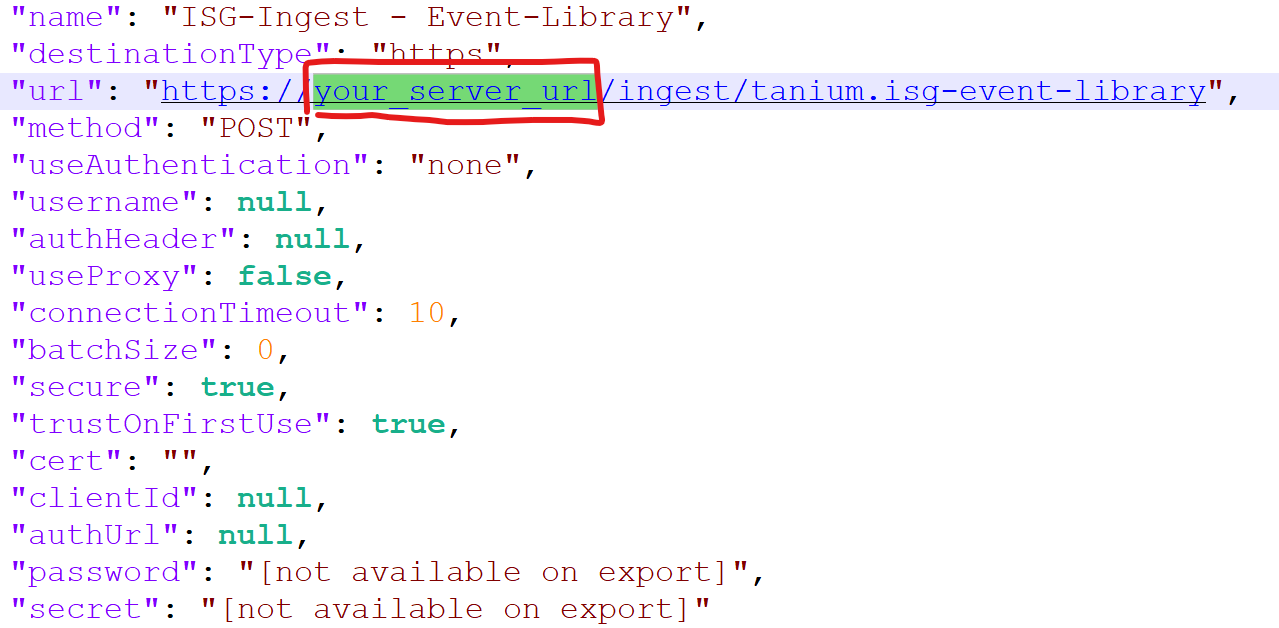
You shall edit the file ISG-Tanium-Connect-3.4.0.json to replace the default HTTPS destination with your specific URL used by AgileSec Analytics. Server. For this purpose you shall replace all instances of your_server_url by your own server address like 10.1.2.48 or my.isgserver.local. There is a total of 18 instances to replace.
5B. Go to Connect
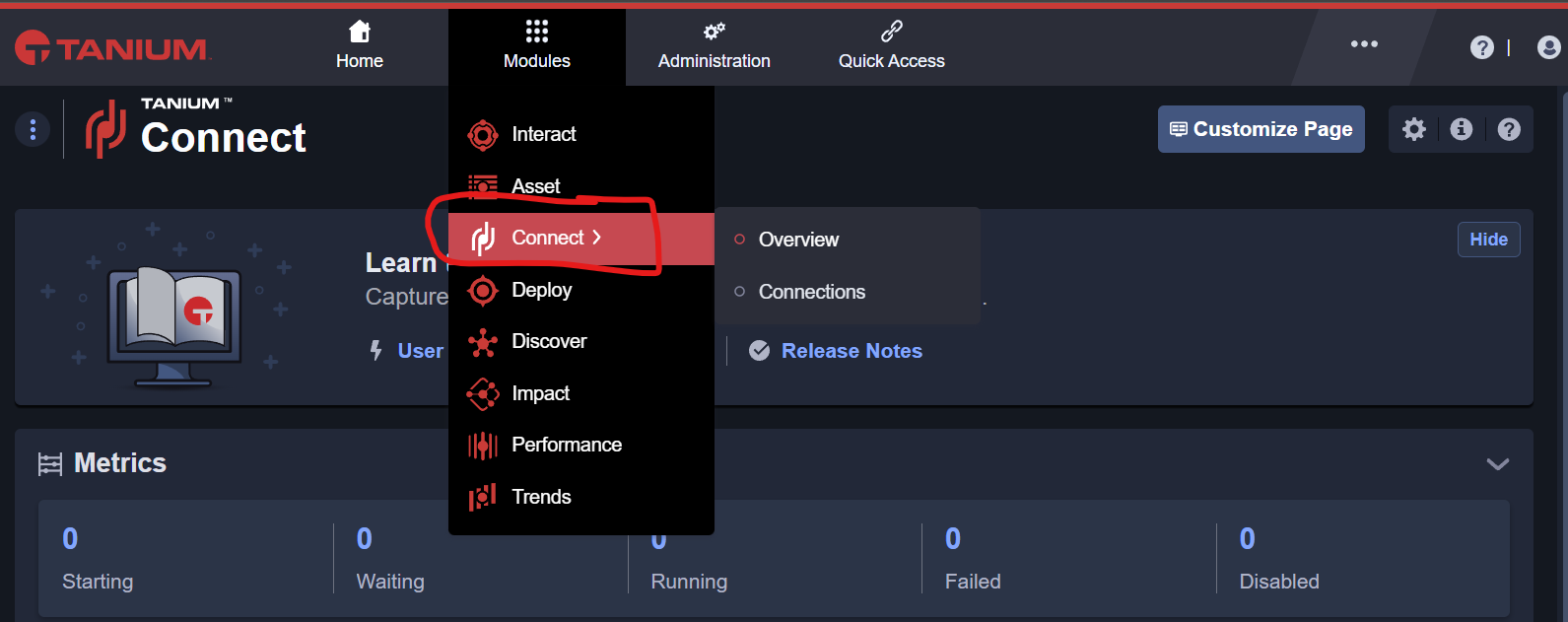
To Load new packages, you shall go to Modules>Connect menu in Tanium.
5C. Import ISG Tanium Connect Jobs
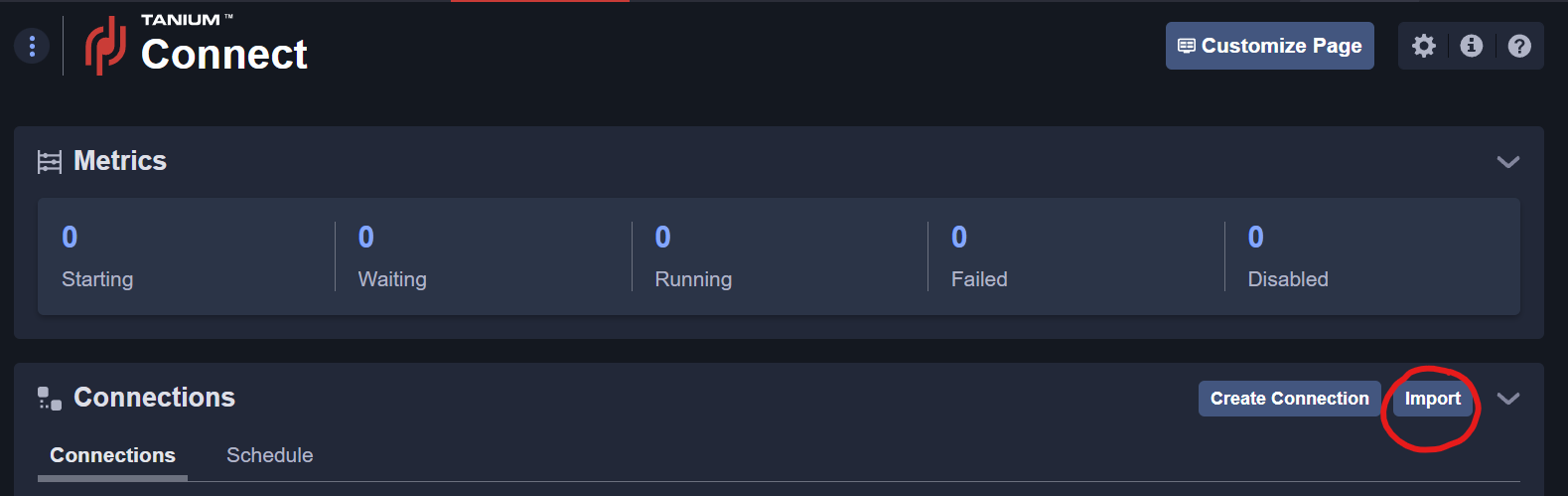
In the package menu, you can click on import new content and select the file ISG-Tanium-Connect-3.4.0.json that you modified to include your ISG Server URL.
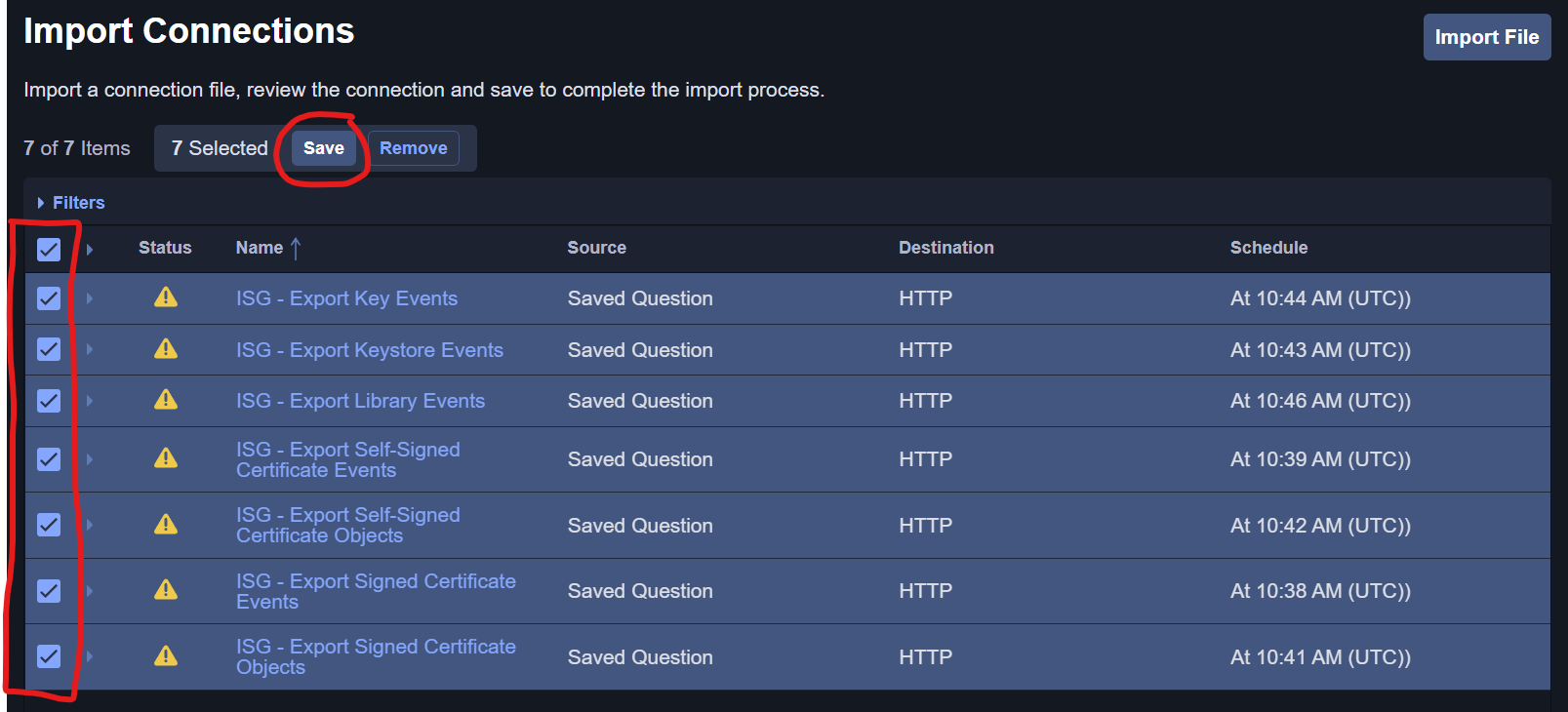
The following Packages shall become available for import. You must select each ISG Tanium Connect Job then save. The error status shall not be relevant and you shall proceed with saving.
Once you save, the ISG connect jobs will be imported.
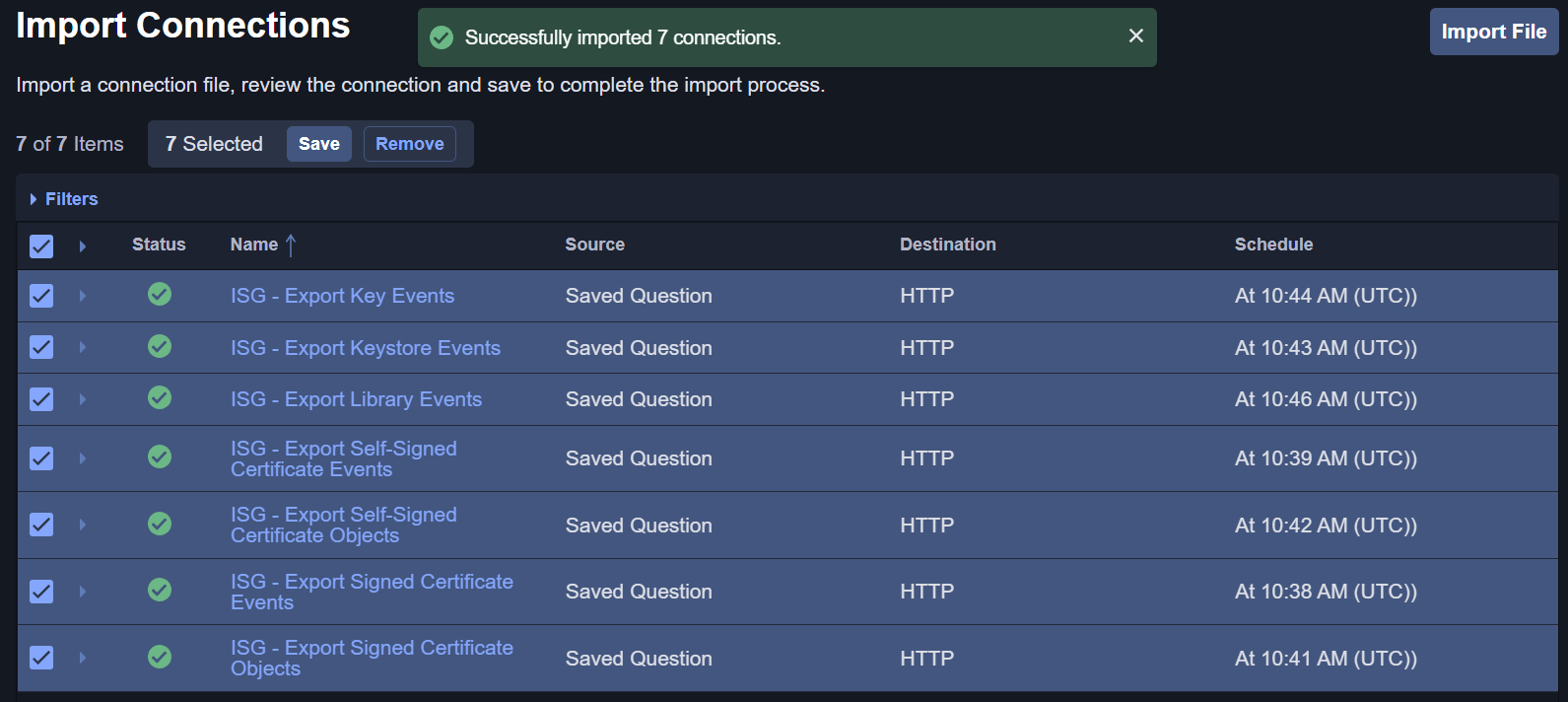
After successful import and returning to the Tanium Connect Menu, the ISG Tanium Connect Jobs shall be available.
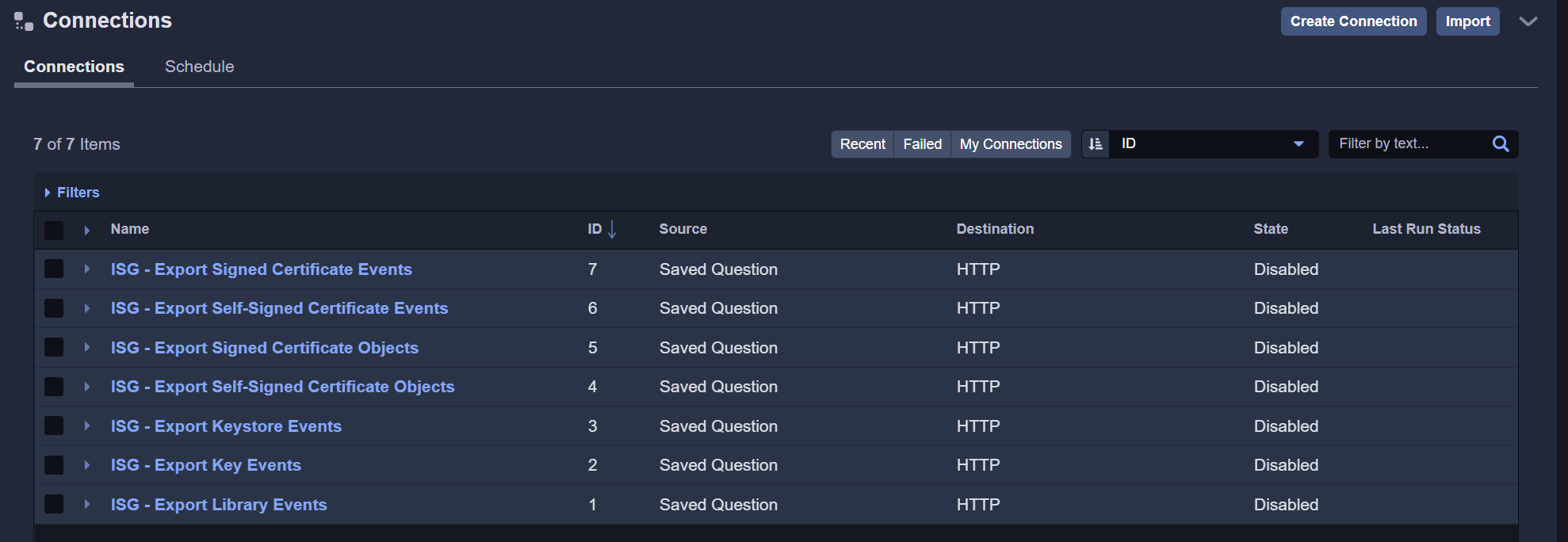
5D. Verify Tanium Connect Job
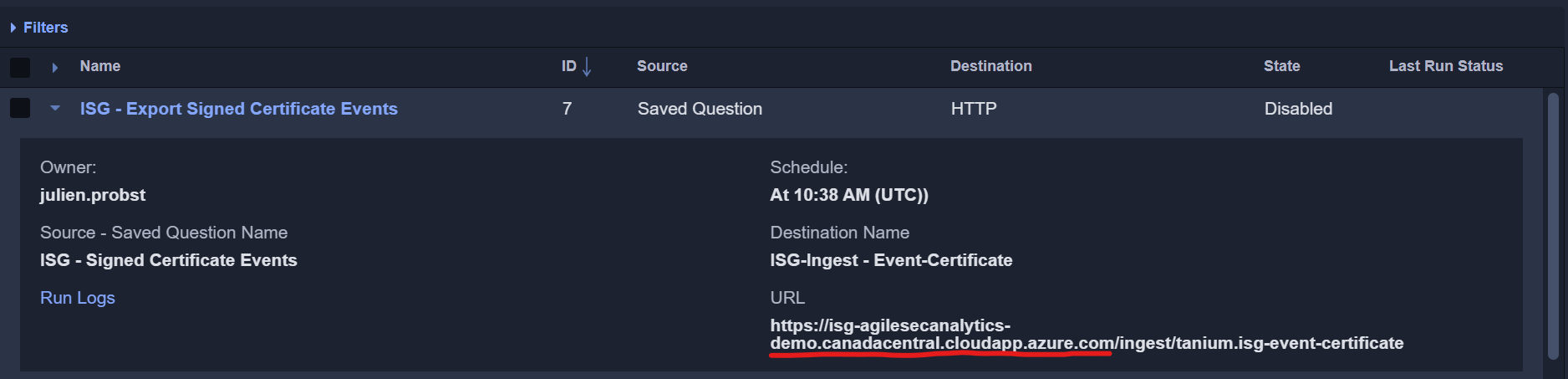
You can verify that all Tanium Connect jobs are correctly pointing to your ISG AgileSec Analytics Backend Server. If there is a mistake, you can still edit the connection manually to reset the appropriate URL.
6. Step: Perform Test Run
Congratulation, all the ISG Tanium Content shall have been sucesfully deployed. You can perform a test run to make sure the end-to-end data flow is working as expected.