Architecture and Deployment Guide
This guide provides a comprehensive technical reference for the AgileSec v3 platform, covering its overall architecture, key components, data flows, security model, and supported deployment topologies. It is intended to serve as a reference for anyone who needs to understand, deploy, operate, integrate with the platform.
Platform v3 Overview
AgileSec v3 is a cloud-native, multi-tenant security scanning and compliance platform built to identify, assess, and manage risks across cloud, container, infrastructure-as-code, and hybrid environments. It delivers:
Unified sensor framework with extensible plugins for multiple technology domains
On-demand and scheduled scanning, including remote execution for on-premises or air-gapped assets.
API based scanning for integration with CI/CD and feedback via API callbacks.
Extensible sensor framework with plugins for diverse technology stacks
Intelligent post-scan processing for policies for risk classification, de-duplication, and auto-resolution of findings
Integrations via APIs, and third-party connectors
Enterprise-grade security with SSO/SAML, encryption, and access control
Robust observability through structured findings, search, and dashboards
Document Scope
This document describes AgileSec v3 as of December 2025. It covers the core platform architecture, key data flows, security model, and supported deployment topologies (cloud-native Kubernetes and on-premises). Implementation-specific configuration details are covered in separate operational documents.
Subsequent sections will dive deeper into component responsibilities, data flows, security considerations, and deployment-specific variations.
High-Level Architecture
AgileSec v3 is an event-driven platform designed for scalability, extensibility, and enterprise security. The architecture is built around a central Kafka Cluster that functions as the primary Data and Events Pipeline, providing loose coupling and high-throughput asynchronous communication between components.
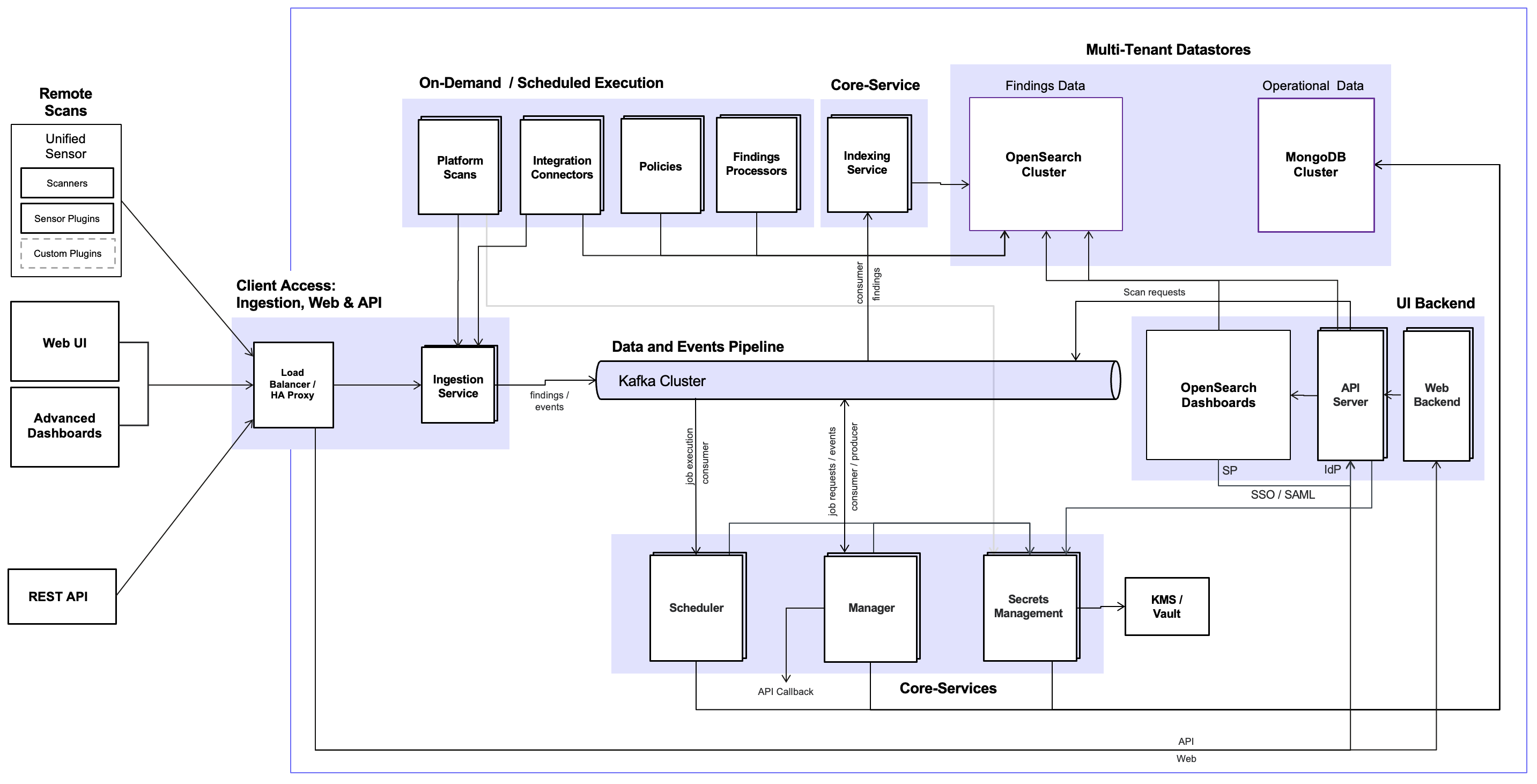
The platform is logically organized into three primary layers, supported by datastores for operational and findings data.
Client Access Layer
This layer provides all external interfaces to the platform, including the Web UI and Web Backend (Node.js), Advanced Dashboards, REST API / API Server, Ingestion Service, Load Balancer, and SSO/SAML integration. It serves as the secure entry point for end users, administrators, and automated clients.
Core Services
The always-on orchestration and intelligence layer consists of the Scheduler, Manager, Secrets Management (KMS/Vault integration), and Data transformation with FluentD. These services manage job lifecycle and various system events, process scan results, handle data transformation via FluentD for indexing, and securely manage encryption keys.
On-Demand and Scheduled Execution Layer
This layer is responsible for the execution of all scanning and processing jobs in a secure and scalable manner. The execution environment — where jobs actually run — varies depending on the deployment model and job type, while scan targets are always external customer systems (cloud assets, on-premises infrastructure, containers, IaC repositories, etc.).
Scan jobs
Scan jobs can be initiated on-demand (via the Web UI, REST API, or remotely using the Unified Sensor CLI) or run automatically on predefined schedules.
Platform Scans - Executed centrally by the AgileSec platform.
In Kubernetes deployments, jobs run in short-lived, isolated sandboxed pods with restricted privileges, network policies, and resource limits for strong security isolation and horizontal scalability.
In on-premise deployments, jobs run on backend nodes, or dedicated scan nodes configured within the AgileSec platform.
API Scans - Also executed centrally by the AgileSec platform, but triggered programmatically via the REST API. They use the same execution environment as Platform Scans.
Remote Scans - Executed using Unified Sensor framework deployed as CLI in the customer's environment. Jobs run locally against targets. Using this model ideal for air-gapped networks or scenarios where data must not leave the customer's perimeter.
All types of scan jobs leverage the Unified Sensor Framework with pluggable sensors, ensuring consistent output format.
Policies Execution and Findings Processing Jobs
These jobs are always executed centrally on the platform. They run in the same secure platform execution environment as Platform scans, consuming findings from OpenSearch, applying policies, perform de-duplication, transformation, auto-resolution, and publishing enriched results.
For both Kunernetes and on-premises environments, jobs are dispatched to the appropriate execution environment via events from the Scheduler over the Kafka pipeline, enabling resilient, asynchronous, and scalable processing.
Supporting Infrastructure
Kafka Cluster
A durable, high-throughput event bus that serves as the central communication backbone. It carries job requests, execution events, raw findings, processed findings, control messages, and system events, ensuring resilient and asynchronous processing across platform.
Datastores
Operational Datastore – MongoDB cluster serving as the primary source of truth for all operational and configuration data, including:
User accounts and platform-level configuration
System administration settings
Scheduling information for recurring and on-demand scans
Sensor configurations and execution history
Scan history and job state
Configurable policies
Findings Datastore - OpenSearch cluster dedicated for storing, indexing and querying enriched findings data.
FluentD – Consumes raw findings from Kafka, applies transformations, and indexes them into OpenSearch for search and analytics.
Advanced Dashboards – SSO-protected OpenSearch Dashboards providing customers with powerful, self-service tools to perform advanced searches, create custom visualizations, and build tailored reports for their findings.
Key Design Elements
Event-driven architecture - Kafka-based asynchronous processing enables horizontal scalability, fault tolerance, and resilience.
Multi-tenant isolation in SaaS - Complete physical separation of data, and configuration between customers when operating as a shared SaaS platform.
Extensible plugin model - Pluggable sensors and integration connectors allow rapid extension of coverage and workflows without modifying the core platform.
Security by design - Security-first design with encryption and centralized secrets management.
Loose coupling and modularity - Components communicate via events, enabling independent scaling, deployment, upgrades, and high availability.
Detailed descriptions of individual components and their responsibilities are provided in the next section.
Component Details
This section provides in-depth descriptions of the major components of AgileSec v3, organized by the primary layers introduced in the high-level architecture.
Client Access Layer
Web UI and Web Backend
The primary browser-based interface for end users, security teams, and administrators. The Web UI offers intuitive navigation for scan management (creating, configuring, and triggering scans), on-demand scan initiation, schedule management, system administration, and interactive findings exploration through pre-built dashboards and exploratory data analysis tools. The Node.js Web Backend handles server-side logic, session management, authentication coordination, and data retrieval for the UI.
Advanced Dashboards
SSO-protected OpenSearch Dashboards instance that provides power users and analysts with self-service capabilities. Users can perform advanced full-text searches, apply complex filters, aggregate data, create fully custom visualizations, save dashboards, and generate reports directly over their indexed findings data.
REST API and API Server
Programmatic interface used by the Web UI and external clients. It provides endpoints for scan submission, status checking, and results retrieval. All endpoints are protected by authentication and authorization, requiring a valid access token.
Ingestion Service
Dedicated high-volume ingestion endpoints designed to receive data streams from sensors. It performs token authentication, tenant identification, and publishes data to the Kafka pipeline for further processing.
Load Balancer
Distributes incoming traffic across service instances, provides TLS termination, and enables high availability and horizontal scaling for the Client Access Layer and all downstream services.
SAML SSO
Enterprise authentication integration with customer Identity Providers (IdP). Enables single sign-on for the Web UI, and Advanced Dashboards, with support for role mapping.
Core Services
The Core Services layer consists of always-on, long-running microservices that form the orchestration and intelligence backbone of the platform.
Scheduler
Always-on orchestration service responsible for initiating jobs and protecting the execution infrastructure from overload.
The Scheduler receives all job requests exclusively through Kafka topics. Job request events are published to Kafka by the Client Access Layer components (Web Backend for UI-triggered jobs, API Server for API-triggered jobs, or by internal recurring schedule logic).
Key responsibilities include:
Consuming job request events from Kafka and evaluating them for execution.
Enforcing rate limiting and concurrency controls to prevent overwhelming the underlying execution environment, ensuring stable performance under high load.
Supporting job prioritization based on configured priority levels (High, Medium, Low) for scan jobs, allowing critical scans to be processed ahead of lower-priority ones.
Using deployment-specific mechanisms to start jobs:
In Kubernetes deployments — Creates short-lived, isolated sandboxed pods for job execution via the Kubernetes API using pre-defined pod templates.
In on-premises deployments — Directly assigns and executes jobs on backend nodes or dedicated scan nodes.
Manager
Always-on service responsible for full job lifecycle management and post-scan orchestration across all deployment models.
Key responsibilities include:
Receiving and processing scan job requests — Consumes scan job request events published to Kafka by the API Server for API-initiated scans or UI-initiated scans.
Submitting jobs for execution — Publishes execution-ready job events to Kafka for the Scheduler to pick up and initiate.
Tracking job status — Consumes progress, completion, and error events from Kafka (published via the Ingestion Service from execution environments).
Persisting job state — Updates and maintains job status, history, and metadata in the Operational Datastore throughout the job lifecycle.
Invoking API callbacks — Upon job completion or status change, delivers asynchronous status updates and results via customer-configured webhook callbacks.
Triggering post-scan processing — Upon successful scan completion, evaluates conditions and publishes events to Kafka to initiate Findings Processing jobs and Policy Execution jobs.
Secrets Management
Always-on service responsible for secure key management, token generation and encryption across the platform.
The Secrets Management service ensures that sensitive data is encrypted at rest using envelope encryption, with master keys managed in the deployment-appropriate secure store.
Key responsibilities include:
Integration with deployment-specific key management systems — Interfaces with the appropriate external or local key store based on the deployment model:
AWS EKS deployments — Uses AWS KMS for generating and storing customer master keys.
Azure AKS deployments — Uses Azure Key Vault (AKV) for storing customer master keys.
On-premises deployments — Uses a local Java Keystore for storing customer master keys.
Generation and storage of customer master keys — Generates Customer Master Keys (CMKs) in the configured key store and securely references them for platform use. CMKs always stay in keystore.
Envelope encryption — Uses CMKs to encrypt Data Encryption Keys (DEKs). Encrypted DEKs are stored alongside the data in the Operational Datastore, while plaintext DEKs are never persisted.
Secure key distribution — Provides plaintext DEKs to authorized services at runtime for encryption/decryption operations, then securely wipes them from memory.
Key rotation support — Facilitates automated rotation DEKs and re-encryption of associated DEKs.
Access control and auditing — Enforces least-privilege access to keys and logs all key operations for compliance and security auditing.
Roadmap
Integration with HashiCorp Vault is planned for a future release, providing additional flexibility for on-premises and hybrid deployments.
The Secrets Management service ensures that sensitive data is encrypted at rest using industry-standard envelope encryption, with master keys managed in the deployment-appropriate secure store to meet customer control and compliance requirements.
FluentD
Always-on service that consumes raw findings events from Kafka, applies final normalization and transformations, and indexes them into the OpenSearch Findings Datastore.
Data Flow
This section illustrates the end-to-end flow of a typical scan job, highlighting the asynchronous, event-driven nature of the platform enabled by Kafka.
High-Level Scan Lifecycle
The diagram below shows the three main phases of a typical scan in AgileSec v3:
Scan – A user or automated process triggers a scan via the Web UI, REST API, schedule, or Unified Sensor CLI. The Unified Sensor Framework executes the scan against the target systems and produces raw findings.
Process – The Ingestion Service receives the raw findings. Policies are applied and backend processes run to cleanse, de-duplicate, transform, and enrich the data. The final results are stored in the Findings Database.
Review – Enriched findings can be viewed and analyzed via the Web UI (with built-in dashboards and explorer), Advanced Dashboards (for custom visualizations), or queried programmatically through the REST API.

This simplified view illustrates the user-facing flow. The underlying event-driven architecture (detailed in the next diagram / subsection) uses Kafka to enable asynchronous, scalable processing.
Scan Execution in the Unified Sensor Framework

Keyfactor AgileSec Platform
The unified sensor framework separates target-specific logic from core scanning capabilities and transformation to canonical message format:
Sensor Plugin — Handles authentication, data retrieval, and initial extraction for the specific target being scanned. It's job is to only fetch the content for scanning.
Unified Sensor Core — Performs standardized scans (binary, source, library detection), enriches raw results with context and labels, and transmits them in a consistent format back to the platform via the Ingestion Service.
The unified sensor framework ensures:
Consistency — All scans produce uniformly formatted raw findings regardless of target type.
Extensibility — New sensor plugins can be added without changing the core.
Separation of Concern — Target specific logic is stored in sensor plugins, while core scanners, enrichment and transformations remain centralized in the core.
Scan Flow Description
A typical scan flow involved following steps:
Authenticate: Sensor establishes secure connection to Github using provided access token.
Fetch: Queries the target system using API or other mechanism to fetch all files that needs to be scanned.
Scan: All downloaded files are passed to the unified sensor core that performs the following types of scans:
Binary Scan: Analyzes binary files to discover cryptographic objects.
Source Scan: Performs static analysis of source code files to detect cryptographic implementations, API calls, and embedded cryptographic objects.
Library Detection: Scans source code and dependencies to identify cryptographic libraries being used.
Enrich: Performs following:
Transformation: Normalizes and standardizes scan results into a consistent format for processing.
Enrichment: Enhances scan result with additional metadata like labels.
Transmit: Sends the enriched scan results to Ingestion Service on Keyfactor AgileSec Platform for inventory and policy-based analysis.
Findings Data Flow

The findings pipeline processes raw scan results into enriched, actionable insights through an event-driven, asynchronous flow:
Raw findings ingestion — Platform Scans and Remote Scans transmit raw findings to the Ingestion Service, which publishes them as events to the Kafka Cluster.
Event-driven distribution — The Kafka pipeline distributes raw findings events to downstream consumers (FluentD instances) for parallel processing.
Transformation and indexing — FluentD consumes raw findings events from Kafka, applies final normalization and transformations, and indexes the data into the OpenSearch Cluster for search and analytics.
Post-scan or scheduled processing — Findings Processors and Policies run asynchronously, triggered either immediately after a scan completes (post-scan) or on a predefined schedule:
Findings Processors reads findings from OpenSearch, perform cleansing, de-duplication, enrichment, transformation, and auto-resolution (where configured), and write enriched findings back to OpenSearch.
Policies read findings from OpenSearch, evaluate them against configured policies, apply risk scoring, and write final scored findings back to OpenSearch.
Review and consumption — Enriched and indexed findings are available for interactive review through the Client Access layer:
Web UI and Web Backend provide built-in dashboards and findings explorer
Advanced Dashboards through OpenSearch Dashboards provides custom visualizations and reporting capabilities.
REST API and API Server for programmatic queries
Security Model
AgileSec v3 incorporates multiple layers of protection for data in transit, at rest, and during processing. The platform enforces strict isolation, encryption, and authentication across all components and deployment models.
Secrets Management and Encryption
The Secrets Management service is the central component for key management and secure credential handling.
Key responsibilities include:
Integration with key management systems — Interfaces with deployment-specific backends:
AWS deployments use AWS KMS
Azure Kubernetes Service (AKS) deployments use Azure Key Vault
On-premises deployments use a local Java Keystore
HashiCorp Vault integration is planned for a future release
Customer Master Key (CMK) management — Generates Customer Master Keys in the configured key store, providing customers full control over root encryption keys.
Data Encryption Key (DEK) generation — Generates unique DEKs for each sensitive data object or configuration payload.
Envelope encryption — Encrypts DEKs using the CMK. Encrypted DEKs are stored alongside the data in MongoDB, while plaintext DEKs are never persisted.
Secure runtime decryption — Provides plaintext DEKs to authorized services (e.g., scan execution environments) on-demand for decryption of configuration data. The service ensures just-in-time access and wipes plaintext keys from memory after use.
JWT issuance for service access — Generates short-lived JWT tokens for authenticated access to OpenSearch (including Advanced Dashboards) and the Ingestion Service.
All configuration data transmitted through the pipeline (e.g., sensor credentials, scan parameters) is encrypted using a fresh DEK before being sent. Scan execution environments have limited privileges to request decryption of required configuration via the Secrets Management service.
Data in Transit
Mutual TLS (mTLS) — All service-to-service communication, including access to Kafka, MongoDB, OpenSearch, and all micro-services is protected using mTLS for on-premise deployments.
Kubernetes deployments — Service-to-service traffic is optionally secured by a service mesh such as Istio for advanced policy enforcement, traffic visibility, and certificate management.
Authentication and Authorization
Single Sign-On (SSO / SAML) — Enterprise authentication integration with customer Identity Providers enables secure access to the Web UI, Advanced Dashboards, and API.
Role-Based Access Control (RBAC) — Fine-grained permissions are enforced across UI, API, and data access based on user roles and tenant context.
API and Ingestion authentication — All API calls and ingestion submissions require valid tokens (JWT or API keys) with strict validation.
Data at Rest
All persistent sensor configuration data in MongoDB is encrypted using envelope encryption with customer-controlled master keys.
Raw and enriched findings can be protected using encrypted file systems (EFS).
Multi-Tenant Isolation
In SaaS mode, strict tenant isolation is enforced across all layers:
Separate encryption keys per tenant
Tenant-scoped access control
Physical partitioning using tenant-specific Kafka topics
Physical partitioning of tenant-specific indexes in OpenSearch
Physical partitioning of tenant-specific databases in MongoDB
In dedicated (on-premises or private K8s) deployments, the instance is single-tenant by design.
This comprehensive security model ensures that sensitive scan data, credentials, and findings remain protected throughout the entire lifecycle, meeting enterprise compliance and security requirements across all supported deployment models.
On-Premises Deployment Topologies
AgileSec v3 supports flexible deployment topologies to accommodate different scale requirements, high availability needs, and infrastructure preferences.
AgileSec v3 supports two primary on-premises deployment configurations:
Single-Node Deployment
Multi-Node Deployment
Single-Node Deployment
In a single-node deployment, all AgileSec v3 components run on a single server or virtual machine. This topology is primarily intended for development, testing, and proof-of-concept environments where simplicity is preferred over horizontal scale and high availability.

Component placement
All AgileSec v3 components are co-located on the same host, including:
User-facing services: Web UI, Web API, OpenSearch Dashboards
Platform services: Scheduler, Manager, Ingestion, Secrets Management service, CBOM service, FluentD
Datastores / messaging: MongoDB, OpenSearch, Kafka
Ingress / routing: HA Proxy
Scan execution: the Scheduler executes scans locally on the same node (when scans are run on the platform)
Because all components run on a single host, most internal service-to-service and datastore traffic stays local. This reduces networking complexity and minimizes the external firewall surface area.
Network traffic flow
Single-node traffic can be understood as one external ingress point (terminated by HA Proxy) plus optional outbound scan traffic. In single-node mode, all internal services and datastores run locally on the same host, and east-west traffic stays on the host network.
External ingress (UI / APIs / Dashboards )
Browser / API client → HA Proxy (HTTPS)
HA Proxy routes traffic to the appropriate internal service, for example:
Web UI (user interface)
Web API (Scan API requests for scan setup/execution/status)
OpenSearch Dashboards
OpenSearch (Search API requests; currently routed directly to OpenSearch)
Web UI interactions call the Web API through the same external endpoint.
OpenSearch Dashboards queries OpenSearch internally.
External ingress (remote sensors → Ingestion only)
Remote sensor → HA Proxy (HTTPS)
HA Proxy → Ingestion service
Ingestion persists and/or forwards scan events/results into the platform pipeline.
Scan execution and outbound scan egress (when scans run on the platform)
A scan can be initiated either from the Platform UI (on-demand or scheduled) or through the Scan API. In all cases, the Scheduler is responsible for executing the scan.
A scan request is created via the Platform UI (on-demand or scheduled) or via the Scan API (Web API).
The Scheduler executes the scan locally on the node.
The scan initiates outbound connections to target systems (for example: source code repositories, cloud APIs, databases, or hosts).
Scan results and events are submitted to Ingestion and persisted through the platform pipeline.
In single-node deployments, the same host processes user/API requests, ingest pipelines, datastore IO, and (optionally) scan workloads, so sizing should account for peak scan activity and indexing throughput.
Multi-Node Deployment
In a multi-node deployment, AgileSec v3 components are distributed across specialized node roles to improve scalability, performance, and availability. This topology is recommended for production and for any environment that requires high availability, larger scan volumes, higher ingestion throughput, or greater data retention than a single node can reliably support. It also enables better isolation between user-facing access, core processing, datastores, and (optionally) scan execution so that heavy workloads do not impact overall platform responsiveness.

Node roles and component placement
Frontend Nodes (Minimum: 1 | Recommended for HA: 2)
Purpose: terminate external traffic and provide user access.
Components:Web UI
Web API (Scan API)
OpenSearch Dashboards
HA Proxy
MongoDB Arbiter (only on first frontend node, if used)
OpenSearch Cluster Manager (only on first frontend node, if used)
Kafka (only on first frontend node, if used)
Frontend nodes are stateless for user access
Backend Nodes (Minimum: 2)
Purpose: host platform services and the data plane (storage + messaging).
Components:MongoDB (primary on first backend node, secondary on additional backend nodes)
OpenSearch (data and cluster-manager-eligible roles)
Kafka
Scheduler
Manager
Secrets Management service
Ingestion service
CBOM service
FluentD
HA Proxy (east–west routing / internal failover)
Scan Nodes (Optional, recommended for large-scale scanning)
Purpose: isolate scan execution from the core platform and datastores.
Components:Scheduler
HA Proxy (east–west routing / internal failover)
Scan-node HA Proxy usage: Scan nodes run HA Proxy for east–west routing to Backend nodes. This provides fault tolerance by routing requests to healthy Backend services and by maintaining stable internal endpoints for dependencies required during scan execution.
Dedicated scan nodes isolate resource-intensive scanning operations from core platform services and datastores. This separation prevents scan workloads from impacting user-facing responsiveness and processing pipeline throughput. Scan nodes execute scans via the Scheduler and rely on HA Proxy routing to reach required Backend services with failover. Scan nodes can be scaled horizontally to meet scanning volume and concurrency requirements.
Network traffic flow
Multi-node traffic is best described as external ingress/egress and internal (east–west) traffic. In this guide, external ingress/egress refers to traffic crossing the platform boundary (clients and target systems), and east–west refers to internal node-to-node and service-to-service traffic within the deployment network, regardless of diagram orientation. The key intent is that Frontend nodes terminate external traffic, while Backend and Scan nodes handle internal processing, persistence, and scan execution.

External traffic distribution (Load Balancer or DNS)
Client traffic can be distributed across the Frontend nodes using either an external Load Balancer in front of the Frontend tier or DNS-based load balancing (for example, multiple A/AAAA records pointing to the Frontend nodes). In both cases, all external access terminates at the Frontend HA Proxy, and either Frontend node can serve requests.
External ingress (UI, Advanced Dashboards and APIs)
All user-facing access terminates at the Frontend HA Proxy:
UI access: User browser → Frontend HA Proxy → Web UI
Web UI calls the platform through the same external endpoint.Scan API: API client → Frontend HA Proxy → Web API
The Web API then interacts with internal services on Backend nodes as needed.Search API : API client → Frontend HA Proxy → OpenSearch
Today, Search API requests are routed directly to OpenSearch (typically on Backend nodes). (If you later change this to route through Web API, you can update this flow without changing the overall topology.)Advanced Dashboards: User browser → Frontend HA Proxy → OpenSearch Dashboards → OpenSearch (internal)
External ingress (remote sensors → Ingestion only)
Remote sensors submit results/events to the platform through the Frontend entry point, but the destination is Ingestion on Backend nodes:
Remote sensor → Frontend HA Proxy → Ingestion service (Backend)
Internal service and pipeline traffic (east–west)
Once traffic enters the platform, internal services communicate primarily within the Backend tier:
Web API (Frontend) → Backend services (Scheduler/Manager/Secrets Management/CBOM as applicable)
Services → Kafka (messaging/event pipeline)
Services → MongoDB (metadata/execution state) and OpenSearch (indexed findings/events), as applicable
Advanced Dashboards (Frontend) → OpenSearch (Backend)
Service routing (prefer local; failover remote)
For east–west service calls, requests are routed through the local HA Proxy with a preference for local service instances when available. If a local instance is unavailable, traffic automatically fails over to healthy instances on other nodes.
Scan execution and scan egress (backend-executed or scan-node-executed)
Scans can be initiated from the Platform UI (on-demand or scheduled) or via the Scan API. In all cases, the Web API publishes scan requests/events to Kafka, and the Scheduler executes the scan by consuming scan events from Kafka. Where the Scheduler runs depends on whether Scan nodes are deployed:
If Scan nodes are not used (scans run on Backend nodes):
Web UI / Scan API → Web API → Kafka → Scheduler (Backend) → Sensor executes scan (egress to target systems)→ Sensor submits results/events → Ingestion (local Backend preferred; failover to other Backend Ingestion nodes)If Scan nodes are used (recommended at scale):
Web UI / Scan API → Web API → Kafka → Scheduler (Scan Node) → Sensor executes scan (egress to target systems)→ Sensor submits results/events → Scan-node HA Proxy → Ingestion (Backend)
In the Scan-node model, result/event submission routes directly to Backend Ingestion via the local HA Proxy on the Scan node, so scan traffic does not need to traverse the Frontend HA Proxy.
Datastore clustering and replication traffic (Backend-heavy)
The following internal traffic is required for HA and distributed operation:
MongoDB replication: Backend ↔ Backend (primary/secondary replication; arbiter participates if used)
OpenSearch cluster traffic: OpenSearch nodes ↔ OpenSearch nodes (cluster membership, shard replication)
Kafka replication and broker traffic: brokers ↔ brokers and clients (services) ↔ brokers
High Availability Considerations
For production deployments requiring high availability:
Frontend tier
Deploy at least 2 Frontend nodes.
Use an external Load Balancer (preferred) or DNS-based load balancing to distribute traffic.
Terminate external access at the Frontend HA Proxy and use health checks so traffic is only sent to healthy Frontend nodes.
Backend tier
Deploy at least 2 Backend nodes for redundancy of platform services and the data plane.
AgileSec’s internal service routing is designed to prefer local; failover remote by default to reduce cross-node traffic while maintaining resiliency.
Scan tier (recommended at scale)
Deploy at least 2 Scan nodes if scans are executed on the platform and scan availability is required.
Scale Scan nodes horizontally to meet peak scan concurrency. If you choose to use auto-scaling, it must be configured and managed based on platform and infrastructure capabilities.
Datastore HA and quorum guidance
OpenSearch
Use an odd number of cluster-manager-eligible voting nodes (recommended minimum: 3) to maintain quorum and avoid split-brain.
If you place a cluster-manager role on a Frontend node, treat it as a coordination/voting node and ensure overall voting quorum remains 3+.
MongoDB
Use a replica set with an odd number of voting members (recommended minimum: 3 voting members).
Common patterns: 3 data-bearing nodes, or 2 data-bearing nodes + 1 arbiter (arbiter is voting-only and does not store data).
Kafka
For HA, deploy at least 3 brokers and configure topic replication to tolerate a broker failure.
Ensure controller/quorum requirements are met for your Kafka mode (for example, a 3-node controller quorum when using KRaft) to avoid loss of quorum during node failures.