.png)
This guide explains how to manage user identities and authentication in AgileSecPlatform, including user accounts, SSO integration, and token-based access. It also describes how AgileSecPlatform serves as an identity provider for OpenSearch Dashboards to enable secure and seamless access.
1. Introduction
This guide provides information about managing user accounts and authentication in AgileSecPlatform. It covers how to create and manage users throughout their lifecycle, configure authentication methods including username/password and SSO, and manage access tokens for programmatic access. AgileSecPlatform also acts as an identity provider for OpenSearch Dashboards, enabling seamless access to your data analytics environment.
This guide focuses on user identity and authentication—the "who can access" question. For information about user roles and permissions (Platform Admin, Org Admin, Org User) and what users can do once authenticated, see the RBAC and Permissions Guide. For detailed SSO provider configuration (SAML, OIDC), refer to the SSO Configuration Guide.
2. Authentication Methods
AgileSecPlatform supports multiple authentication methods to accommodate different organizational requirements and use cases.
2.1 Username/Password Authentication
Platform-managed authentication allows you to create user accounts directly within AgileSecPlatform with username and password credentials. This method is ideal for smaller teams, development environments, or organizations that don't use centralized identity management. Users authenticate by providing their credentials at login, and passwords are managed according to the platform's security policies.
2.2 Single Sign-On (SSO) Authentication
SSO authentication enables users to access AgileSecPlatform using their existing organizational credentials through identity federation. This method centralizes user identity management, improves security through your organization's authentication policies, and provides a seamless login experience across multiple applications.
AgileSecPlatform supports the following SSO protocols and providers:
-
SAML 2.0: For enterprise identity providers like Entra ID, Okta, and others. See SAML 2.0 SSO Integration Guide
-
OIDC (OpenID Connect): For Microsoft Entra ID. See OIDC SSO Setup Guide for Microsoft Entra ID.
2.3 OpenSearch Access via AgileSecPlatform
AgileSecPlatform acts as an identity provider (IdP) for OpenSearch Dashboards (Advanced Dashboards), allowing users to access OpenSearch using their AgileSecPlatform credentials. When users authenticate to the platform, they can seamlessly access OpenSearch Dashboards without additional login prompts. This integration ensures consistent identity management across both platforms while allowing for granular permission control within OpenSearch.
2.4 Choosing an Authentication Method
For most organizations, SSO authentication is recommended as it provides centralized identity management, stronger security policies, and better user experience. Use username/password authentication for service accounts, testing environments, or when SSO integration is not available. OpenSearch access is automatically available to all users based on their AgileSecPlatform authentication method.
3. User Management
This section covers the management of platform-managed user accounts that authenticate using username and password credentials.
3.1 Creating Platform-Managed User Accounts (Username/Password)
To create a new user account with username/password authentication:
-
Navigate to the Settings → Users
-
Click InviteUser
-
Provide the email address.
-
Assign the appropriate role (Platform Admin, Org Admin, or Org User)
-
Click Invite
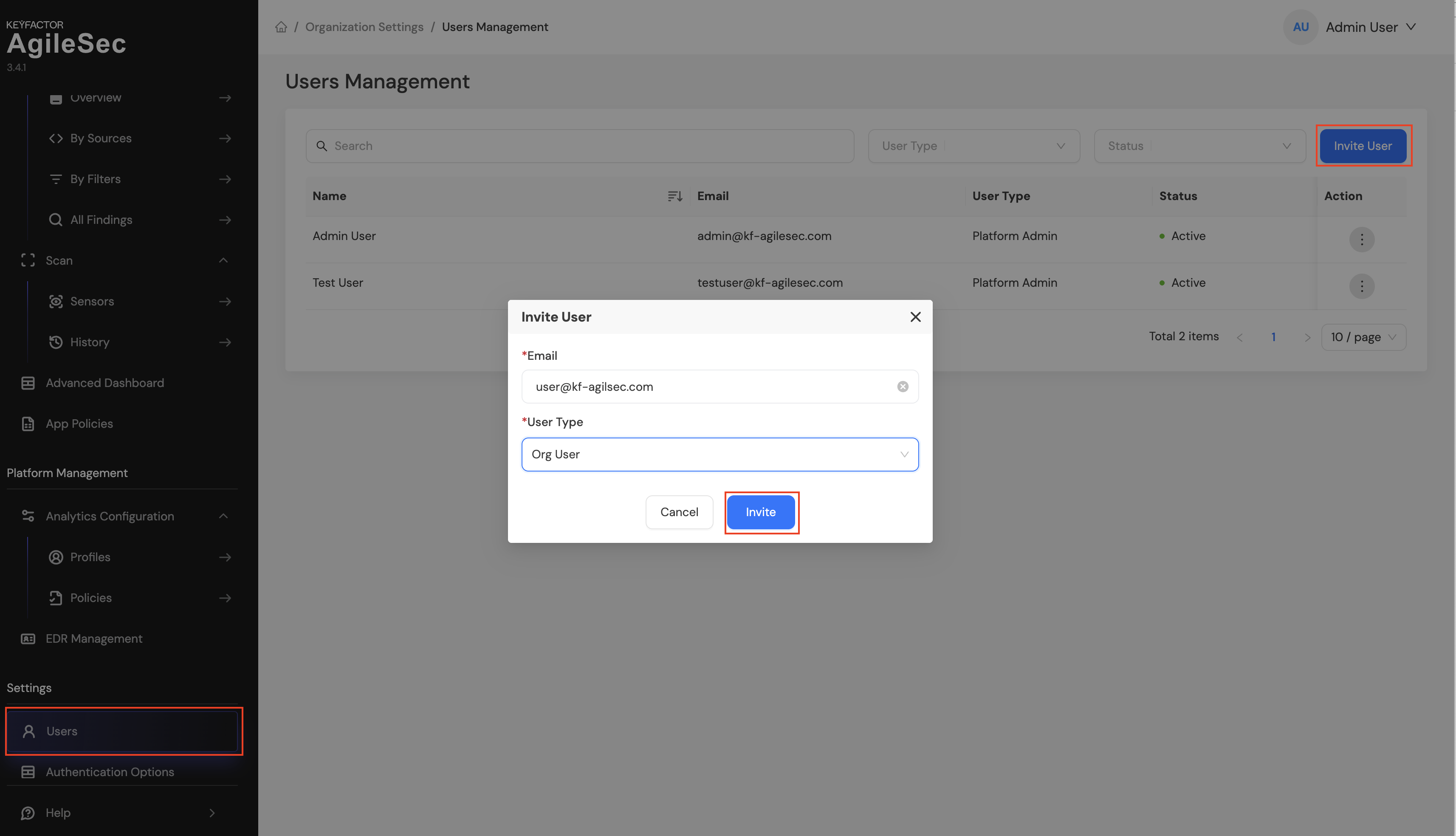
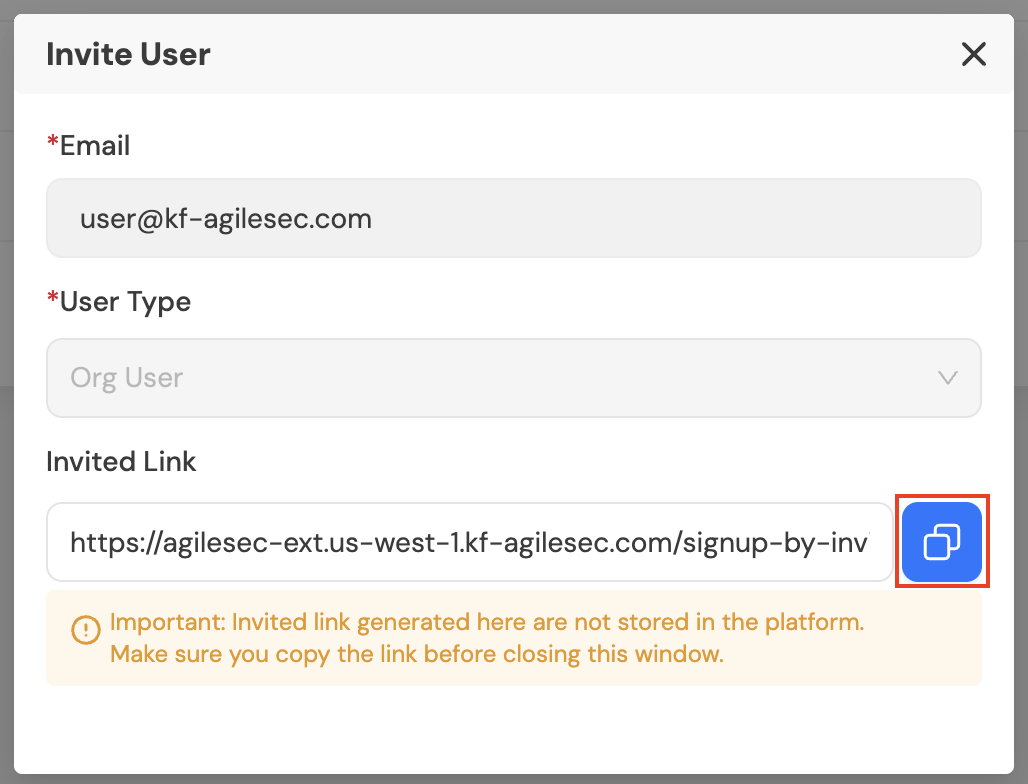
If outbound emails are configured, the user will receive an email invitation to sign up. If outbound emails are not configured, copy the invitation link and share it with the user to start the signup process.
Once the user completes the signup process, they can log in to AgileSecPlatform using their email address and password.
SSO Users
Once the user is added to AgileSecPlatform, they can authenticate using your organization's SSO provider. Users do not need to complete the signup process when SSO is configured.
3.2 Password Requirements and Policies
AgileSecPlatform enforces the following password requirements to ensure account security:
-
Minimum length of 8 characters
-
Must contain at least one uppercase letter
-
Must contain at least one number
-
Must contain at least one special character (example: @ ! # $ & ?)
3.3 Password Resets
Self-Service Reset
Users can reset their own passwords using the "Forgot Password" link on the login page. This requires outbound emails to be configured. Users will receive a password reset link via email that they can use to create a new password.
Admin-Generated Reset Link
Platform Admins and Org Admins can generate a password reset link for any user:
-
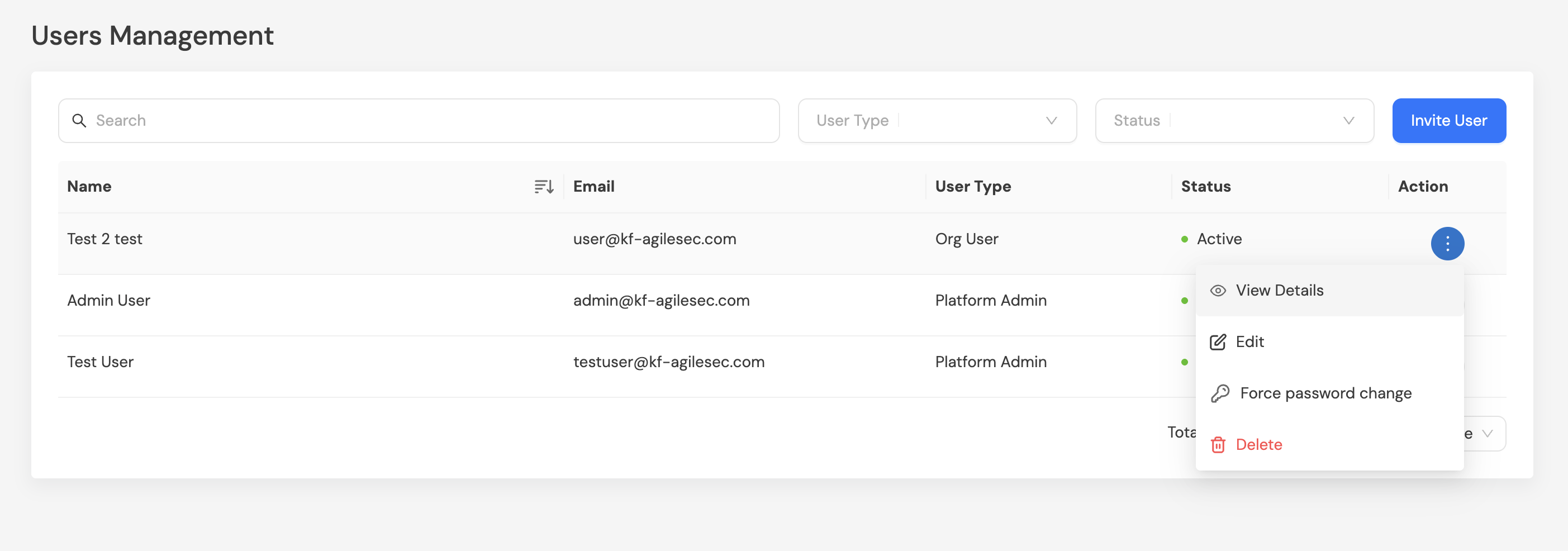
Navigate to Settings → Users
-
Select the action menu for the user
-
Choose Force Password Change
-
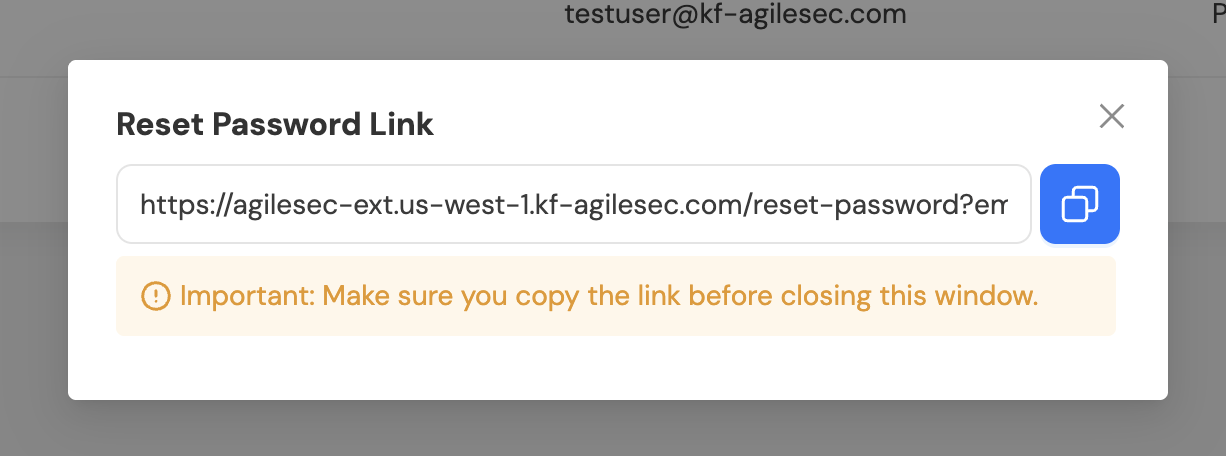
Copy and share the generated reset link with the user
3.4 Updating Users
To update user information:
-
Navigate to Settings → Users
-
Select the action menu for the user
-
Choose Edit
-
Update the following fields as needed:
-
First Name
-
Lsat Name
-
User Type
-
-
Save the changes
3.5 Deleting Users
Permanently remove user accounts when they are no longer needed:
-
Navigate to Settings → Users
-
Select the action menu for the user
-
Choose Delete
-
Confirm the deletion
Warning: Deleting a user removes all tokens, and configurations.
4. Token-Based Authentication
AgileSecPlatform provides three types of JWT (JSON Web Token) tokens for programmatic and service-based access to different platform capabilities.
4.1 API Tokens
API tokens are JWT tokens used to authenticate requests to the Scan API.
Creating API Tokens:
-
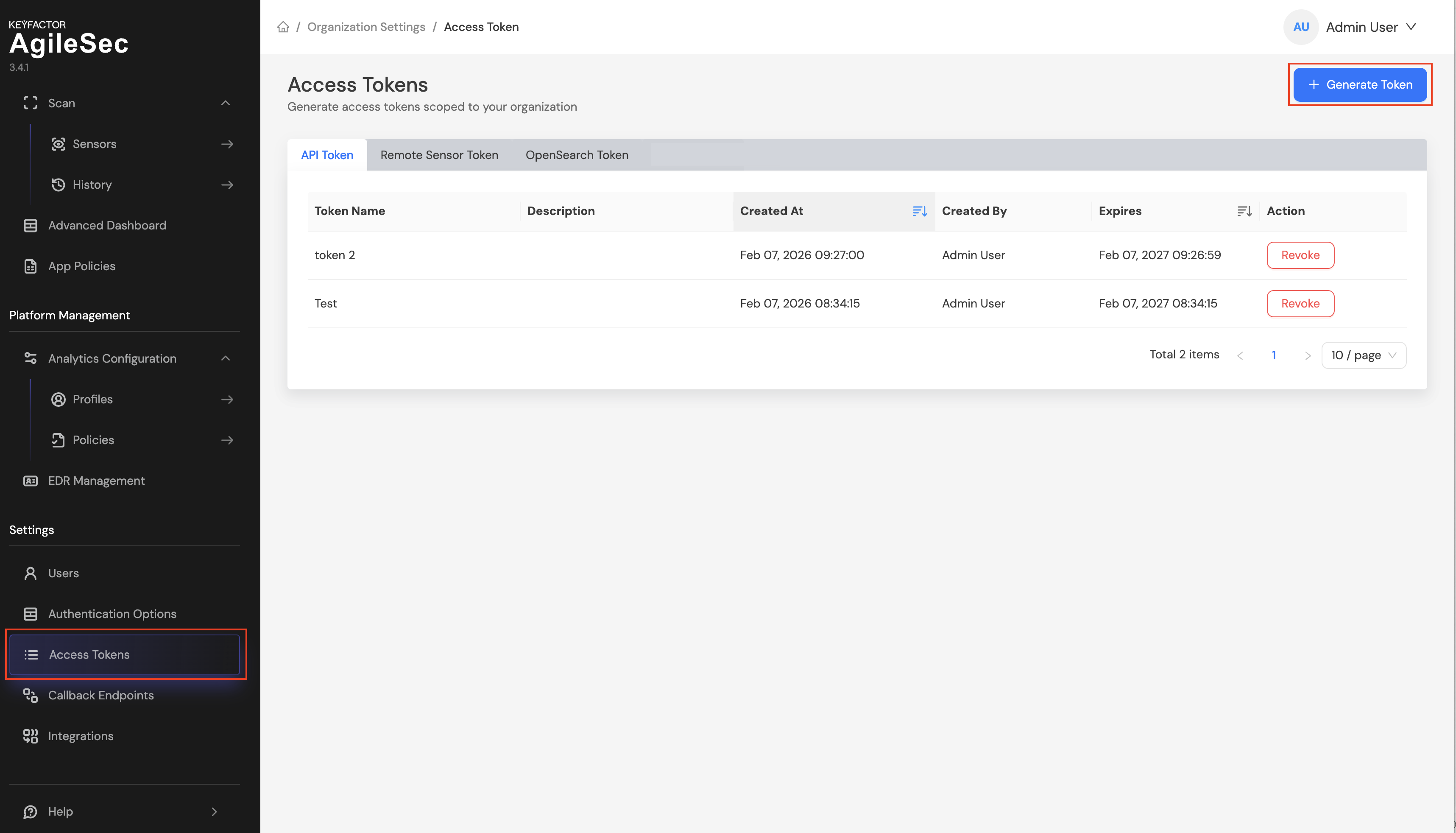
Navigate to Settings → Access Tokens
-
Select API Tokens tab
-
Click Generate Token
-
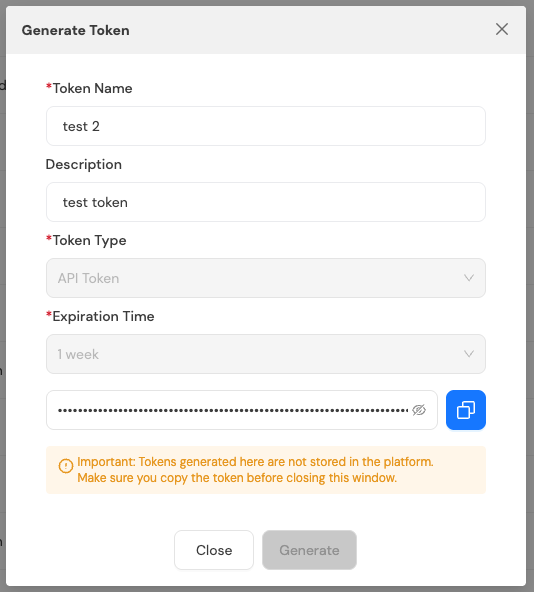
Fill in the token details:
-
Token Name: Provide a descriptive name for the token
-
Description: Add notes about the token’s purpose or usage (optional)
-
Token Type: Pre-selected as "API Token"
-
Expiration Time: Set when the token should expire
-
-
Click Generate
-
Important: Copy the token immediately. The token will only be displayed once and cannot be retrieved after closing the dialog.
Using API Tokens:
Include the API token in your HTTP requests using the isg-api-token header:
isg-api-token: your-api-token-here
API tokens inherit permissions from the user who created them.
4.2 Remote Sensor Tokens
Remote Sensor tokens are JWT tokens used to authenticate Unified Sensors connecting to AgileSecPlatform. These tokens enable Unified Sensors to send scan findings and data back to the platform after completing security scans across your distributed infrastructure.
Creating Remote Sensor Tokens
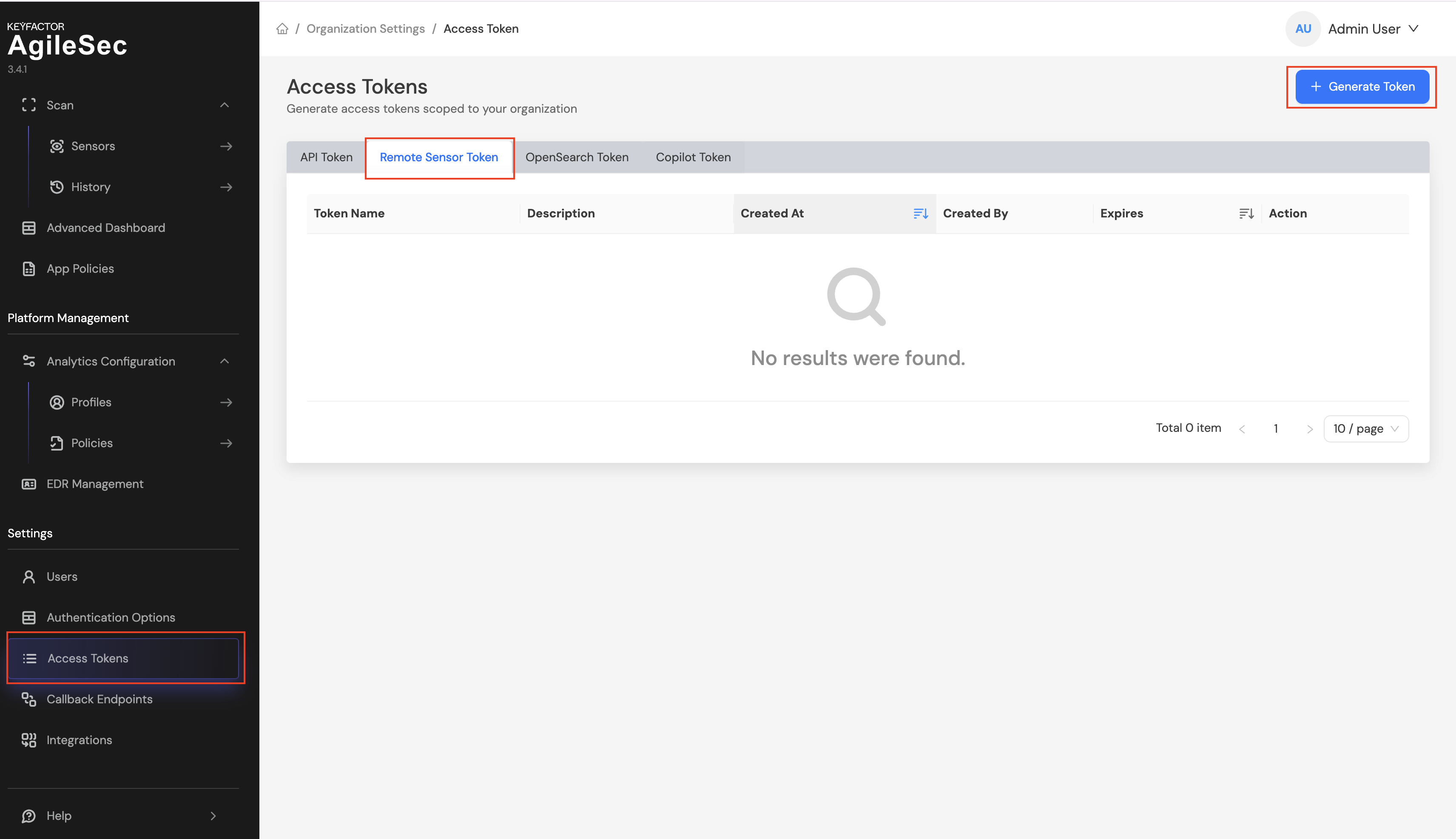
Option 1: From Access Tokens Settings
Navigate to Settings → Access Tokens, select the "Remote Sensor Tokens" tab, and click "Generate Token".
Option 2: From Remote Scan Download Page
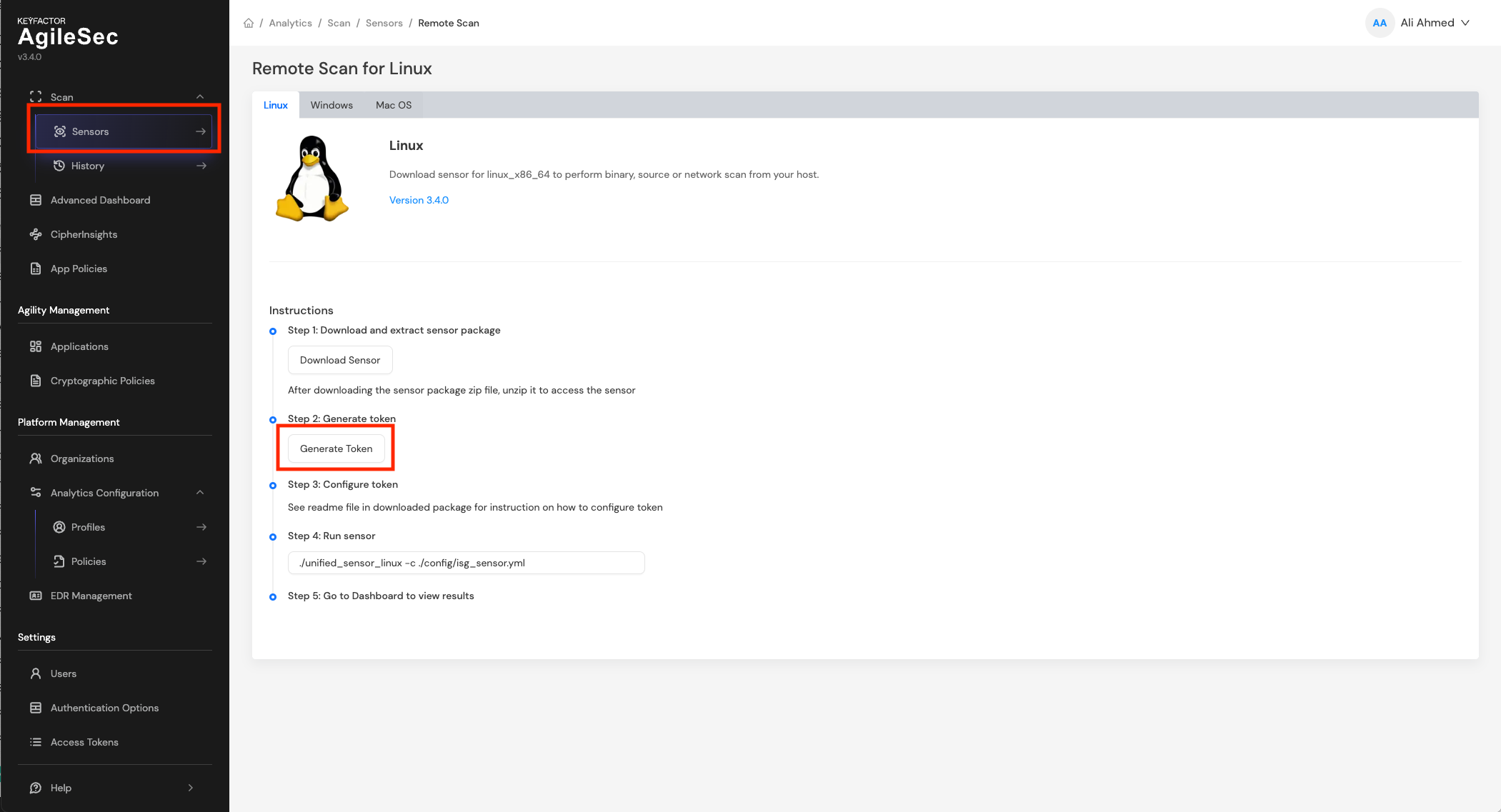
Navigate to Sensors → Remote Scan Download and click "Generate Token".
Both options display the same token generation form:
-
Fill in the token details:
-
Token Name: Provide a descriptive name for the sensor
-
Description: Add notes about the sensor's location or purpose (optional)
-
Token Type: Pre-selected as "Remote Sensor Token"
-
Expiration Time: Set when the token should expire (optional)
-
-
Click "Generate"
-
Important: Copy the token immediately. The token will only be displayed once and cannot be retrieved after closing the dialog.
Using Remote Sensor Tokens
Configure your Unified Sensor with the generated token during setup. The sensor will use this token to authenticate and send scan findings data to AgileSecPlatform. Refer to the Unified Sensor deployment documentation for detailed configuration instructions.
4.3 OpenSearch Token
OpenSearch tokens are JWT tokens that enable programmatic access to OpenSearch through AgileSecPlatform's Search API. These tokens provide controlled access to search and query capabilities while maintaining AgileSecPlatform's authentication and authorization model.
OpenSearch Access Methods
There are two ways to access OpenSearch data programmatically:
-
Through AgileSecPlatform Search API (using OpenSearch Tokens):
-
Access OpenSearch through AgileSecPlatform's API wrapper
-
Use OpenSearch tokens for authentication
-
Inherits permissions from the user's AgileSecPlatform role
-
Provides centralized access control and audit logging
-
Direct OpenSearch API Access (using Internal OpenSearch Users):
-
Access OpenSearch APIs directly, bypassing AgileSecPlatform
-
Requires creating internal users and roles within OpenSearch
-
Provides granular index-level and document-level permissions
-
Covered in detail in the RBAC and Permissions Guide
Creating OpenSearch Tokens
-
Navigate to Settings → Access Tokens
-
Select the "OpenSearch Tokens" tab
-
Click "Generate Token"
-
Fill in the token details:
-
Token Name: Provide a descriptive name for the token
-
Description: Add notes about the token's purpose or usage (optional)
-
Token Type: Pre-selected as "OpenSearch Token"
-
Expiration Time: Set when the token should expire (optional)
-
-
Click "Generate"
-
Important: Copy the token immediately. The token will only be displayed once and cannot be retrieved after closing the dialog.
5. OpenSearch Identity Integration
AgileSecPlatform acts as an identity provider (IdP) for Advanced Dashboard (OpenSearch Dashboards), enabling users to access OpenSearch using their AgileSecPlatform credentials. This integration provides seamless authentication and centralized identity management across both platforms.
How It Works
When users authenticate to AgileSecPlatform, they can access OpenSearch Dashboards without additional login prompts. The authentication flow works as follows:
-
User logs into AgileSecPlatform using username/password or SSO
-
AgileSecPlatform validates the user's credentials and role
-
User navigates to OpenSearch Dashboards using Advanced
-
AgileSecPlatform provides authentication to OpenSearch on behalf of the user
-
User gains access to OpenSearch Dashboards based on their permissions