.png)
The SignServer Container is deployed using Helm, the Kubernetes package manager. The Helm chart manages the full deployment lifecycle and allows optional components to be enabled and customized alongside SignServer.
The diagram below shows how the components of a SignServer Kubernetes deployment fit together:
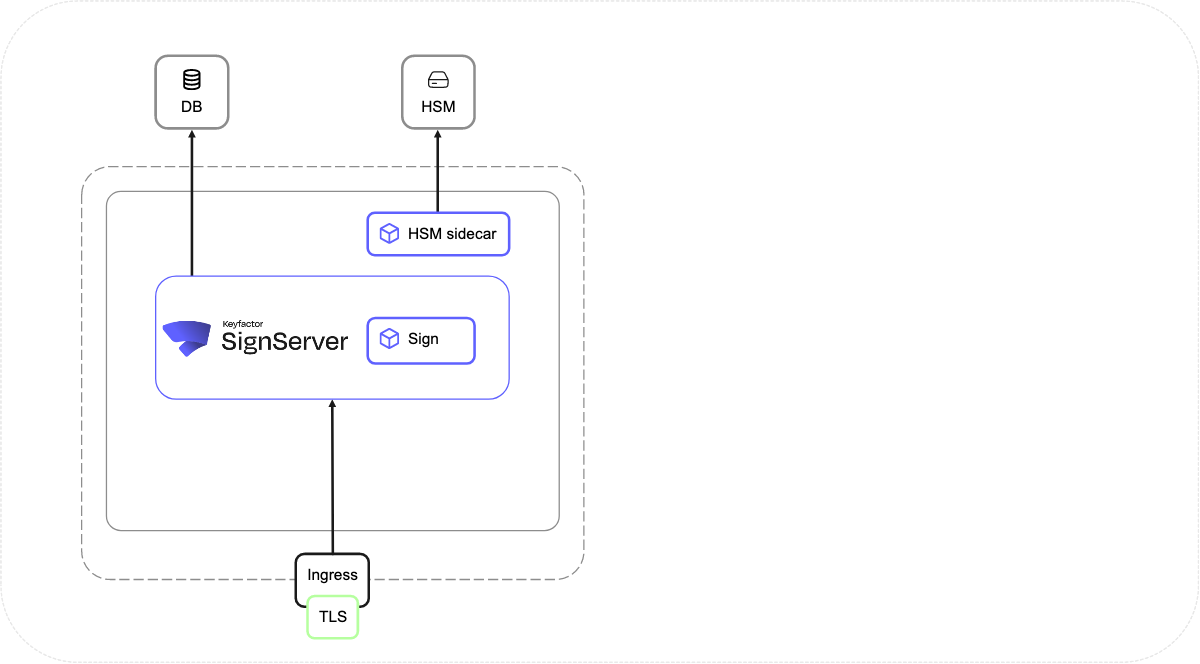
Containers
SignServer
The core signing application container. Handles signing operations, policy enforcement, worker management, and the Admin Web interface. For a full list of included components, see SignServer Container Set.
HSM Sidecar Containers
Optional sidecar containers that run alongside SignServer in the same pod and handle PKCS#11 communication with a network-attached HSM. Required for production HSM-backed key storage. See HSM Integration.
Cluster-external Access
To expose SignServer outside the Kubernetes cluster, you need an ingress, gateway layer, or reverse proxy that handles TLS termination and routes traffic to the SignServer service.
When used, any cluster-external access option requires TLS with client certificate authentication for Admin Web access.
Ingress NGINX retirement notice: Kubernetes has announced the retirement of Ingress NGINX. Existing deployments continue to function, but new deployments should use an actively maintained alternative, such as an NGINX reverse proxy. The
ingressparameters remain available in the SignServer Helm chart for backward compatibility, but are no longer recommended for new deployments. See the Ingress NGINX retirement announcement for details.
Recommended: NGINX Reverse Proxy
The NGINX reverse proxy as a sidecar container is the recommended replacement for Ingress NGINX. For setup, see Configure a Reverse Proxy in SignServer.