.png)
To allow Per Connection in SignServer:
-
Access the SignServer Administration GUI.
-
Select Administrators at the top.
Under the Incoming Connections section you will see a new connection attempt:
-
Click Add Authorization.
-
Select Peer System and click Add.
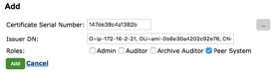
-
There is now a second Authorization with a Peer System role.
