.png)
Enterprise
The JWT Authorizer is used to authorize signature requests based on the provided JSON Web Token (JWT) included in the request.
Fully qualified class name: AUTHTYPE=org.signserver.server.jwtauth.JwtAuthorizer
Introduction
JSON Web Token (JWT) is an internet standard for JSON-based token authentication. JWTs allow you to digitally sign information (referred to as claims) with a signature and can be verified at a later time with the public key of the issuer. JWT claims are typically used to pass the identity of authenticated users between an authorization server and a resource server. The JWT Authorizer allows having the authorization server separate from the SignServer application.
Use Case Example
There are several authorization servers available and this implementation has been tested with Keycloak. The following use case example outlines authenticating with Keycloak (as the authorization server) to obtain a signed token, then used in the request sent from the client to SignServer (the resource server). The client in the following overview could, for example, be an app using OpenID Connect (OIDC).
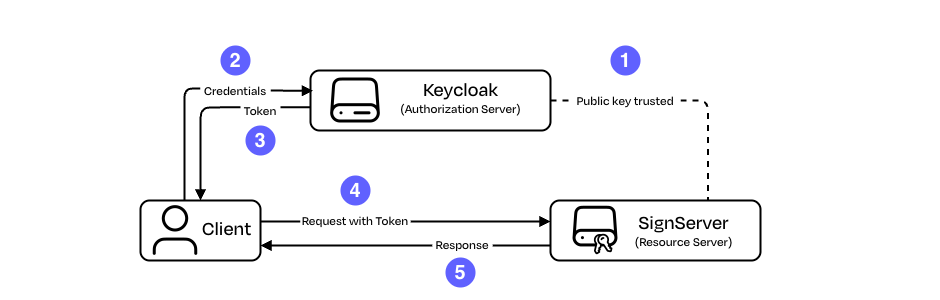
-
Public key trusted: The Worker in SignServer is either configured to trust the authorization server's public key or configured with the trusted URL where the authorization server’s public keys can be found. Authorization rules matching claims from the tokens are also configured.
-
Credentials: The client authenticates toward the authorization server using its credentials.
-
Token: The authorization server creates and signs a token using its private key and returns it to the client.
-
Request with token: The client sends its request to SignServer and includes the token.
-
Response: SignServer verifies the token (including its signature and validity) and matches its claims against the configured authorization rules. If a rule matches, the request is processed and the response is returned to the client.
JWT Authorizer can be used in conjunction with One-time Crypto Worker for EJBCA Peers CA Connector introducing additional information for issuing certificates via claims of a JWT.
Configuration
Set up a trusted authorization server using indexed worker properties starting with an AUTHSERVER prefix.
You must configure authorization JWT matching rules to allow access to the request, which provides a token of type (typ) JWT with a valid signature that can be verified by the public key configured with that issuer name/URI or the set of keys fetched from JWKS URL.
Authorization Server Properties
Define the following properties for each authorization server:
|
Property |
Description |
|---|---|
|
|
Provide the issuer name. The issuer field needs to be matched to the value provided as the Issuer Claim (iss) in the tokens. The "iss" value is a case-sensitive string. The value must also match an authorization JWT Example: For more information on Issuer Claim (iss), refer to RFC 7519, section 4.1.1. "iss" (Issuer) Claim. |
|
|
Provide the public key data. Example: This property cannot be combined with the |
|
|
Provide the URL of the JSON Web Key Set (JWKS) endpoint provided by your authorization server. Example: This property cannot be combined with the |
|
|
(Optional) To use ECDSA, set the key algorithm to This property can only be used when |
Authorization JWT Matching Rules
Use the matching rules to authorize a user to submit requests the Worker. To authorize, set up the JWT with a matching authorization rule that is configured in the Worker. The matching rule AUTHJWTn. must contain the issuer name, the claim name, and the expected claim value.
The n value in the property is the unique numeric value (suffix) in order to have multiple claims matched to a single issuer. For example: AUTHJWT10, AUTHJWT20, AUTHJWT37. As long as SignServer can match with one of the matching rules, the authorization is successful.
Define the following properties for each authorization JWT matching rule:
|
Matching Rule Property |
Description |
|---|---|
|
|
Provide the issuer name. The issuer field needs to be matched to the value provided as the Issuer Claim (iss) in the tokens. The value must also match an authorization server Example: For more information on Issuer Claim (iss), refer to RFC 7519, section 4.1.1. "iss" (Issuer) Claim. |
|
|
Provide the name of the claim to match with. Example: |
|
|
Provide the value of the claim. Example: |
|
|
(Optional) Descriptive text for the authorization JWT property. |
Example of Authorization JWT Matching Rules Configuration
AUTHJWT39.ISSUER=MyIssuer
AUTHJWT39.CLAIM.NAME=groups
AUTHJWT39.CLAIM.VALUE=SignServer-users
Matching rules can support multiple values. Using different numeric values, repeat the issuer and claim name properties, and provide the differing value property.
The following example shows how to specify multiple end users, shown as user1 and user2 for claim sub and issuer MyIssuer.
AUTHJWT47.ISSUER=MyIssuer
AUTHJWT47.CLAIM.NAME=sub
AUTHJWT47.CLAIM.VALUE=user1

AUTHJWT48.ISSUER=MyIssuer
AUTHJWT48.CLAIM.NAME=sub
AUTHJWT48.CLAIM.VALUE=user2
Additional Worker Properties
|
Property |
Description |
|---|---|
|
|
Configures a list of accepted audiences that are checked against the intended audiences from the claim of the token (if present). If the token has an audience, it must match a configured audience. If the audiences do not match, the request is not authorized. Example: |
|
|
Removes the requirement to specify |
|
|
Defines the maximum allowed difference in seconds between the authorization server clock and the SignServer clock when validating JWT time-based claims. Default: 300 (seconds) The clock skew is applied only when validating the
|
Token Validation with JSON Web Key Set (JWKS)
When using a JSON Web Key Set (JWKS) for token validation, only keys with a valid format, according to RFC 7517: JSON Web Key (JWK), are considered.
A key is valid when the following parameters are present. If any required field is missing or contains an unexpected value, the key is ignored and not used for validation.
|
Parameter |
Description |
Required |
|---|---|---|
|
|
The key ID of the public key that is used to match the key with the |
|
|
|
The key type indicating the cryptographic algorithm family, either |
|
|
|
The intended use of the public key. If present, it must be set to |
|
|
|
A JSON array listing the operations for which the key is intended to be used. If present, it must contain |
|
|
|
Modulus of the public key |
for RSA keys |
|
|
Exponent of the public key |
for RSA keys |
|
|
The cryptographic curve used with the key. Expected values: |
for EC keys |
|
|
X-coordinate for the Elliptic Curve point |
for EC keys |
|
|
Y-coordinate for the Elliptic Curve point |
for EC keys |
If both use and keyOps are absent, the key set is ignored. If both are present, the values must convey consistent information.
For more information on the JSON Web algorithm, refer to: RFC 7518: JSON Web Algorithms (JWA).
JWKS Cache
When the JWKS endpoint URL is used to fetch the public keys from the authorization server, SignServer caches the keys per issuer. Note that the JWKS cache is local to each application instance and is not distributed across multiple pods or nodes.
All cache entries are configured to expire 1-hour after creation, or from most recent update. If a JWT token is received with key ID not found in the cache and the refresh of the key set occurred more than five minutes ago, SignServer attempts to fetch the issuer’s public keys.
The default cache size is 10 issuers. To change this value, set the global configuration property GLOB.JWKS_CACHE_SIZE to the desired number of cached issuers.
A server restart is required for the changes to take effect.
Example
The following displays configured authorization servers and JWTs:
AUTHSERVER1.ISSUER=TEST_ISSUER1
AUTHSERVER1.PUBLICKEY=....

AUTHSERVER2.ISSUER=TEST_ISSUER2
AUTHSERVER2.PUBLICKEY=...

AUTHJWT37.ISSUER=TEST_ISSUER1
AUTHJWT37.CLAIM.NAME=scopes
AUTHJWT37.CLAIM.VALUE=scope1

AUTHJWT38.ISSUER=TEST_ISSUER2
AUTHJWT38.CLAIM.NAME=scopes
AUTHJWT38.CLAIM.VALUE=scope2
The following displays an example JWT token:
Base 64-encoded
eyJraWQiOiJqd3Qua2V5IiwidHlwIjoiSldUIiwiYWxnIjoiUlMyNTYifQ.eyJzdWIiOiJ1c2VyMSIsInVwbiI6ImR1a2UiLCJhdXRoX3RpbWUiOjE1ODM4MzAwMzcsImlzcyI6Im15LWF1dGgtc2VydmVyIiwiZ3JvdXBzIjpbInN0YWZmIiwiU2lnblNlcnZlci11c2VycyIsInJlbGVhc2UtbWFuYWdlcnMiLCJtYWlsdXNlcnMiXSwiZXhwIjoxNTgzODMxMDM3LCJpYXQiOjE1ODM4MzAwMzcsImp0aSI6IjQyIn0.Tzy6hoLKwmiQ4C7exBaEUVjH_TK6qiY6KUJUu2QLC-52QxJRXKdBXR1t6l2JqbhWm20o_yKcgp6d4n03AyX8IUGOVul5xY5nWP4Uyn_SfWznuANCXKIf9y8a99ucO4yTEtsrAw2Hiv88LSpia768m1epUXe8_fgoFxfZr8adtRkJ2mT5evHtFwbWtUTT2r3-okuQPvmUfhBrECVKYrBwrV3JlXgXGTjSz4j3XwFfdh516EhKXY8dSn4PMG4hmcnmLNJkz59sUOSTgpwgtp8JzqGBLqtsehJGSYVFDueIDCEbljEAXNgfIbUpT7PuE1IY8VyTm792RB_u_Dq5f03TEQ
The following displays the header and payload for the above token:
Header
{
 "kid":"jwt.key",
 "typ":"JWT",
 "alg":"RS256"
}
Payload
{
 "sub":"user1",
 "upn":"duke",
 "auth_time":1583830037,
 "iss":"my-auth-server",
 "groups": [
    "staff",
    "SignServer-users",
    "release-managers",
    "mailusers"
  ],
 "exp":1583831037,
 "iat":1583830037,
 "jti":"42"
}
The following displays an example (using cURL) that sends a request authenticating using JWT:
$ curl -H "Authorization: Bearer eyJraWQiOiJqd3Qua2V5IiwidHlwIjoiSldUIiwiYWxnIjoiUlMyNTYifQ.eyJzdWIiOiJ1c2VyMSIsInVwbiI6ImR1a2UiLCJhdXRoX3RpbWUiOjE1ODM4MzAwMzcsImlzcyI6Im15LWF1dGgtc2VydmVyIiwiZ3JvdXBzIjpbInN0YWZmIiwiU2lnblNlcnZlci11c2VycyIsInJlbGVhc2UtbWFuYWdlcnMiLCJtYWlsdXNlcnMiXSwiZXhwIjoxNTgzODMxMDM3LCJpYXQiOjE1ODM4MzAwMzcsImp0aSI6IjQyIn0.Tzy6hoLKwmiQ4C7exBaEUVjH_TK6qiY6KUJUu2QLC-52QxJRXKdBXR1t6l2JqbhWm20o_yKcgp6d4n03AyX8IUGOVul5xY5nWP4Uyn_SfWznuANCXKIf9y8a99ucO4yTEtsrAw2Hiv88LSpia768m1epUXe8_fgoFxfZr8adtRkJ2mT5evHtFwbWtUTT2r3-okuQPvmUfhBrECVKYrBwrV3JlXgXGTjSz4j3XwFfdh516EhKXY8dSn4PMG4hmcnmLNJkz59sUOSTgpwgtp8JzqGBLqtsehJGSYVFDueIDCEbljEAXNgfIbUpT7PuE1IY8VyTm792RB_u_Dq5f03TEQ" --data "data=<document/>" https://sign.example.com/signserver/worker/XMLSigner
Logging
If the request is allowed, the provided subject claim (sub) is logged in the AUTHORIZED_USERNAME field.