.png)
Client Auth Certificates
The Client Auth Certificates tab allows the Signum Administrator to manage certificates that can be used for authenticating users in Certificate User Domains.
In the Certificates tab, you can:
Upload certificates to make them available for use with any Certificate Domain user.
Download the certificate as a .cer file.
Permanently delete certificates that are no longer needed.
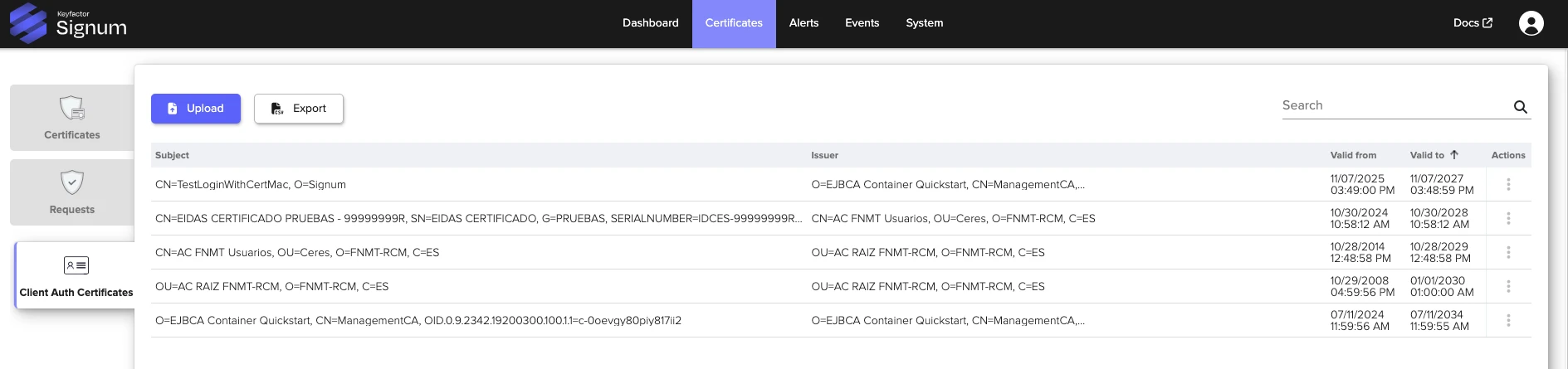
The table in the Client Auth Certificates tab provides the following data for each uploaded certificate:
Item | Description |
|---|---|
Subject | The name of the certificate. |
Issuer | The issuer of the certificate. |
Valid from / Valid to | The dates of validity. |
Actions | The ellipsis button provides actions to:
|
To view certificate data such as the serial number, thumbprint, and signature algorithm, click on the certificate name to bring up an overview window.