.png)
Instructions for deploying the PKCS#11 HSM Connector to scan for cryptographic assets and deliver findings to the AgileSec Platform for processing and analysis.
Overview
The PKCS#11 Connector accesses local HSM via PKCS#11 API with Keyfactor AgileSec Platform.
This Connector allows you to discover, inventory, and analyze cryptographic assets across HSM devices.
What Gets Scanned
The PKCS#11 HSM Connector can discover the following cryptographic asset types on any HSM supporting PKCS#11:
-
X.509 Certificates: SSL/TLS certificates
-
Keys: RSA, DSA, EC, and symmetric keys
Prerequisites
Ensure you meet the following requirements to enable scanning.
Shared Machine
The PKCS#11 HSM Connector and the HSM must be on the same machine. The PKCS#11 API uses a local shared library to communicate with the HSM.
PKCS#11 Required Access Rights
Scanning for public artifacts requires no specific access rights.
For restricted artifacts, User or Security Officer (SO) rights and associated pin are required.
Remote Execution Requirements
If running the Connector remotely using CLI, the remote execution machine must meet these requirements:
|
Component |
Requirement |
|---|---|
|
Operating System |
|
|
RAM |
Minimum 500 mb (0.5 GB) to enable API calls and data streaming. |
|
Disk Space |
Minimal; scans are API-driven and findings are streamed to the AgileSec platform. No data is stored on disk. |
|
Permissions |
Read/write access to remote sensor working directory (remote sensor install location) |
Running the Connector
The PKCS#11 HSM Connector performs Remote Scan Execution via CLI on customer-managed infrastructure.
Refer to Scan Execution Flows for additional scan execution information.
Configuration Fields
The following parameters are used to configure AgileSec PKCS#11 HSM scans.
|
Field Name |
Type |
Required |
Description |
|---|---|---|---|
|
|
String |
✅ Yes |
File path to the PKCS#11 shared library to communicate with the HSM. Multiple module paths are supported for public artifact scans (no required access rights). Example: |
|
|
String |
❌ No |
Role to access restricted, non-public artifacts. Only |
|
|
String |
❌ No |
Pin associated with the |
|
|
String |
❌ No |
Scans only configured slot names or slot IDs to retrieve artifacts. Slot IDs use hex format (i.e. 0x112233…) Multiple label searching is supported. If not set, all slots will be scanned. |
Remote Scan Execution
Scans may be run on remote host machines with the AgileSec Remote Sensor Package.
Download Remote Sensor Package
-
Open your browser and navigate to the Keyfactor AgileSec Platform Web URL
-
Log in with your credentials
-
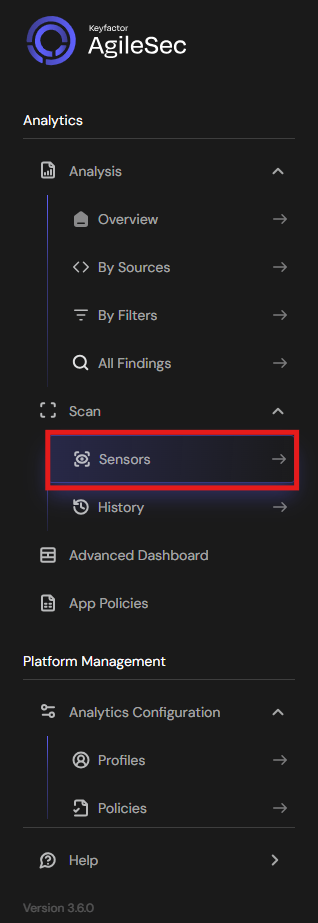
Click on "Sensors" in the left navigation menu under Scan
-
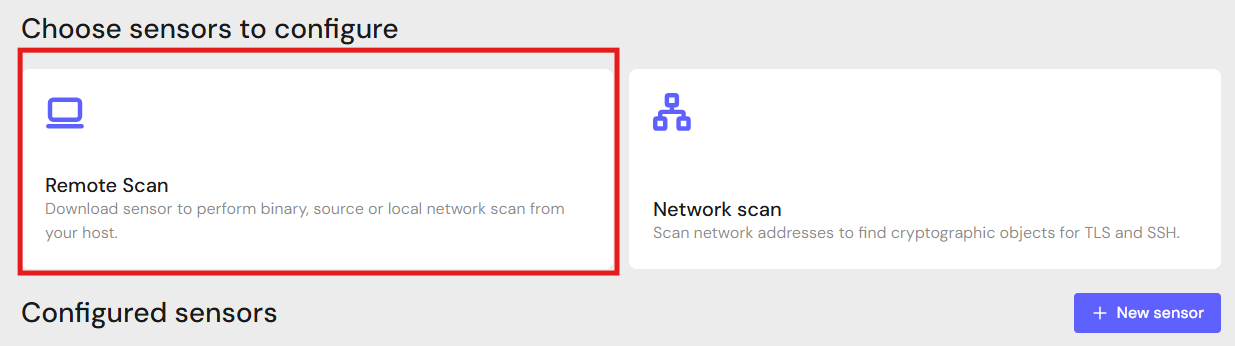
Click Remote Scan.
-
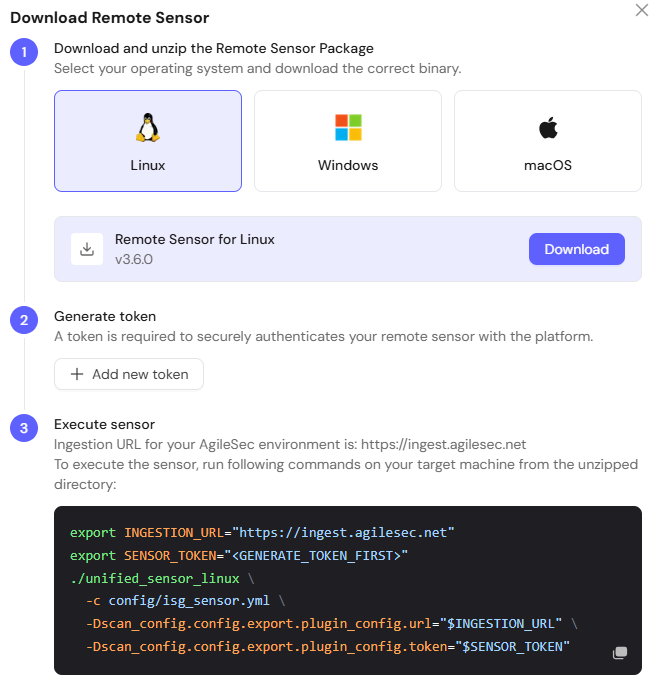
Click + Download Remote Sensor.

-
Download the sensor binary for your remote machine’s operating system
Generate Platform Token
-
In the Download Remote UI, click "Generate Token"
-
Copy the generated token
-
Store securely in an environment variable such as
SENSOR_TOKEN:export SENSOR_TOKEN="your-generated-token"
Create Configuration File
Create a YAML configuration file (e.g., pkcs11-config.yml) with your scan settings. An example configuration can be found in config/sample-configs/pkcs11.yml.
Step 4: Run the Connector
Execute the Connector with your configuration file:
-
Linux/macOS
Bash# Set environment variables export SENSOR_TOKEN="your-sensor-token" # Run Connector ./unified_sensor_linux -c pkcs11-config.yml -
Windows (PowerShell)
PowerShell# Set environment variables $env:SENSOR_TOKEN = "your-sensor-token" # Run Connector .\\unified_sensor_windows.exe -c .\\pkcs11-config.yml
Remote Scan Execution Configuration Examples
-
Query multiple HSM (Public)
YAMLscan_config: plugins: - pkcs11_import - export config: pkcs11_import: name: pkcs11 plugin_config: module: - /path/to/hsm1/pkcs11-api-library/pkcs11.so - /path/to/hsm2/pkcs11-api-library/pkcs11.so -
Query HSM with
userroleYAMLscan_config: plugins: - pkcs11_import - export config: pkcs11_import: name: pkcs11 plugin_config: module: - /path/to/hsm1/pkcs11-api-library/pkcs11.so user: "user" pin: "user pin value" -
Query HSM with label filter (Public)
YAMLscan_config: plugins: - pkcs11_import - export config: pkcs11_import: name: pkcs11 plugin_config: module: - /path/to/hsm1/pkcs11-api-library/pkcs11.so label: - label_1 - label_2
Known Limitations
Only Standard PKCS#11 Roles Supported
Only standard PKCS#11 role names user and so are supported. If your HSM allows custom names, they cannot be used to access restricted artifacts.
Slot Name Filter
Slot name labels will match other slots if it is a substring.
If label is set to a slot name, the slot name will be treated as a substring for filtering searches. If a slot name label partially matches other slot names, all partially-matching slots will be included in the scan. For example, setting label to slot name “ECC” will also match ECCSet1, ECCSet2, ECCAdmin, etc.
If this behavior is not desired, set label to the slot ID instead of slot name to filter for exact matches.
Getting Support
Collect diagnostic information:
-
Connector version
-
Configuration file (redact tokens)
-
Log output
-
HSM details (type, PKCS#11 library, version)
Contact Support
-
Portal: https://support.keyfactor.com