.png)
Instructions for deploying the Thales Luna HSM Connector to scan for cryptographic assets and deliver findings to the AgileSec Platform for processing and analysis.
Overview
The Thales Luna HSM Connector integrates Thales Luna Network HSM with Keyfactor's AgileSec platform. The Connector authenticates to the Luna REST API, iterates over the configured HSM partitions, enumerates their objects, and transmits findings to the AgileSec platform.
What Gets Scanned
The Thales Luna HSM Connector can discover the following cryptographic asset types:
-
Cryptographic Keys: Symmetric and asymmetric keys stored in HSM partitions.
-
Key Attributes: Algorithm, key size, permitted key operations (sign, verify, encrypt, decrypt, wrap, unwrap, derive, encapsulate, decapsulate), and object metadata (label, fingerprint, sensitivity and extractability attributes).
Prerequisites
Ensure you meet the following requirements to enable scanning.
Network Access
Ensure HTTPS network connectivity from AgileSec platform or remote execution machine to the Luna HSM appliance.
Supported Authentication Methods
The Thales Luna HSM Connector uses two authentication methods:
-
Session Authentication: The Thales Luna HSM Connector uses REST API authentication (Username/Password). API authentication must be enabled and configured on the Luna HSM appliance.
-
Partition Auth: Each partition uses role/password to authenticate. These may be set per-partition or generically for all partitions.
Thales Luna Required Access Rights
Luna REST API must be enabled on the HSM appliance. The Thales Luna HSM Connector requires access to the following API endpoints:
|
Access Rights |
REST API Endpoint |
|---|---|
|
Authorize session |
|
|
Login to partition |
|
|
Get object from partition |
|
|
Get each object’s details |
|
|
Get information associated with a specific task |
|
Note: Custom restricted roles will require an ACL policy allowing access to these APIs for scanning execution. The default Admin and Operator roles should have access to these API endpoints.
Remote Execution Requirements
If running the Connector remotely using CLI, the remote execution machine must meet these requirements:
|
Component |
Requirement |
|---|---|
|
Operating System |
|
|
RAM |
Minimum 500 mb (0.5 GB) to enable API calls and data streaming. |
|
Disk Space |
Minimal; scans are API-driven and findings are streamed to the AgileSec platform. No data is stored on disk. |
|
Permissions |
Read/write access to remote sensor working directory (remote sensor install location) |
Running the Connector
The Thales Luna HSM Connector performs Remote Scan Execution via CLI on customer-managed infrastructure.
Refer to Scan Execution Flows for additional scan execution information.
Configuration Fields
The following parameters are used to configure AgileSec PKCS#11 HSM scans.
Basic Parameters
|
Field Name |
Type |
Required |
Description |
|---|---|---|---|
|
|
String |
✅ Yes |
Thales Luna API URL |
|
|
String |
✅ Yes |
REST API credentials username configured on the Luna HSM appliance. |
|
|
String |
✅ Yes |
REST API credentials password configured on the Luna HSM appliance. |
|
|
Number |
❌ No |
Thales API version. Defaults to 16. |
|
|
String |
✅ Yes if not individually provided in |
General role to be used for partitions if not assigned in |
|
|
String |
❌ No |
Partition password if partitions are password-protected. Applied to all partitions unless a specific partition object’s Specific partition’s |
|
|
List of partitions Objects (see |
✅ Yes |
Specific partitions to scan. Only these partitions will be scanned. |
partitions Object Fields
Each partition may configure unique role and password settings.
|
Field Name |
Type |
Required |
Description |
|---|---|---|---|
|
|
String |
✅ Yes |
Thales Luna HSM serial number. |
|
|
String |
✅ Yes |
Specific partition’s ID. |
|
|
String |
✅ Yes if |
Login role for specific partition . Overrides |
|
|
String |
❌ No |
Specific partition password if partitions are password-protected. Overrides |
Advanced Configuration Parameters
Parallel Processing: Advanced users may configure concurrent partition and object processing for faster scans.
Async Task Support: Advanced users may configure task polling for long-running HSM operations.
|
Field Name |
Type |
Required |
Description |
|---|---|---|---|
|
|
Number |
❌ No |
Enable concurrent partitions processing for faster scans. Defaults to 1 (linear; no parallelism). |
|
|
Number |
❌ No |
Enable concurrent partition objects processing for faster scans. Defaults to 1 (linear; no parallelism). |
|
|
Number (Seconds) |
❌ No |
Controls the time to wait in seconds before polling a pending task. After 100 polls, if still not resolved, an error will occur. |
Remote Scan Execution
Scans may be run on remote host machines with the AgileSec Remote Sensor Package.
Download Remote Sensor Package
-
Open your browser and navigate to the Keyfactor AgileSec Platform Web URL
-
Log in with your credentials
-
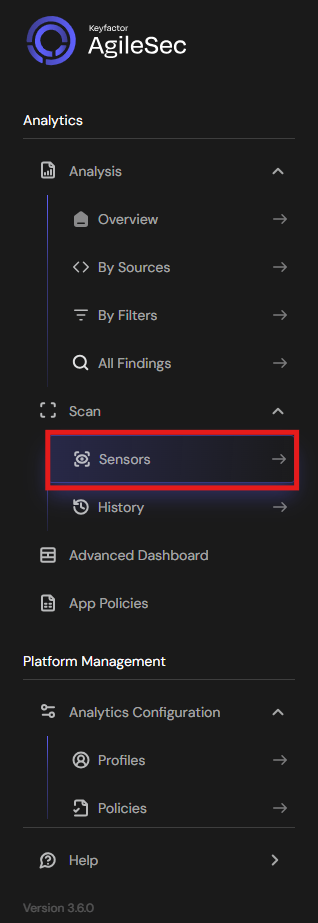
Click on "Sensors" in the left navigation menu under Scan
-
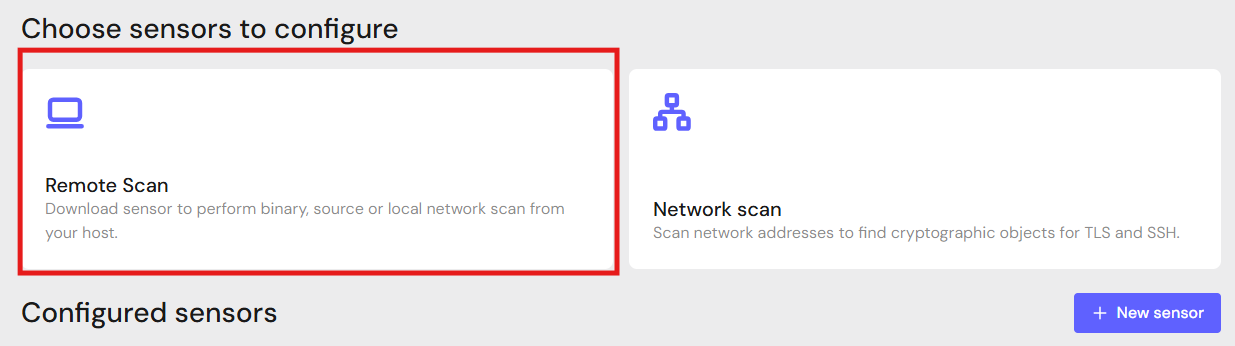
Click Remote Scan.
-
Click + Download Remote Sensor.

-
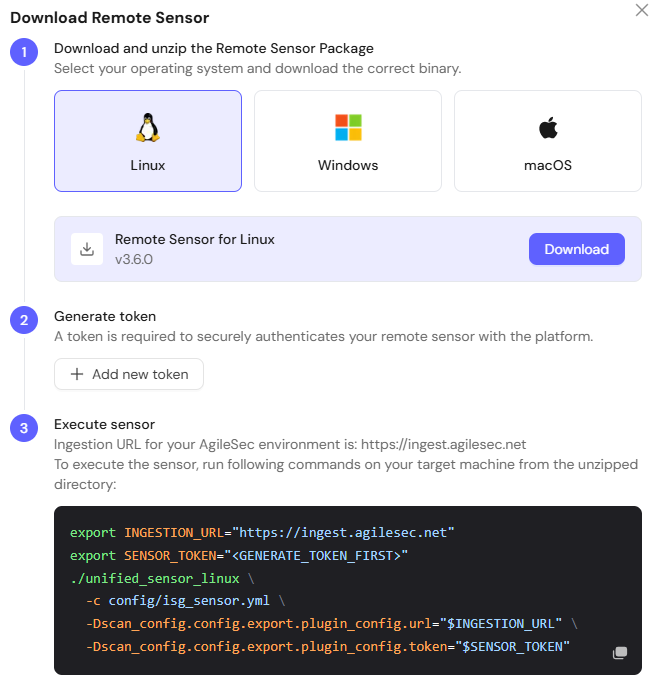
Download the sensor binary for your remote machine’s operating system
Generate Platform Token
-
In the Download Remote UI, click "Generate Token"
-
Copy the generated token
-
Store securely in an environment variable such as
SENSOR_TOKEN:export SENSOR_TOKEN="your-generated-token"
Create Configuration File
Create a YAML configuration file (e.g., thales_luna-config.yml) with your scan settings. An example configuration can be found in config/sample-configs/thales_luna.yml.
Step 4: Run the Connector
Execute the Connector with your configuration file:
-
Linux/macOS
Bash# Set environment variables export SENSOR_TOKEN="your-sensor-token" # Run Connector ./unified_sensor_linux -c thales_luna-config.yml -
Windows (PowerShell)
PowerShell# Set environment variables $env:SENSOR_TOKEN = "your-sensor-token" # Run Connector .\\unified_sensor_windows.exe -c .\\thales_luna-config.yml
Remote Scan Execution Configuration Examples
-
Basic Configuration
YAMLscan_config: plugins: - thales_luna - export config: thales_luna: name: thales_luna plugin_config: base_url: "<https://luna-hsm:8443>" username: "rest_api_user" password: "${env:LUNA_PASS}" api_version: 16 -
With Specific Partitions and Concurrency
YAMLscan_config: plugins: - thales_luna - export config: thales_luna: name: thales_luna plugin_config: base_url: "<https://luna-hsm:8443>" username: "rest_api_user" password: "${env:LUNA_PASS}" api_version: 16 partition_role: "co" partition_password: "${env:PARTITION_PASS}" partitions: - hsm_id: "hsm1" partition_id: "partition1" role: "co" password: "${env:PARTITION1_PASS}" - hsm_id: "hsm1" partition_id: "partition2" max_parallel_partitions: 2 max_parallel_partition_tasks: 8
Known Limitations
REST API Required
The Luna HSM must have the REST API enabled. Older firmware versions may not support this feature.
Concurrency Limits
Setting max_parallel_partitions and max_parallel_partition_tasks too high may overwhelm the HSM. The total goroutine count is max_parallel_partitions × max_parallel_partition_tasks.
Troubleshooting Common Errors
-
CONFIG-404— Unable to read/parse configuration file-
Cause: The configuration file path is incorrect or the file is malformed.
-
Fix: Verify the config file path and validate JSON syntax.
-
-
Thales Luna BaseURL is not configured-
Cause: The
base_urlfield is empty or missing. -
Fix: Set
base_urlto the Luna HSM REST API URL.
-
-
401 Unauthorized-
Cause: Invalid REST API credentials.
-
Fix: Verify the username and password are correct for the Luna REST API.
-
-
Partition login failures
-
Cause: Incorrect partition role or password.
-
Fix: Verify the
partition_roleandpartition_passwordsettings. Check per-partition overrides if configured.
-
-
Task polling timeouts
-
Cause: Async HSM operations taking longer than the configured
task_wait_time. -
Fix: Increase the
task_wait_timevalue.
-
Getting Support
Collect diagnostic information:
-
Connector version
-
Configuration file (redact credentials)
-
Log output
-
Luna HSM details (URL, firmware version, API version)
Contact Support
-
Portal: https://support.keyfactor.com