.png)
The following provides information on managing crypto tokens, with instructions on how to create, edit, and activate crypto tokens.
For information about what crypto tokens are, what they do and about their fields, see Crypto Tokens Overview.
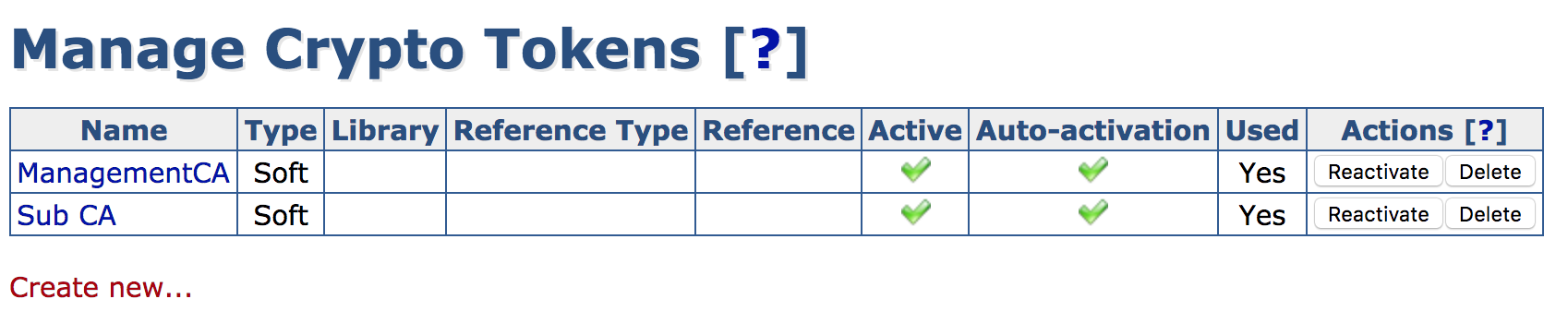
The EJBCA Administration menu option Crypto Tokens displays the Manage Crypto Tokens page. In addition, crypto tokens can be activated from the CA Activation page.
Managing Crypto Tokens from the CA UI
Creating a Crypto Token
To create a crypto token, select the Crypto Tokens menu option to display the Manage Crypto Tokens page, and click Create new at the bottom of the page.
In the appearing creation screen, select the token type and specify the password and other options. For a list of available crypto token fields, see Crypto Tokens Overview.
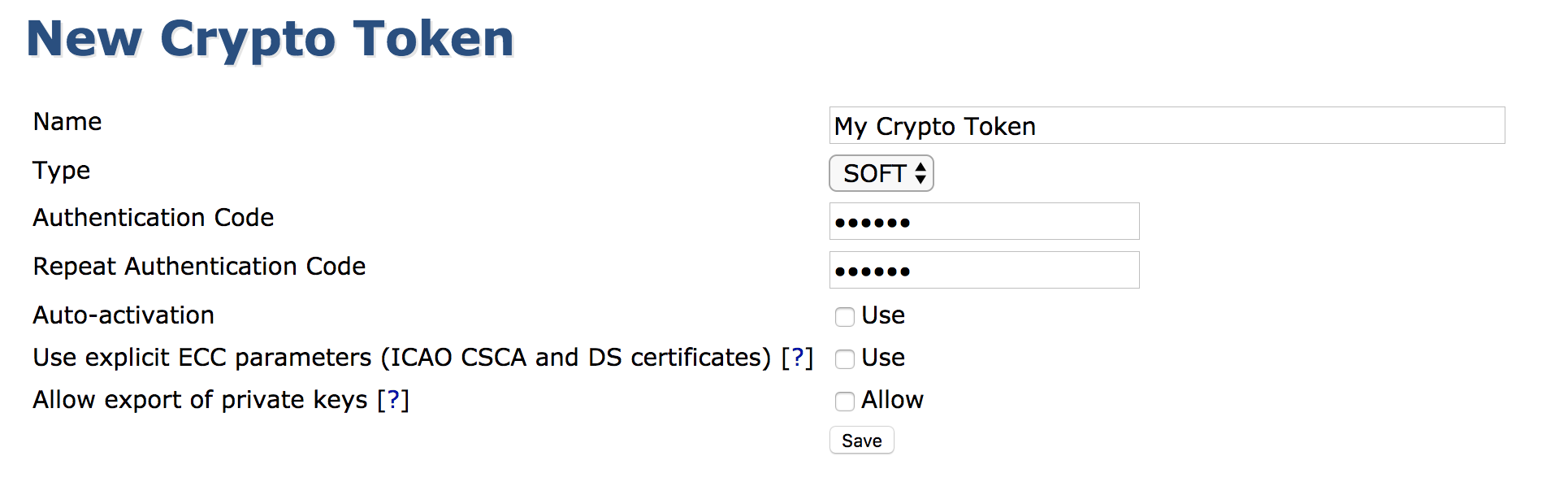
When creating PKCS#11-based crypto tokens, create only one crypto token per slot/token on an HSM, see Hardware Security Modules (HSM).
In EJBCA Enterprise Edition, you can also create new Crypto Tokens using the WS API call createCryptoToken in your application or with the Web Service Interface.
View or Edit a Crypto Token
This view is similar to the creation of a token except for showing the ID and activation status. The view allows changing values such as the name or auto-activation status.
Note that it is not possible to change the crypto token ID or type.
Key management
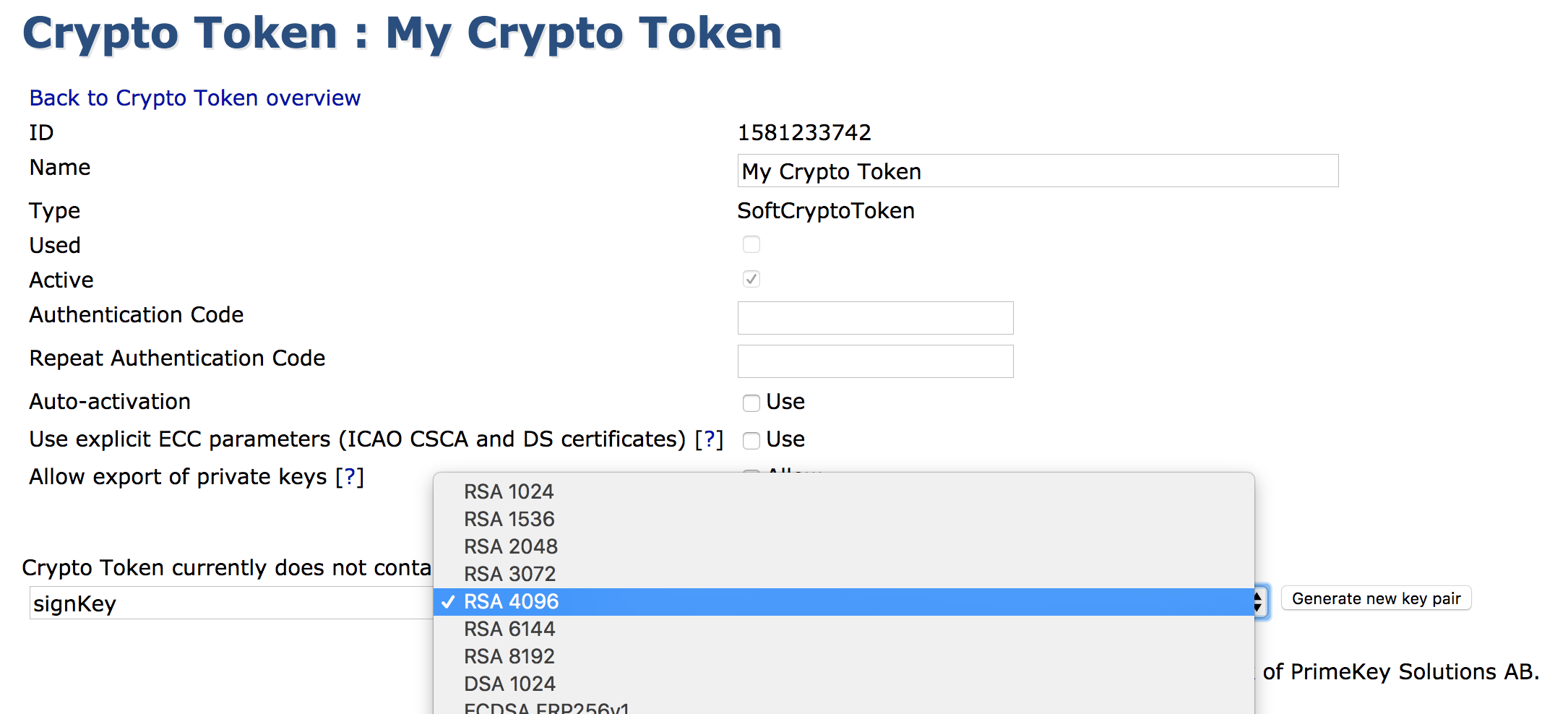
While viewing an active Crypto Token, you can also view and interact with the Crypto Token's keys. The shown SubjectKeyID column is a SHA1 over the public key.
-
A new key pair can be created by giving it an alias, a key specification, key usage (when Type is Pkcs11NgCryptoToken), and clicking Generate.
-
Crypto Token Type is Note that the shown key specifications might not be supported by underlying PKCS#11 modules. If attempting to use such a key specification, an error will be shown. is an EJBCA Enterprise only feature
-
When Crypto Token Type is Pkcs11NgCryptoToken, there are 3 options to choose from for Key Usage:
-
Sign / Verify
-
Encrypt / Decrypt
-
Sign and Encrypt
-
-
-
Key pairs can be removed by clicking Remove for the specific key pair or selecting multiple keys and clicking Remove selected.
-
A key pair can be tested by clicking Test for the specific key pair.
-
A key pair's public key can be downloaded in PEM format by clicking Download Public Key.
When using Pkcs11NgCryptoToken for the crypto token type, the mapping between key usage and PKCS11 attributes (see the Oasis PKCS#11 base specification) set on the keys is broken down in the table below:
|
PKCS11 Attribute |
Sign / Verify |
Encrypt / Decrypt |
Sign and Encrypt |
|---|---|---|---|
|
CKA_DECRYPT |
False |
True |
True |
|
CKA_ENCRYPT |
False |
True |
True |
|
CKA_SIGN |
True |
False |
True |
|
CKA_VERIFY |
True |
False |
True |
|
CKA_UNWRAP |
False |
False |
False |
|
CKA_WRAP |
False |
False |
False |
The shown key specifications might not be supported by underlying PKCS#11 modules. If attempting to use such a key specification, an error will be shown.
In EJBCA Enterprise Edition, you can also generate new keys by using the WS API call generateCryptoTokenKeys in your application, with the Web Services CLI, or by using the REST API for crypto token management.
Activation and Deactivation
The following actions are available in the Crypto Token list:
|
Action |
Description |
|---|---|
|
Activate |
Enter an authentication code and click Activate to activate an inactive Crypto Token. |
|
Deactivate |
Deactivates an active Crypto Token. |
|
Reactivate |
Reactivates an active Crypto Token with Auto-activation enabled. |
Managing Crypto Tokens from the CLI
Nearly all functionality concerning crypto tokens is mirrored in the command line using the following command:
$ bin/ejbca.sh cryptotoken
To create a crypto token, use the create command:
$ bin/ejbca.sh cryptotoken create --token "Cryptotoken 01" --pin "foo123" --type "SoftCryptoToken" --autoactivate "FALSE"
To update the pin, use the setpin command:
$ bin/ejbca.sh cryptotoken setpin --token "Cryptotoken 01" --oldpin "foo123" --newpin "bar123"
The
setpin command automatically sets the autoactivate property to true.
Composite Key Support
EJBCA supports the use of composite keys as defined in version 13 of the IETF Composite Signatures Internet-Draft.
A composite key consists of two cryptographic components:
-
A classical cryptography key (RSA, ECDSA, or EdDSA), and
-
A post-quantum key (ML-DSA-44, ML-DSA-65, or ML-DSA-87).
HSM Considerations
When using composite keys with a Hardware Security Module (HSM), it is strongly recommended, and in some cases required, that the HSM supports External Mu.
External Mu allows the HSM to accept a pre-hashed value (μ) as input to the signature operation instead of requiring the entire data object (for example, a full certificate or CRL).
If External Mu is not supported, the complete data to be signed must be transferred to the HSM. This can lead to:
-
Exceeding internal size limits of the HSM, causing signature operations to fail.
-
Significantly reduced performance due to increased data transfer and processing overhead.
Signature Scheme Restrictions
EJBCA does not support the legacy PKCS#1 v1.5 signature scheme with composite keys.
When the classical cryptography component is an RSA key, the PSS (PKCS#1 v2.1) signature scheme is always used.
Supported Crypto Token Types
Composite keys are supported by:
-
Soft Crypto Tokens
-
P11NG Crypto Tokens (
Pkcs11NgCryptoToken) -
REST API-based Crypto Tokens for HSMs listed in the section about composite algorithms in Supported Algorithms.
SunPKCS11 Crypto Tokens do not support composite keys.
Creating composite keys in EJBCA
Composite keys can be created in EJBCA in the same way as standard asymmetric keys, with the following requirements:
-
The key specification must be one of the supported composite algorithms (for example,
MLDSA87-RSA3072-PSS-SHA512). -
The key alias must be suffixed with
-COMPOSITE. For example,exampleKey-COMPOSITE.
For a list of supported composite algorithms, see Interoperability and Certifications.
Creating composite keys outside of EJBCA
Composite keys may also be created outside of EJBCA, for example by using tools provided by the HSM vendor.
In this case, the two component keys must be generated separately using the following naming convention:
-
Append the suffix
-COMPCto the classical key component (for example:signKey-COMPC) -
Append the suffix
-COMPQto the quantum-safe key component (for example:signKey-COMPQ)
When both component keys exist with matching base names, EJBCA automatically detects them and presents them as a single composite key with the suffix -COMPOSITE.
Composite Key Implementation Details
A composite key is stored internally as two underlying component keys in the HSM, using the following suffixes:
-
-COMPCfor the classical cryptographic key component of the key. -
-COMPQfor the quantum-safe component of the key.
These suffixes replace the -COMPOSITE suffix of the composite key alias when stored as individual component keys in the HSM.
When a signature operation is performed using a -COMPOSITE key, EJBCA performs the corresponding cryptographic operations on the -COMPC and -COMPQ component keys and combines the results into a single composite signature.
Deleting a composite key deletes both underlying component keys.
Key Alias Visibility
When key aliases are listed in EJBCA (for example, on the Crypto Tokens page, in command line output, or in list menus) EJBCA displays only the -COMPOSITE key if matching -COMPC and -COMPQ keys are found with the same base name.
The underlying component keys (-COMPC and -COMPQ) are hidden to prevent accidental use of only one part of the composite key.
If the key sequence feature is used, the key sequence number is appended after the suffix. For example:
-
signKey-COMPOSITE00001for the composite key alias. -
signKey-COMPC00001andsignKey-COMPQ00001for the underlying component keys in the HSM.
For more information, see Post-Quantum Cryptography Keys and Signatures and Issue Composite Certificates.