.png)
A Hardware Security Module (HSM) is a dedicated, tamper-resistant device used to generate, store, and protect cryptographic keys. HSMs are essential for PKI, digital signing, and regulated environments where strong key protection is mandatory.
In Keyfactor solutions, HSMs act as the trust anchor for EJBCA, SignServer, and Signum. They ensure that private keys used for issuing certificates, signing code, or performing timestamping remain secure and auditable.
Why HSMs Matter
Security, Compliance, and Auditability
HSMs enforce hardware-based protection that prevents key extraction, tampering, and unauthorized access. This is increasingly relevant when organizations operate in cloud environments or outsourced datacenters, where physical control is limited.
HSMs also support regulatory assurance through certifications such as FIPS and Common Criteria, help meet audit requirements with complete traceability, and enforce controlled processes for backup, restore, and key lifecycle events.
How HSMs Are Used in PKI and Signing
|
Area |
How HSMs Are Used |
Keyfactor Products |
|---|---|---|
|
Root & Subordinate CAs |
Keys are generated and stored in HSMs; signing operations are executed inside hardware |
EJBCA |
|
OCSP Signing |
OCSP keys are protected for online verification services |
EJBCA |
|
Key Recovery Encryption Keys |
Encryption keys for storing end-entity (or users) private keys securely |
EJBCA |
|
Code, Document & Firmware Signing |
High-assurance signing keys stored and used inside the HSM |
SignServer, Signum |
|
Timestamping |
TSA keys are protected, and signing operations are executed in hardware |
SignServer |
|
Audit Log Protection |
HSM-protected keys can secure signing audit logs |
EJBCA, SignServer |
Integration Models
Comparing Deployment Options
This table provides an overview of the available deployment options, including their strengths, trade-offs, and recommended use cases, helping you to compare them and find the option that best suits your environment.
|
Deployment Model |
Description |
Strengths |
Trade-offs |
Typical Use Cases |
|---|---|---|---|---|
|
On-Premises HSM |
Physical HSM installed in a datacenter, connected locally via USB or over a secure network |
Full ownership and control, lowest latency |
Requires hardware maintenance and internal expertise |
Regulated industries. USB-connected HSMs are ideal for offline CA (root) setups. Network-connected HSMs are ideal for online issuing CAs. |
|
Cloud HSM |
Managed HSM service from cloud providers |
Easy to provision, no hardware lifecycle, close to cloud workloads |
Shared infrastructure implications for DR/backup; higher latency for on-prem |
Cloud-native issuing CA, cloud-hosted signing |
|
Hybrid |
Mix of on-prem HSM and cloud HSMs |
Flexibility, modernization without replacing trusted roots |
Requires clearly separated key domains |
On-premises HSM for CA root and cloud HSM for supporting cloud-hosted workloads or during gradual cloud migrations. |
Keyfactor Product Support
This table summarizes how each Keyfactor product integrates with HSMs, the use cases they support, and any additional considerations, giving you an overview of supported interfaces, key protection capabilities, and deployment flexibility across on-prem, cloud, and hybrid environments.
|
Product |
HSM Integration |
Supported Use Cases |
Notes |
|---|---|---|---|
|
EJBCA |
PKCS#11 and REST |
Root/Issuing CA keys, OCSP keys, key recovery encryption keys |
Supports on-prem, cloud HSM, and combining Supports all major HSM vendors and service models |
|
SignServer |
PKCS#11 and REST |
Code/document/firmware signing, timestamping, audit log signing |
Supports on-prem, cloud HSM, and hybrid PKI Supports all major HSM vendors and service models |
|
Signum |
PKCS#11 and REST |
High-volume, scalable, signing workloads with native app integration |
Optimized for cloud and container environments |
Supported HSM providers include all major HSM providers. See https://docs.keyfactor.com/ejbca/latest/hardware-security-modules-hsm.
Example Deployments
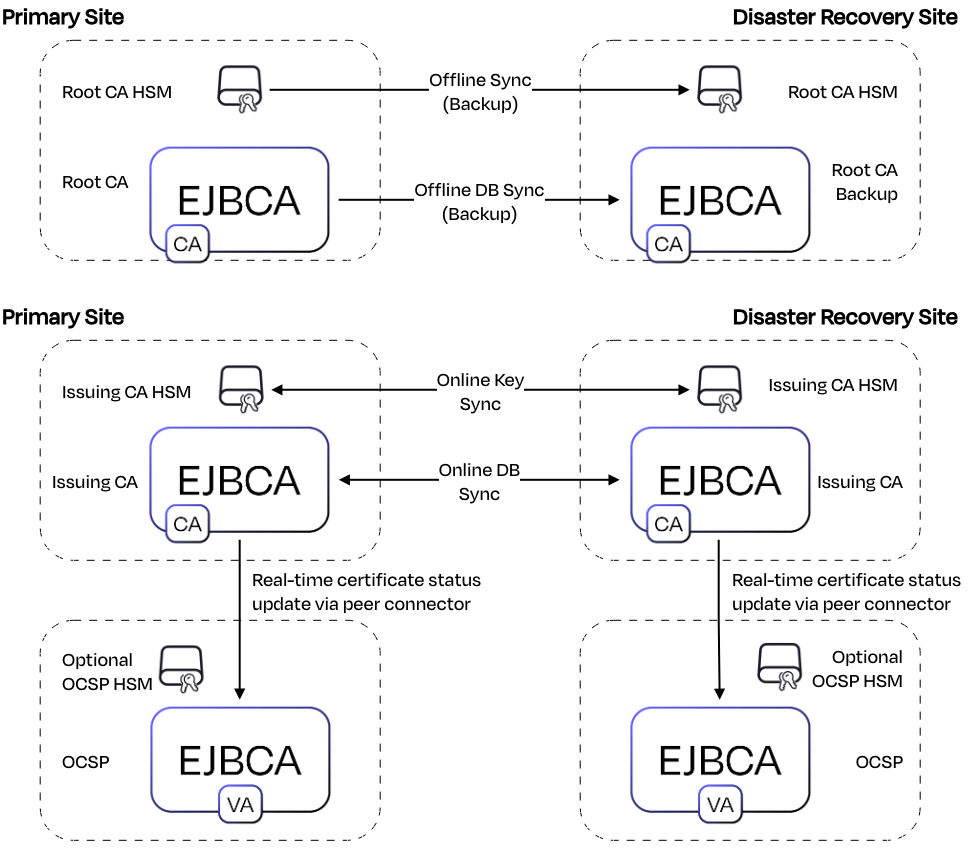
Example 1: On-Premises PKI
A Root CA resides on an offline HSM, with Issuing CAs and OCSP services operating online on-premises. This model is commonly used in regulated environments requiring full control over trust anchors.
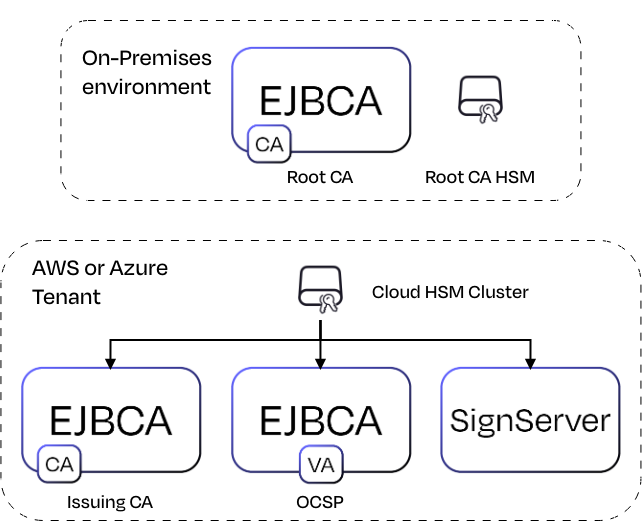
Example 2: Cloud-Hosted PKI
The Root and Issuing CA runs in AWS or Azure using a cloud HSM. Signing workloads in SignServer run close to cloud applications for low-latency operations.
Best Practices HSM usage with PKI and Signing
There are some key operational areas to consider when deploying and managing HSMs. Below is a summary of our recommended practices for secure key management, access control, compliance validation, performance planning, and preparing for future cryptographic requirements such as post-quantum migration.
|
Area |
Recommended Practice |
|---|---|
|
Key Domains |
Keep CA keys, signing keys, and application keys in separate partitions or slots |
|
Access Control |
Enforce RBAC and the 4-eyes principle where applicable. |
|
Backup & Lifecycle |
Establish a routine to back up HSM content after key ceremonies or key generations. |
|
Certification Validation |
Confirm HSM certification (FIPS / CC) matches compliance needs |
|
Performance Testing |
Evaluate throughput for high-volume signing before production |
|
Crypto Agility |
Prepare for post-quantum migration and hybrid key support |
Conclusion
HSMs are foundational to secure and compliant PKI and signing deployments. They provide the hardware-backed assurance required to protect the most sensitive cryptographic keys, whether used for issuing certificates, signing code and firmware, or securing online validation services.
In practice, most EJBCA, SignServer, and Signum deployments rely on HSM integration because the security, auditability, and regulatory expectations of these use cases demand it. Combining HSM-backed key protection with Keyfactor’s product stack delivers a secure, auditable, and scalable platform for PKI and signing workloads, ready to adapt as cryptographic standards evolve.
Next Steps
Learn more:
-
PQC and HSM support: https://docs.keyfactor.com/solution-areas/latest/interoperability-and-future-ready-cryptography#id-(latest)InteroperabilityandFuture-ReadyCryptography-HardwareSecurityModules(HSMs)
-
Supported HSMs in EJBCA by the Deployment optionhttps://docs.keyfactor.com/ejbca/latest/interoperability-and-certifications#id-(9.3.5)InteroperabilityandCertifications-SupportedHardwareSecurityModules(HSMs)Supported-Hardware-Security-Modules-(HSMs)
Contact us
Request a live demo with one of our experts — whether you want to explore workflows hands-on or discuss your specific needs.