.png)
Overview
Incremental scanning is an optional feature. Incremental scanning enables the sensor to efficiently scan only changes since the last scan, significantly reducing scan time and resource usage. If not available or enabled, standard scans do full scans every scan cycle.
Benefits of Incremental Scanning
Enabling incremental scanning gives the following benefits:
Efficiency Gains:
-
Reduced scan time - Only scans changes since the last scan rather than all files.
-
Lower resource usage - Minimizes computational overhead for regularly scanned repositories.
-
Early exit optimization - If no changes are detected, scan exits immediately without processing files.
Smart Scanning Pattern: The system balances efficiency with thoroughness through a cyclical approach. After an initial full scan, multiple incremental scans are performed, only checking new or modified files. Periodically, the system conducts a full scan with auto-resolution to ensure findings are up-to-date and any findings no longer present are auto-resolved.
Automatic Cleanup: Auto-resolution automatically marks findings as "resolved" when they no longer appear in full scans, keeping your findings list current.
Incremental Scan Flow
When you choose to enable incrementalScan with an autoResolutionInterval (e.g., 5), the scanning follows a cyclical pattern:

Scan Cycle:
-
Full Scan (count = 0): The first scan is always a full scan resulting in a scan of all files. Auto-resolution does not run on the first full scan.
-
Incremental Scans (count = 1 to N): The next N scans (where N =
autoResolutionInterval- 1) are incremental. Each incremental scan:-
Compares the current context with the stored context
-
If unchanged, exits early (no new files)
-
If changed, fetches only new or modified files since the last scan
-
Scan count increments with each scan
-
-
Full Scan + Auto-Resolution (count wraps to 0): After N incremental scans, the count resets to 0 and triggers a full scan. After this full scan, the backend process also triggers Auto-Resolution.
-
Cycle Repeats: This incremental scan flow continues for subsequent scans.
How Auto-Resolution Works
Auto-resolution runs only at the end of a full scan (when the scan count wraps back to 0). Auto-resolution automatically marks findings as "resolved" when they were detected in previous scans but are no longer present in the latest full scan.
Incremental scan with auto-resolution example:
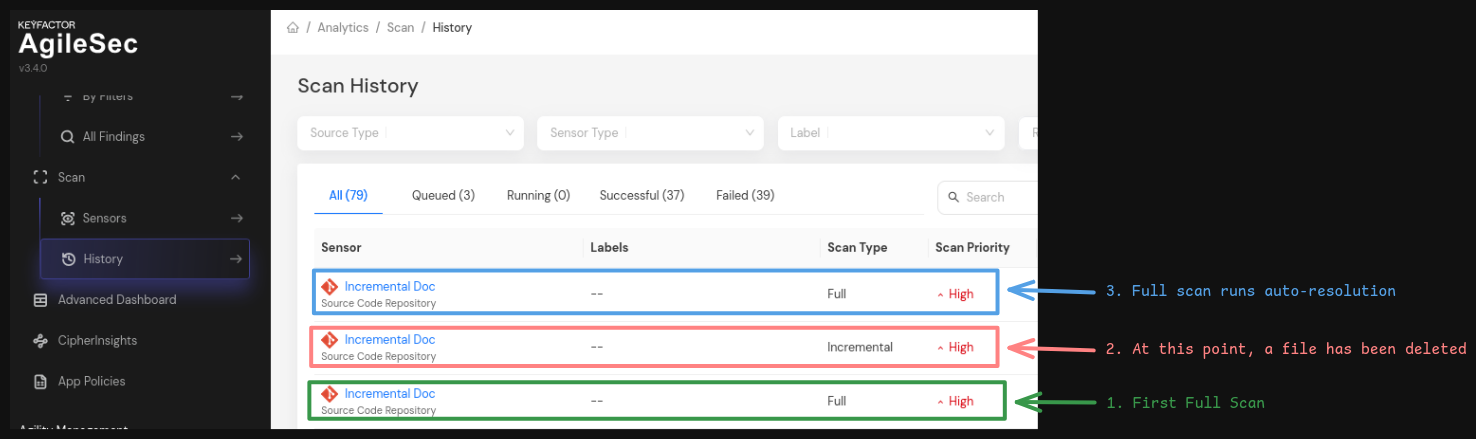
After the auto-resolution process completes, open the findings tab of the original scan history in which the findings were first discovered. You will see the findings have been marked as "Resolved".
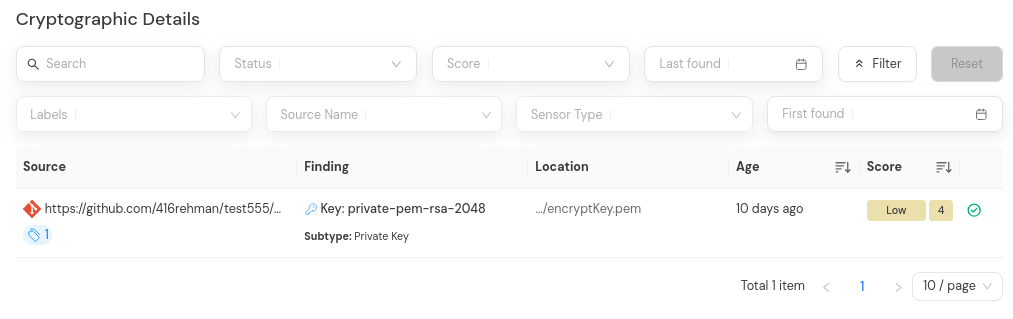
Important Notes:
-
Auto-resolution does not run for each incremental scan. Auto-resolution only runs for subsequent full scans.
-
Findings removed during incremental scans will be auto-resolved at the next full scan.