.png)
How Sensors and Connectors execute scanning within the Keyfactor AgileSec Platform, including what is scanned and how data flows through the system.
Overview
Sensors and Connectors integrate a target system with Keyfactor’s AgileSec Platform. They enable you to discover, inventory, and analyze cryptographic assets across one or more data sources within that target system.
Note: Refer to Sensors and Connectors User Guides for specific execution instructions and configuration examples.
What Gets Scanned
What a Sensor or Connector scans depends on the type and the target system, but in general Sensors and Connectors may analyze content and/or metadata to discover:
-
X.509 Certificates: TLS/server certificates, code signing certificates, client authentication certificates, and other X.509 identities.
-
Private Keys: RSA, DSA, EC private keys in common encodings (PEM/DER/PKCS#8), including encrypted keys where supported.
-
Keystores and Bundles: JKS/JCEKS, PKCS#12, PEM bundles, and other container formats.
-
Tokens and Credentials: JWT/JWE tokens and other token formats (as supported).
-
Cryptographic Libraries and Implementations: Common crypto libraries/frameworks and indicators of crypto usage (ecosystem-dependent).
-
Container and Package Artifacts: Certificates/keys embedded in Docker/OCI images and packaged artifacts (where applicable).
-
Compiled and Archived Artifacts: Embedded certificates/keys in binaries and archives (for example, JAR/WAR/EAR and other supported formats).
Scan Execution Methods
Sensors and Connectors can be executed using the following methods:
-
Platform UI: Configure and execute scans directly through the Keyfactor AgileSec web UI with on-demand or scheduled execution options.
-
Using API: Programmatically trigger scans through REST API calls, enabling scan integration into CI/CD pipelines and automation workflows.
-
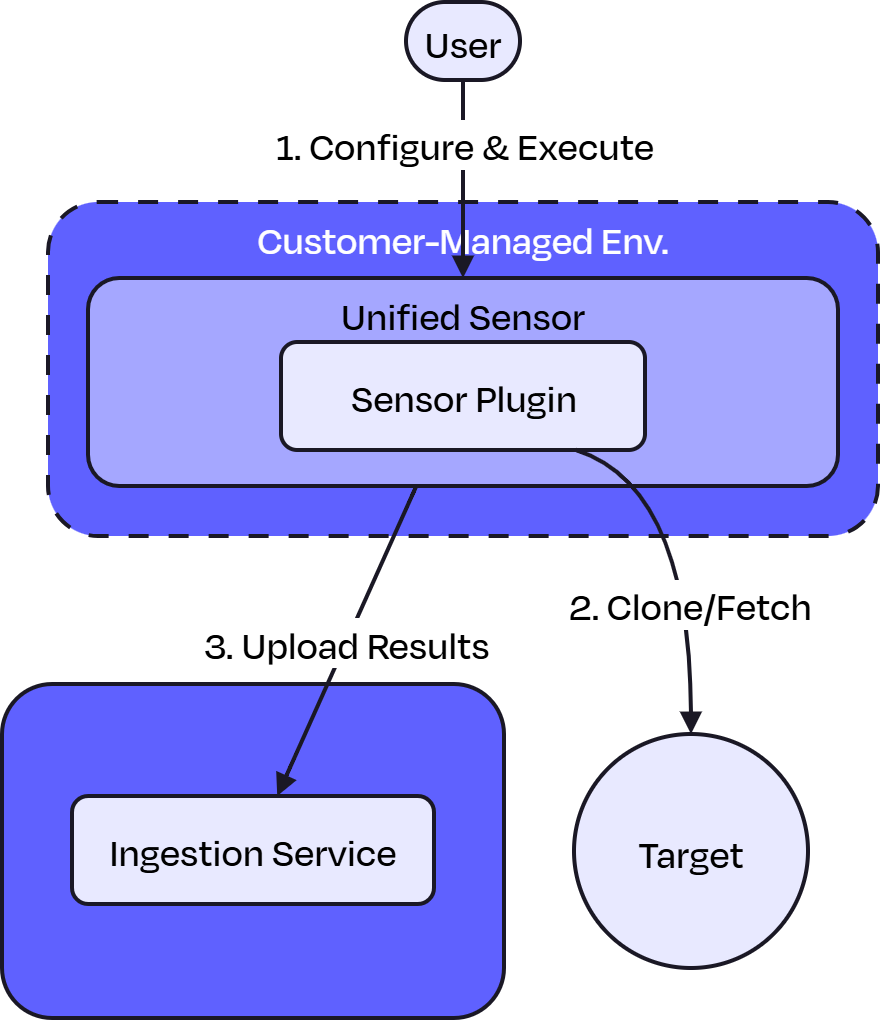
Remote execution: Deploy and run the sensor via CLI on customer-managed infrastructure. Suitable for scenarios such as scanning air-gapped or internal repositories the platform cannot directly reach or when customers want to manage their own scheduling and execution environment.
Note: Not every Sensor or Connector can use all three execution methods.
Platform Scan Execution
Running the Sensor or Connector through the user interface is the simplest and fastest way to get started. Platform execution enables on-demand or scheduled scans in a dedicated environment.
-
For Linux deployments, scans run on scan nodes or backend nodes.
-
For Kubernetes environments, scans
-
Leverage automatic resource provisioning and auto-scaling.
-
Create ephemeral sandbox pods for performing each scan.
-
Platform Scan Execution Flow
-
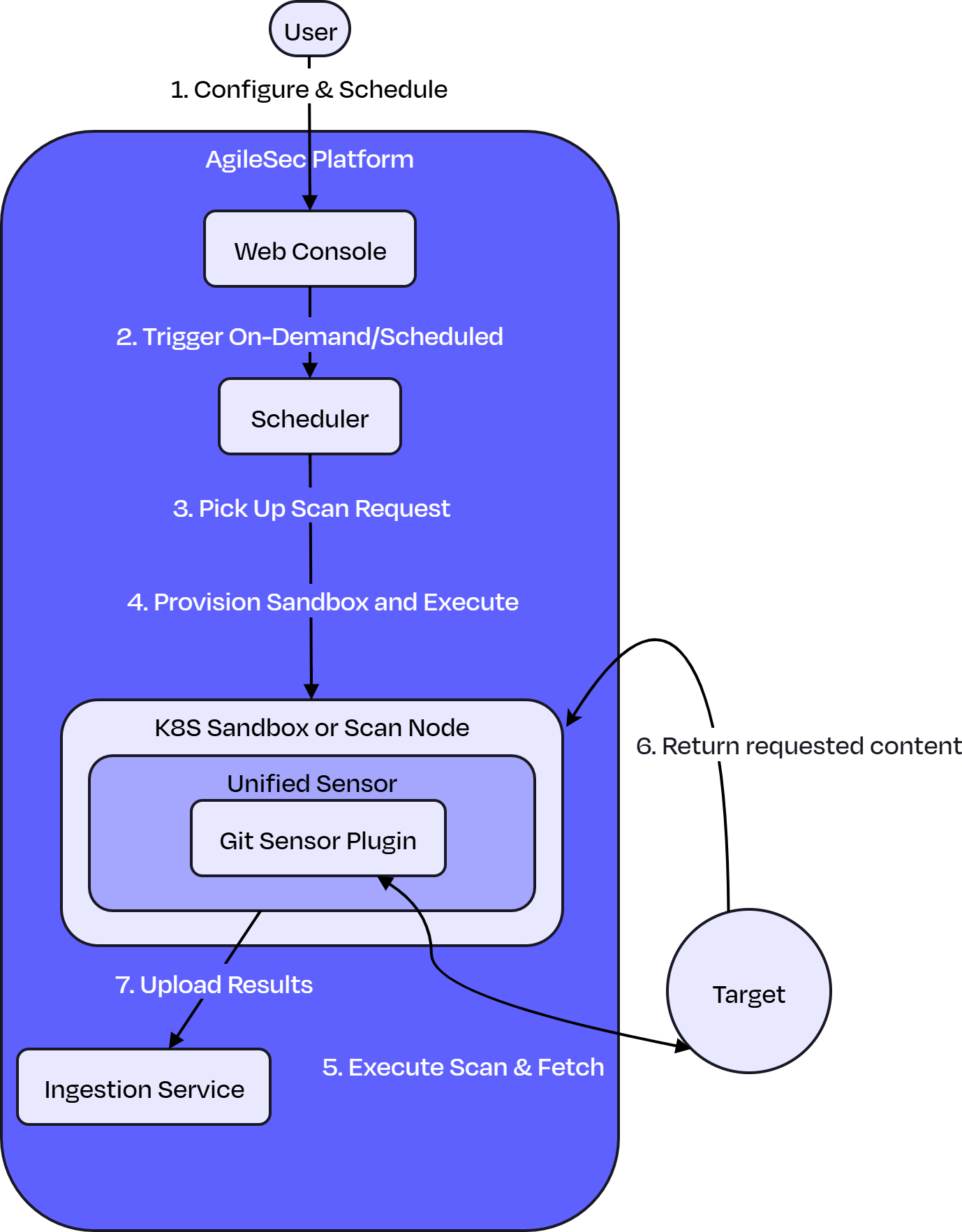
Configure & Schedule: User accesses the Web Console to configure the Sensor or Connector settings, specify targets, and define scan execution as either on-demand or scheduled.
-
Trigger On-Demand/Scheduled: The trigger event to run on-demand or scheduled scan is sent to the Scheduler.
-
Pick Up Scan Request: The Scheduler picks up pending scan request from Kafka queue for processing.
-
Provision Sandbox and Execute Scan: The Scheduler executes the Sensor based on the deployment environment:
-
On-premises: Executes on available scan nodes or backend nodes
-
Cloud: Provisions an ephemeral sandbox pod and launches the Unified Sensor with the Git (or other) Sensor/Connector Plugin
-
-
Execute Scan & Fetch: The Sensor/Connector Plugin authenticates and connects to the target system to fetch content for scanning.
-
Target Returns Requested Content: The target system returns the requested content to the Sensor/Connector Plugin running in the sandbox.
-
Upload Results: After scanning and enriching the results, the Unified Sensor uploads the results to the Ingestion Service for storage and analysis.
Note: See Sensors and Connectors User Guides for specific configuration information.
API Scan Execution
Programmatically trigger scans through REST API calls, enabling seamless integration with CI/CD pipelines, automation workflows, and custom applications. API execution provides flexibility for developers to incorporate cryptographic scanning into their existing development and deployment processes.
-
Ideal to trigger scans with automated workflows and CI/CD integration
-
Supports asynchronous scan execution
-
Enables batch scanning of multiple repositories
-
Provides programmatic access to scan status using callback.
Note: For a complete API reference, see API documentation.
API Scan Flow
-
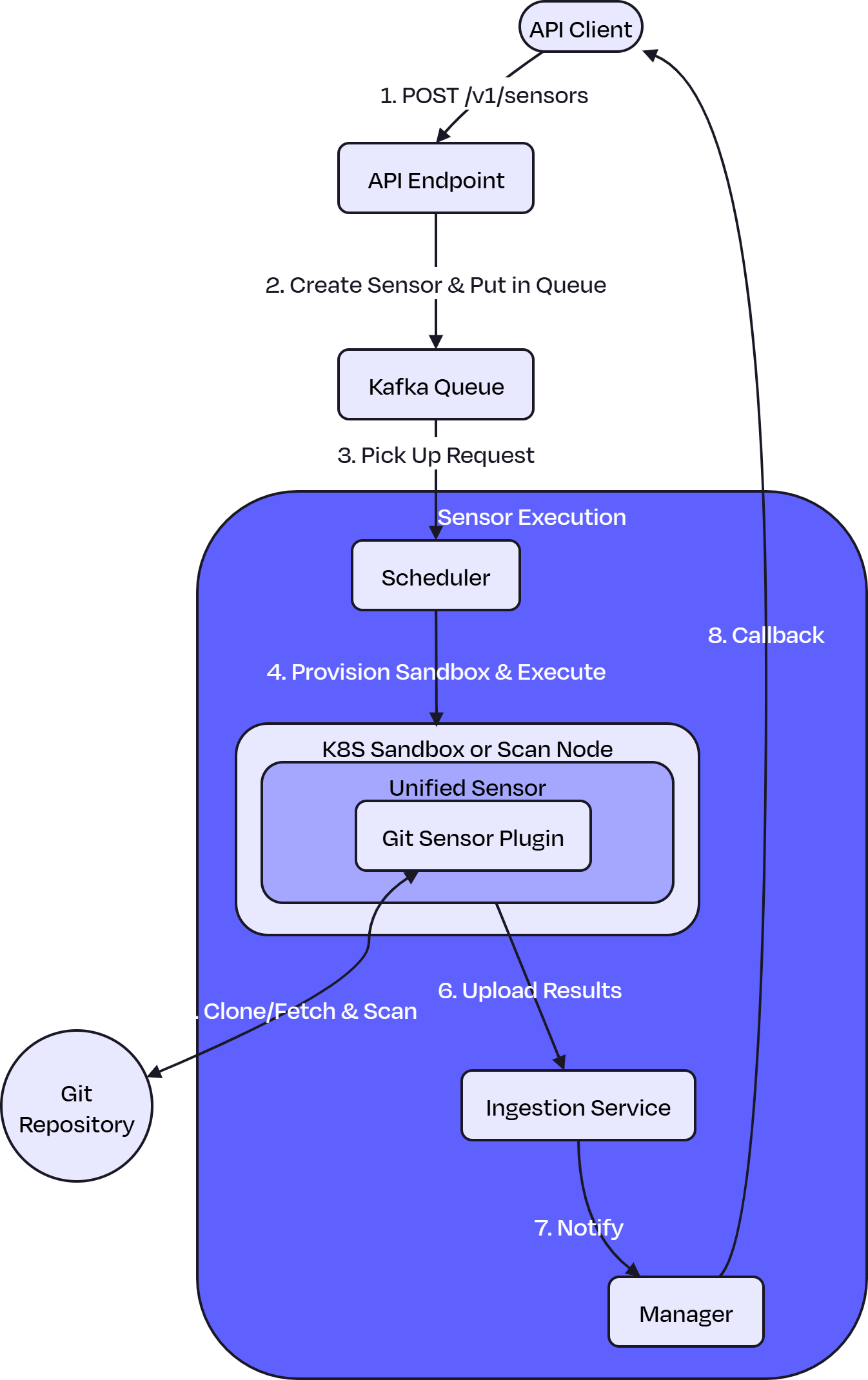
POST /v1/sensors/ (with config): API client sends a POST request to the API endpoint with sensor configuration and scan parameters.
-
Create Sensor & Put in Queue: The API endpoint validates the request, creates a sensor instance with the provided configuration, and places the execution request in the Kafka queue.
-
Pick Up Scan Request: The Scheduler picks up pending scan request from Kafka queue for processing.
-
Provision Sandbox & Execute: The Scheduler executes the sensor based on the deployment environment:
-
On-premises: Executes on available scan nodes or backend nodes
-
Kubernetes: Provisions an ephemeral sandbox pod and launches the Unified Sensor with the GitHub Sensor Plugin
-
-
Execute Sensor & Scan: The sensor plugin authenticates to the target system, retrieves relevant content, and then performs cryptographic scanning.
-
Upload Results: After scanning and enriching the results, the Unified Sensor transmits the cryptographic findings to the Ingestion Service.
-
Notify: The Ingestion Service notifies the Manager that the scan has been completed and results have been stored.
-
Callback: The Manager executes the configured callback to notify the API client of the scan completion status.
Remote Scan Execution
Remote Execution allows you to run the Sensor or Connector on a remote machine.
-
Allows full control over execution environment.
-
Can reach things such as internal GitHub Enterprise instances behind firewalls which may not be accessible from the AgileSec platform.
-
Enables configurable batch size and threading.
Best For: Security-sensitive environments with complex network restrictions or very large Sensor scans.
Remote Scan Execution Flow
-
Configure & Execute: User configures the Sensor or Connector settings and executes the Sensor or Connector via CLI on their own infrastructure.
-
Fetch: The Sensor Plugin authenticates, fetches the content.
-
Upload Results: After scanning and enriching the results, the Unified Sensor transmits the cryptographic inventory findings to the platform's Ingestion Service for storage and analysis.