.png)
Enterprise
The MPIC Validator enables Multi-Perspective Issuance Corroboration (MPIC) for Certificate Authority Authorization (CAA) validation from multiple network perspectives. The MPIC Validator is based on the Open Multi-Perspective Issuance Corroboration API Specification.
This page describes how the MPIC Validator works in EJBCA and how it is configured.
While Keyfactor ensures that EJBCA provides the functionality required to comply with CA/Browser Forum requirements, this documentation does not provide compliance guidance.
Issuing CAs need to be able to ensure that EJBCA is configured according to compliance according to their own understanding of the baseline requirements.
Multi-Perspective Issuance Corroboration (MPIC) is used in two areas of EJBCA:
-
CAA validation (along with the CAA Validator)
-
ACME Domain Control Validation (DVC)
MPIC provides a safer alternative to single-perspective validation, which may be vulnerable to DNS and BGP hijacking attacks. It allows CAA validation results to be corroborated across multiple network perspectives in different geographic locations.
Note that the functionality was tested against the AWS MPIC Lambda implementation version 1.3.0 and supports Open MPIC API Specification version 3.5.
TLS Validation
A typical CAA record has the following format:
Command:
dig caa example.com
Response:
example.com. 243 IN CAA 0 issue "ca.org"
For an MPIC request sent to a server configured with two network perspectives, one in the US and one in Europe, the response would look as follows:
Request:
curl --location 'https://<your-mpic-server-url>/v1/mpic' \
--header 'Content-Type: application/json' \
--header 'x-api-key: ••••••' \
--data '{
  "check_type": "caa",
  "domain_or_ip_target": "example.com"
}'
Response:
{
    "request_orchestration_parameters": null,
    "actual_orchestration_parameters": {
        "perspective_count": 2,
        "quorum_count": 1,
        "attempt_count": 1
    },
    "is_valid": true,
    "check_type": "caa",
    "perspectives": [
        {
            "perspective_code": "eu-west-1",
            "check_passed": true,
            "errors": null,
            "timestamp_ns": 1736247778402104091,
            "check_type": "caa",
            "details": {
                "caa_record_present": true,
                "found_at": "example.com",
                "response": "example.com. 243 IN CAA 0 issue \"ca.org\""
            }
        },
        {
            "perspective_code": "us-west-1",
            "check_passed": true,
            "errors": null,
            "timestamp_ns": 1736247778485125494,
            "check_type": "caa",
            "details": {
                "caa_record_present": true,
                "found_at": "example.com",
                "response": "example.com. 243 IN CAA 0 issue \"ca.org\""
            }
        }
    ],
    "caa_check_parameters": null
}
In this example, the response includes the is_valid flag, indicating that ca.org is authorized to issue certificates for example.com from both network perspectives.
The response also shows that the CAA query returned the same result from both the European and US network perspectives.
Note that this example uses only two perspectives. For secure queries, six perspectives are recommended.
S/MIME Validation
The CA/Browser Forum S/MIME Baseline Requirements define the criteria for accepting or rejecting an S/MIME certificate request based on the results of a CAA check.
A typical S/MIME CAA record has the following format:
example.com. 243 IN CAA 0 issuemail "ca.org"
For MPIC, a request would look as follows:
Request:
curl --location 'https://<your-mpic-server-url>/v1/mpic' \
--header 'Content-Type: application/json' \
--header 'x-api-key: ••••••' \
--data '{
  "check_type": "caa",
  "domain_or_ip_target": "example.com",
  "caa_check_parameters" : {
    "certificate_type": "s-mime"
  }
}'
Response:
{
    "request_orchestration_parameters": null,
    "actual_orchestration_parameters": {
        "perspective_count": 2,
        "quorum_count": 1,
        "attempt_count": 1
    },
    "is_valid": true,
    "check_type": "caa",
    "perspectives": [
        {
            "perspective_code": "eu-west-1",
            "check_passed": true,
            "errors": null,
            "timestamp_ns": 1736247778402104091,
            "check_type": "caa",
            "details": {
                "caa_record_present": true,
                "found_at": "example.com",
                "response": "example.com. 300 IN CAA 0 issuemail \"ca.org\""
            }
        },
        {
            "perspective_code": "us-west-1",
            "check_passed": true,
            "errors": null,
            "timestamp_ns": 1736247778485125494,
            "check_type": "caa",
            "details": {
                "caa_record_present": true,
                "found_at": "example.com",
                "response": "example.com. 300 IN CAA 0 issuemail \"ca.org\""
            }
        }
    ],
    "caa_check_parameters": {
        "certificate_type": "s-mime",
        "caa_domains": [
            "example.com"
        ]
    }
}
To enable this type of validation, the certificate profile field Extended Key Usage option Email Protection must be selected within the certificate profile, in addition to creating the MPIC Validator.
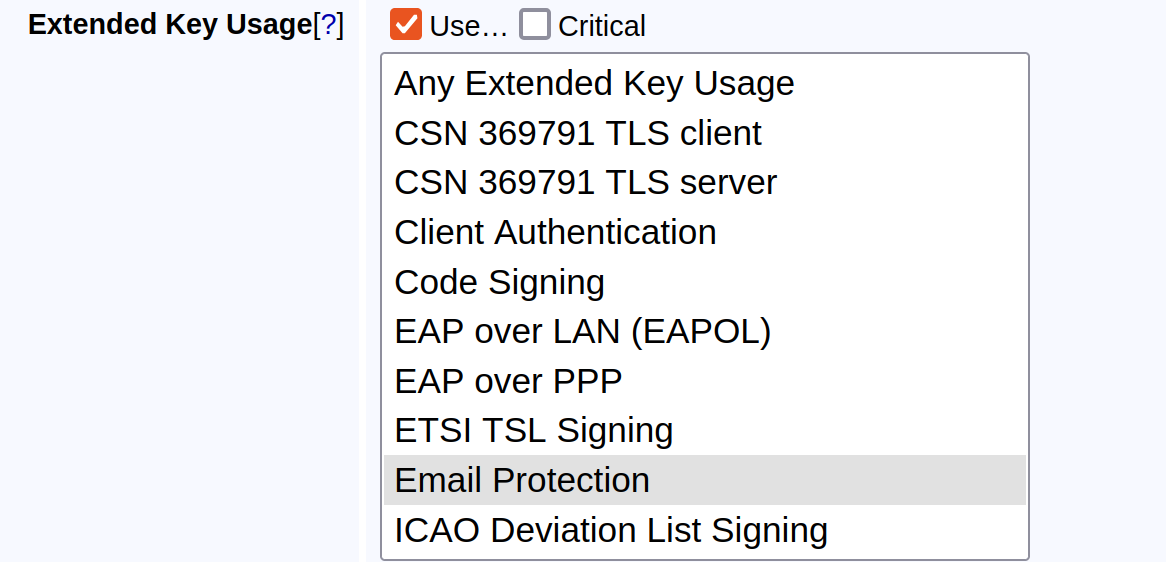
When using an MPIC Validator, you must select either Email Protection or Server Authentication in the certificate profile, but not both.
Configure MPIC Validator
Issuance Phase
Different validators are run at different phases of the issuance process. The MPIC Validator can only be run during the data phase. For descriptions of the different issuance phases, see Validators Overview.
Fields
The following displays the MPIC Validator settings.
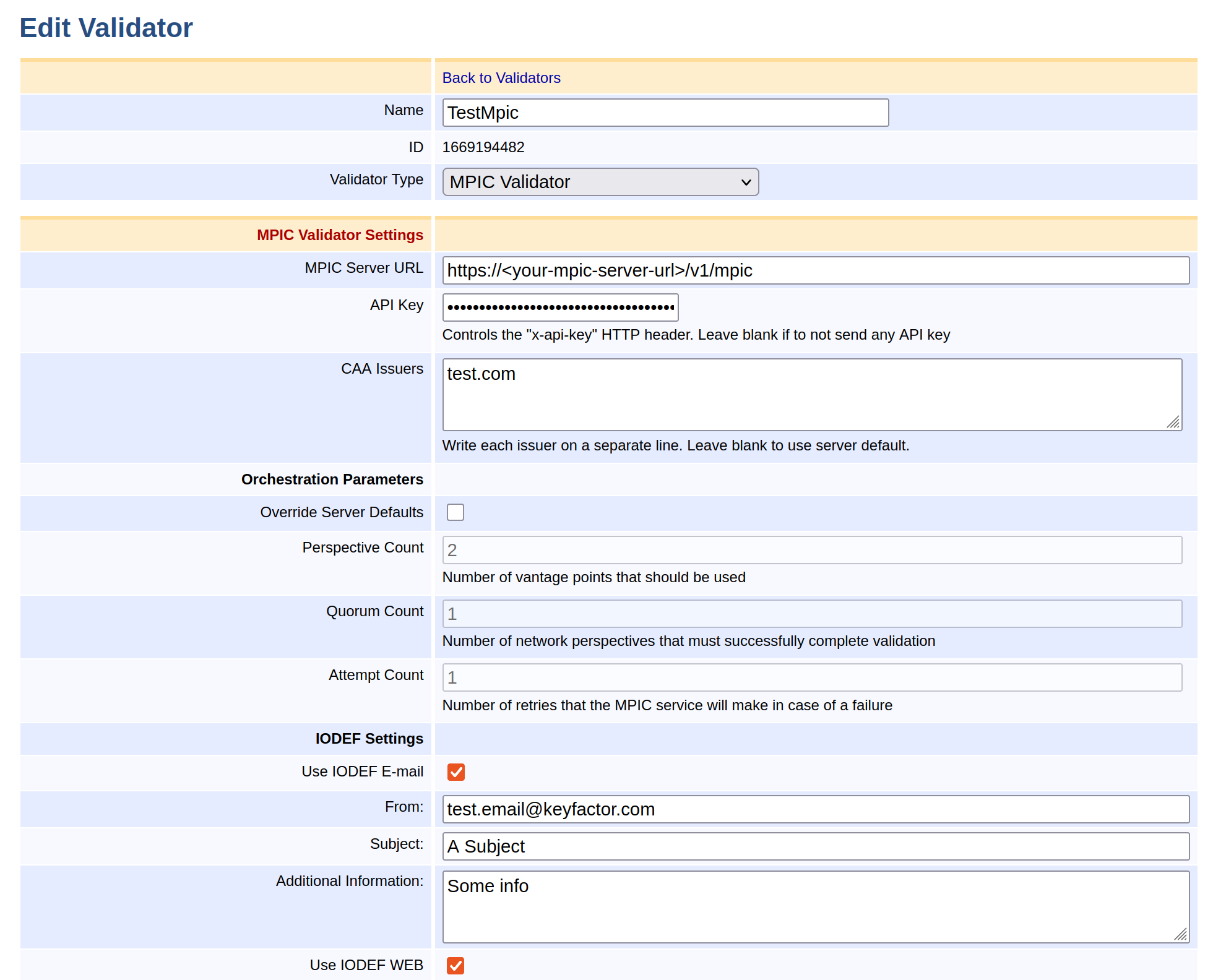
EJBCA allows the administrator to configure the following when setting up an MPIC Validator:
|
Field Name |
Description |
|---|---|
|
MPIC Server URL |
The MPIC server URL. |
|
API Key |
The API key sent in the |
|
CAA Issuers |
This value should match the value field in the CAA record of the DNS. |
|
Override Server Defaults |
Select to override the default configuration for Perspective, Quorum, and Attempt counts. |
|
Perspective Count |
The number of vantage points to use in the requests. Allows the implementing API endpoint flexibility in picking vantage points so long as vantage points are picked from at least two different Regional Internet Registry service regions if possible. |
|
Quorum Count |
The number of network perspectives that must successfully complete the specified validation methods. If this value is greater than 2, the API will enforce that successful network perspectives must be spread across two Regional Internet Registry service regions |
|
Attempt Count |
The number of times a validation or CAA check is retried to get the result of a single API POST request. |
|
IODEF Settings |
|
|
Use IODEF E-mail |
Select to enable sending emails to any mailto-links registered on the DNS as CAA IODEF records. |
|
From |
The From field in the resulting email. |
|
Subject |
The Subject line in the resulting email. |
|
Additional Information |
Any additional information required, in addition to the following default message which will be appended at the end: A faulty Certificate Request was made for the domain 'http://example.com ' for the issuer http://ca.com which was rejected by the CA due to the issuer not having a CAA record on the domain's DNS. |
|
Use IODEF WEB |
Enables sending IODEF incident reports to any HTTP or HTTPS URLs registered on the DNS as CAA IODEF records. |
Workflow
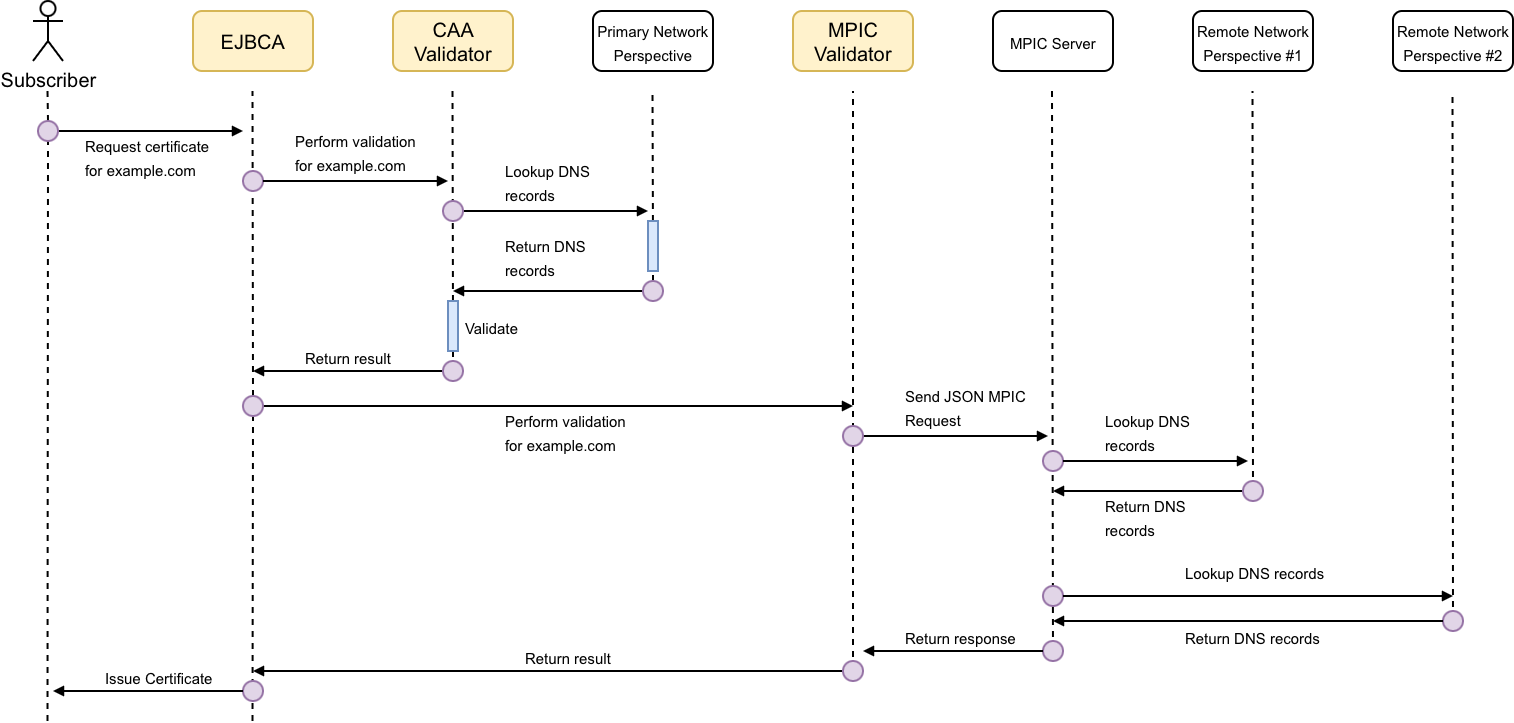
The following workflow is followed by EJBCA when the MPIC Validator is configured to operate in conjunction with the CAA Validator. The yellow boxes represent EJBCA internals.
Baseline Requirement Compliance Errata
Keep in mind that the MPIC Validator only verifies the quorum requirement. The CAA Validator must still validate the Primary Network Perspective. If either validator returns a negative result, the issuance attempt fails.
MPIC Validator Logging
The MPIC Validator logs both successful and failed validations. Successful validations are logged in the security audit log because they can be considered a security event and may be used as audit evidence. Validation failures are not considered security events and are logged to the standard server log at INFO level.
Example failure:
10:29:09,060 INFO [org.ejbca.core.model.validation.MpicValidator] (default task-6) MPIC CAA validation failed for domain 'test.globalsign.com' with type 'tls-server'. JSON response from MPIC server: {"request_orchestration_parameters":null,"actual_orchestration_parameters":{"attempt_count":1,"perspective_count":2,"quorum_count":1},"perspectives":[{"check_passed":false,"check_type":"caa","details":{"response":"globalsign.com. 300 IN CAA 0 issuemail \"globalsign.com\"\nglobalsign.com. 300 IN CAA 0 iodef \"mailto:report-abuse@globalsign.com\"\nglobalsign.com. 300 IN CAA 0 issue \"globalsign.com\"\nglobalsign.com. 300 IN CAA 0 issue \"letsencrypt.org\"","caa_record_present":true,"found_at":"globalsign.com"},"perspective_code":"eu-west-1","timestamp_ns":1736238548872449850,"errors":null},{"check_passed":false,"check_type":"caa","details":{"response":"globalsign.com. 300 IN CAA 0 iodef \"mailto:report-abuse@globalsign.com\"\nglobalsign.com. 300 IN CAA 0 issue \"globalsign.com\"\nglobalsign.com. 300 IN CAA 0 issue \"letsencrypt.org\"\nglobalsign.com. 300 IN CAA 0 issuemail \"globalsign.com\"","caa_record_present":true,"found_at":"globalsign.com"},"perspective_code":"us-west-1","timestamp_ns":1736238548832234721,"errors":null}],"is_valid":false,"check_type":"caa","caa_check_parameters":{"caa_domains":null,"certificate_type":"tls-server"}}
Example success:
15:30:41,883 INFO [org.cesecore.audit.impl.log4j.Log4jDevice] (default task-9) 2025-01-07 15:30:41+02:00;VALIDATOR_VALIDATION_SUCCESS;SUCCESS;VALIDATOR;CORE;CN=diegows;278366771;;atest123;msg=MPIC Validator 'TestMpic' has permitted issuance of certificates to issuer , with messages: [Allowed to issue for for domain 'test.google.com' with type 'tls-server'. JSON response from MPIC server: {"request_orchestration_parameters":null,"actual_orchestration_parameters":{"attempt_count":1,"perspective_count":2,"quorum_count":1},"perspectives":[{"check_passed":true,"check_type":"caa","details":{"response":"google.com. 47663 IN CAA 0 issue \"pki.goog\"","caa_record_present":true,"found_at":"google.com"},"perspective_code":"eu-west-1","timestamp_ns":1736256641635312259,"errors":null},{"check_passed":true,"check_type":"caa","details":{"response":"google.com. 86400 IN CAA 0 issue \"pki.goog\"","caa_record_present":true,"found_at":"google.com"},"perspective_code":"us-west-1","timestamp_ns":1736256641692320803,"errors":null}],"is_valid":true,"check_type":"caa","caa_check_parameters":{"caa_domains":null,"certificate_type":"tls-server"}}].
For more general information about validators and common validator settings, see the Validators Overview.