.png)
Set up bidirectional Cross-Cluster Search (CCS) between any number of OpenSearch clusters behind HAProxy with mutual TLS (mTLS).
Overview
Cross-Cluster Search (CCS) allows an OpenSearch cluster to execute search queries against one or more remote clusters as if they were a single cluster. This guide covers setting up bidirectional CCS between any number of OpenSearch clusters behind HAProxy with mutual TLS (mTLS).
What is Cross-Cluster Search?
CCS enables a coordinating cluster to fan out search requests to one or more remote clusters and aggregate the results transparently. A query like
GET agilesec-east:agilesec.kf-agilesec_com.v3.event-x509/_search
runs from cluster-a but returns results from cluster-b's index. Multiple clusters can be queried simultaneously:
GET agilesec-east:agilesec.kf-agilesec_com.v3.event-x509,agilesec-central:agilesec.kf-agilesec_com.v3.event-x509/_search
Use Cases
-
Multi-region search: Query data across geographic regions from a single endpoint
-
Disaster recovery: Read from a secondary cluster when the primary is degraded
-
Data isolation: Keep cluster data separate for compliance while allowing unified search
Architecture
Traffic between clusters flows through HAProxy in proxy mode over port 9301 with mTLS. Every cluster connects to every other cluster. Each CCS cluster acts as both a local cluster and a remote cluster depending on where the query originates.
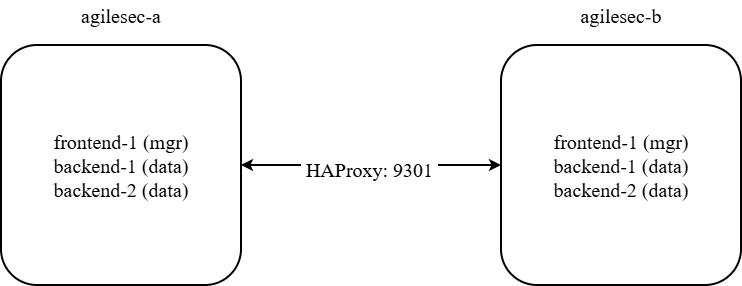
Any available port can be used instead of 9301.
Proxy Connection Mode
This guide uses proxy mode because clusters are behind HAProxy. In proxy mode, all traffic flows through a single address and OpenSearch never tries to discover individual nodes behind it. Sniff mode (the default) requires direct network access to all nodes and does not work through a load balancer.
Prerequisites
-
All clusters are running OpenSearch 2.x
-
HAProxy is configured with
mode tcpon port 9301 on each cluster -
Each cluster has its own root CA or shares one
-
Note: If all clusters share a CA, skip the CA bundle steps
-
-
Node certificates use a wildcard pattern e.g.
CN=*.your-domain.internal -
Each cluster's node certs are distinguishable by a DN attribute (e.g.
ST=,O=, orOU=)
Example Cluster Topology
The steps below use these placeholder values. Replace them with your actual values.
|
Placeholder |
Description |
Example value |
|---|---|---|
|
|
Name of first cluster |
|
|
|
Name of second cluster |
|
|
|
HAProxy address for cluster-a |
|
|
|
HAProxy address for cluster-b |
|
|
|
Node cert DN pattern for cluster-a |
|
|
|
Node cert DN pattern for cluster-b |
|
|
|
Path to opensearch config dir |
|
Node topology (per cluster)
|
Node |
Role |
Notes |
|---|---|---|
|
|
cluster_manager |
Dedicated manager, no data |
|
|
cluster_manager, data, ingest |
Data node |
|
|
cluster_manager, data, ingest |
Data node |
CCS Configuration Steps
These configuration steps use two clusters – cluster-a and cluster-b – as a working example with placeholder values. Substitute your own cluster names, node addresses, HAProxy endpoints, and certificate DNs throughout. The same process applies when connecting three, four, or more clusters.
Step 1: Setup HA Proxy
HA proxy on frontend must be setup to proxy OpenSearch transport traffic.
-
On node
frontend-1, edit file<installation directory>/services/haproxy/haproxy.cfg -
Add an HA proxy frontend configuration to listen on OpenSearch transport port. For this documentation we will use port 9301 as an example; however, any available port can be selected instead.
frontend fe_opensearch_transport
    bind frontend-1.kf-agilesec.internal:9301
    mode tcp
    option tcplog
    default_backend opensearch_transport_backend
-
Add an HA proxy backend to route traffic from 9301 to all OpenSearch backend nodes
backend opensearch_transport_backend
    mode tcp
    balance roundrobin
    default-server inter 5s fastinter 2s downinter 10s fall 3 rise 2
    server os1 backend-1.kf-agilesec.internal:9300 track opensearch_internal_backend/ois1
    server os2 backend-2.kf-agilesec.internal:9300 track opensearch_internal_backend/ois2
-
Restart HA Proxy
-
Test to make sure port 9301 is reachable through external FQDN of the other clusters.
From agilesec-a cluster:
nc -zv <agilesec-b external FQDN> 9301
Example
nc -zv agilesec.us-east-1.kf-agilesec.com 9301
From agilesec-b cluster:
nc -zv <agilesec-a external FQDN> 9301
Example
nc -zv agilesec.us-west-1.kf-agilesec.com 9301
Scaling to more clusters
For three or more clusters, each cluster’s external FQDN on port 9301 must be reachable by all nodes on other clusters.
# From agilesec-a
nc -zv <agilesec-b external FQDN> 9301
nc -zv <agilesec-c external FQDN> 9301

# From agilesec-b
nc -zv <agilesec-a external FQDN> 9301
nc -zv <agilesec-c external FQDN> 9301

# from agilesec-c
nc -zv <agilesec-a external FQDN> 9301
nc -zv <agilesec-b external FQDN> 9301
Step 2: Combine CA Bundles
Skip this step if all clusters share the same root CA. This step is only required when each cluster has its own separate CA.
When using separate CAs, each cluster must trust every other cluster's CA. Every cluster's CA bundle must contain the root CA of every other cluster it connects to.
Create a combined CA bundle on each cluster containing all CAs in the mesh.
Two-cluster example
-
On cluster
agilesec-a'sbackend-1node, copyagilesec-rootca-cert.pemfromagilesec-bcluster to<agilesec-a-installation-dir>/temp/agilesec-b-agilesec-rootca-cert.pem -
Create
agilesec-combined-rootca-cert.pem:
# Create combined bundle
INSTALL_DIR=<installer-dir>
cd $INSTALL_DIR/services/opensearch/config/certs
cat agilesec-rootca-cert.pem \
    $INSTALL_DIR/temp/agilesec-b-agilesec-rootca-cert.pem \
    > agilesec-combined-rootca-cert.pem
-
Copy
agilesec-combined-rootca-cert.pemto all nodes onagilesec-acluster. -
On cluster
agilesec-b’s backend-1 node, copyagilesec-rootca-cert.pemfromagilesec-acluster to<agilesec-b-installation-dir>/temp/agilesec-a-agilesec-rootca-cert.pem -
Create
agilesec-combined-rootca-cert.pem
# Create combined bundle
INSTALL_DIR=<installer-dir>
cd $INSTALL_DIR/services/opensearch/config/certs
cat agilesec-rootca-cert.pem \
    $INSTALL_DIR/temp/agilesec-a-agilesec-rootca-cert.pem \
    > agilesec-combined-rootca-cert.pem
-
Copy
agilesec-combined-rootca-cert.pemto<installer-dir>/services/opensearch/config/certson all nodes onagilesec-bcluster.
Scaling to more clusters
For three or more clusters, each bundle must include all CAs. The simplest approach is to build one master bundle and distribute it to all clusters:
# Build a single bundle with all CAs
cat ca-a.pem ca-b.pem ca-c.pem > /tmp/agilesec-combined-rootca-cert.pem

# Deploy the same bundle to every node on every cluster
Step 3: Update opensearch.yml on Each Cluster
Repeat these step for each cluster.
Data nodes (backend-1, backend-2)
Edit <installation dir>/services/opensearch/config/opensearch.yml.
-
Add
remote_cluster_clientto node roles:
node.roles: [cluster_manager, data, ingest, remote_cluster_client]
-
Add one
node_dnentry per cluster. Check the value in each cluster’sopensearch.ymlplugins.security.nodes_dn:
plugins.security.nodes_dn:
  - "<agilesec-a-node-dn>"
  - "<agilesec-b-node-dn>"
  # Add one entry per additional cluster
Example:
plugins.security.nodes_dn:
  - "CN=*.kf-agilesec.internal,OU=Server,O=Keyfactor,ST=California,C=US"
  - "CN=*.kf-agilesec.internal,OU=Server,O=Keyfactor,ST=Ohio,C=US"
-
Add one
cluster.remoteblock per remote cluster:
cluster.remote.agilesec-b.mode: proxy
cluster.remote.agilesec-b.proxy_address: "<agilesec-b external FQDN>:9301"
# Add one block per additional remote cluster
Example:
cluster.remote.agilesec-east.mode: proxy
cluster.remote.agilesec-east.proxy_address: "agilesec.us-west-1.kf-agilesec.com"
-
Update
plugins.security.ssl.transport.pemtrustedcas_filepathto point toagilesec-combined-rootca-cert.pem:
plugins.security.ssl.transport.pemtrustedcas_filepath: "certs/agilesec-combined-rootca-cert.pem"
Dedicated manager nodes (frontend-1)
Edit <installation dir>/services/opensearch/config/opensearch.yml. Same as backend nodes but without data and ingest in node roles:
-
Add
remote_cluster_clientto node roles:node.roles: [cluster_manager, remote_cluster_client] -
Add one
node_dnentry per cluster. Check the value in each cluster’sopensearch.ymlplugins.security.nodes_dn:plugins.security.nodes_dn: - "<agilesec-a-node-dn>" - "<agilesec-b-node-dn>" # Add one entry per additional cluster -
Add one
cluster.remoteblock per remote cluster:cluster.remote.agilesec-b.mode: proxy cluster.remote.agilesec-b.proxy_address: "<agilesec-b external FQDN>:9301" # Add one block per additional remote cluster
Example
node.roles: [cluster_manager, remote_cluster_client]

plugins.security.nodes_dn:
  - "CN=*.kf-agilesec.internal,OU=Server,O=Keyfactor,ST=California,C=US"
  - "CN=*.kf-agilesec.internal,OU=Server,O=Keyfactor,ST=Ohio,C=US"

cluster.remote.agilesec-east.mode: proxy
cluster.remote.agilesec-east.proxy_address: "agilesec.us-east-1.kf-agilesec.com:9301"
Scaling to more clusters
Each cluster needs one cluster.remote block per remote cluster and one nodes_dn entry per remote cluster's node cert DN. For a three-cluster mesh, each cluster's config would look like:
cluster.remote.agilesec-b.mode: proxy
cluster.remote.agilesec-b.proxy_address: "<cluster-b-haproxy>"
cluster.remote.agilesec-c.mode: proxy
cluster.remote.agilesec-c.proxy_address: "<cluster-c-haproxy>"

plugins.security.nodes_dn:
  - "<agilesec-a-node-dn>"
  - "<agilesec-b-node-dn>"
  - "<agilesec-c-node-dn>"
Note on cluster.remote name
The name used in cluster.remote.<name> is a local alias. The name does not have to match the remote cluster's actual cluster.name, but it is best practice to match them to avoid confusion. This alias is what you use in CCS queries. It is recommended to use the pattern agilesec-<cluster region>.
GET <name>:agilesec.kf-agilesec_com.v3.event-x509/_search
Step 4: Restart Clusters
Restart all clusters after updating configs. When restarting multiple clusters, do them one at a time. Within each cluster restart nodes in this order to avoid disruption:
-
frontend-1(dedicated manager) -
backend-1 -
backend-2
Wait for each node to fully rejoin the cluster before restarting the next.
bash /home/ec2-user/351/scripts/manage.sh restart opensearch
Step 5: Verify OpenSearch
-
Login as platform admin on
agilesec-acluster and go to Advanced Dashboard. -
In Advanced Dashboard, go to Dev Tools and run the following queries:
Check all nodes are up
GET _cat/nodes?v&h=name,ip,node.role
All nodes should appear with r in the node.role column confirming remote_cluster_client is active.
Example:
name                  ip            node.role
opensearch-backend-2  10.100.220.59 dimr
opensearch-backend-1  10.100.220.56 dimr
opensearch-frontend-1 10.100.220.53 mr
Check remote connections
GET _remote/info
Expected response showing all remote clusters connected:
{
  "cluster-b": {
    "connected": true,
    "mode": "proxy",
    "proxy_address": "<agilesec-b cluster external FQDN>:9301",
    "num_proxy_sockets_connected": 0
  }
}
Connected will be false if no CCS query has been run so far. After running a CCS query, connected should show true.
Test CCS queries
Count documents in a remote index:
GET agilesec-b:agilesec.kf-agilesec_com.v3.event-x509/_count
Search across both clusters simultaneously:
GET agilesec.kf-agilesec_com.v3.event-x509,agilesec-b:agilesec.kf-agilesec_com.v3.event-x509/_search
{
  "query": { "match_all": {} }
}
Step 6: Update Advanced Dashboards
Advanced Dashboards need to be updated to use CCS.
-
Log in to Agilesec UI as a Platform Admin and go to Advanced Dashboards.
-
Go to Dev tools.
Update event-* Index pattern
-
Run following query to get index pattern id.
GET .kibana/_search
{
  "query": {
    "bool": {
      "must": [
        { "term": { "type": "index-pattern" } },
        { "match_phrase": { "index-pattern.title": "agilesec.<org_domain>.v3.event-*" } }
      ]
    }
  },
  "_source": ["index-pattern.title"]
}
Note: Replace the dot in your organization’s <org_domain> with an underscore. For example. kf-agilesec.com → kf-agilesec_com
-
copy
_id. -
Update index pattern for
event-*to include all other regions.
POST .kibana/_update/<_id from step 3>
{
  "doc": {
    "index-pattern": {
      "title": "agilesec.<org domain>.v3.event-*,agilesec-*:agilesec.<org domain>.v3.event-*"
    }
  }
}
Note: Replace the dot in your organization’s <org_domain> with an underscore. For example. kf-agilesec.com → kf-agilesec_com
-
Refresh Field List for
event-*Index Pattern-
Navigate to Settings → Settings and Setup → Index Patterns.
-
Select the
event-*index pattern. -
Click Refresh Field List.
-
Update alert-* Index Pattern
-
Run the following query to get the index pattern id.
GET .kibana/_search
{
  "query": {
    "bool": {
      "must": [
        { "term": { "type": "index-pattern" } },
        { "match_phrase": { "index-pattern.title": "agilesec.<org domain>.v3.alert-*" } }
      ]
    }
  },
  "_source": ["index-pattern.title"]
}
Replace <org domain> with your organization's domain with dot replaced with underscore. For example. kf-agilesec.com → kf-agilesec_com
-
copy
_id -
Update index pattern for
alert-*to include all other regions.
POST .kibana/_update/<_id from step 3>
{
  "doc": {
    "index-pattern": {
      "title": "agilesec.<org domain>.v3.alert-*,agilesec-*:agilesec.<org domain>.v3.alert-*"
    }
  }
}
Replace <org domain> with your organization's domain with dot replaced with underscore. For example. kf-agilesec.com → kf-agilesec_com
-
Refresh Field List for
alert-*Index Pattern-
Navigate to Settings → Settings and Setup → Index Patterns.
-
Select the
alert-*index pattern. -
Click Refresh Field List.
-
Step 7: Verify Advanced Dashboard
-
Go to Advanced Dashboard and check any dashboard to see if it shows data from other regions.
-
Add following filter to any dashboard to restrict data for a specific region
Adding a New Cluster to an Existing Mesh
When adding a new cluster to an already running CCS mesh, the following changes are required on all existing clusters.
|
Change Task |
Method |
Restart required |
|---|---|---|
|
Add new cluster's CA to existing nodes' bundles |
File edit |
Yes |
|
Add new cluster's |
File edit |
Yes |
|
Add |
File edit |
Yes |
|
Add |
API or file |
No (API), Yes (file) |
Since the CA bundle update requires a restart anyway, it is generally cleaner to add all settings in opensearch.yml and do a single restart.
Adding cluster.remote via API only (no restart needed):
PUT _cluster/settings
{
  "persistent": {

    "cluster.remote.cluster-c.mode": "proxy",
    "cluster.remote.cluster-c.proxy_address": "<agilesec-c external FQDN>:9301"
  }
}
Key Settings Reference
|
Setting |
Where |
Purpose |
|---|---|---|
|
|
opensearch.yml or API |
Use proxy mode – required behind HAProxy or load balancer |
|
|
opensearch.yml or API |
HAProxy endpoint for the remote cluster |
|
|
opensearch.yml only |
Allows this node to initiate CCS connections |
|
|
opensearch.yml |
Trusted node certificate DNs – one entry per cluster |
|
Combined CA bundle |
File on disk |
Each cluster must trust every other cluster's CA for mTLS |
Troubleshooting
GET _remote/info returns {}
-
Verify
remote_cluster_clientis innode.roleson all nodes -
Check which config file OpenSearch is actually using:
ps aux | grep opensearch | grep path.conf -
Confirm HAProxy port is reachable from the node:
(echo > /dev/tcp/<haproxy-host>/9301) && echo "OPEN" || echo "CLOSED" -
Check for conflicting persistent API settings:
GET _cluster/settings?flat_settings=true
SSL handshake / connection reset errors
-
CA bundle is missing the remote cluster's CA – verify with:
openssl verify -CAfile rootca-cert.pem rootca-cert.pem -
CA bundle may be corrupted (incomplete PEM) – copy a known good bundle from another node and verify
-
Set
plugins.security.ssl.transport.enforce_hostname_verification: falseif node certs use internal hostnames but HAProxy uses public hostnames
CCS returns index_not_found
-
OpenSearch Security masks permission errors as 404 – this is usually a
nodes_dnmismatch -
Verify the remote cluster's node cert DN is listed in
nodes_dnon the receiving cluster -
Check the receiving cluster's audit log for
MISSING_PRIVILEGESentries when the query arrives
Connected but query returns no results
-
Confirm the index exists on the remote cluster: log into the remote cluster and run
GET _cat/indices?v -
The alias used in the query must exactly match the name configured in
cluster.remote.<name>