.png)
The following provides information on Chimera Certificate Authorities (CAs) and Chimera certificates.
For information on how to create a Chimera CA, see Creating a Chimera CA.
To address the possible threat to classical algorithms posed by future quantum computers, Post-Quantum Cryptography (PQC) algorithms are being standardized. The National Institute of Standards and Technology (NIST) defines that the goal of post-quantum cryptography (also called quantum-safe cryptography, and quantum-resistant cryptography) is to develop cryptographic systems that are secure against both quantum and classical computers and can interoperate with existing communications protocols and networks.
Hybrid cryptography combines classic asymmetric cryptography with quantum-safe asymmetric cryptography to enable a migration path for systems with multiple components that cannot all be upgraded or replaced at the same time.
Chimera PKI Migration
One migration path to implement quantum-safe algorithms and upgrade existing Public Key Infrastructures (PKIs) is using Chimera certificates. Chimera use a classic key and signature in the standard X.509 fields, but have a post-quantum key and signature as non-critical extensions. Unlike composites, this makes Chimera certificated backwards compatible, at the cost of requiring the handling of an extra set of key and signature.
Chimera CA Migration Example
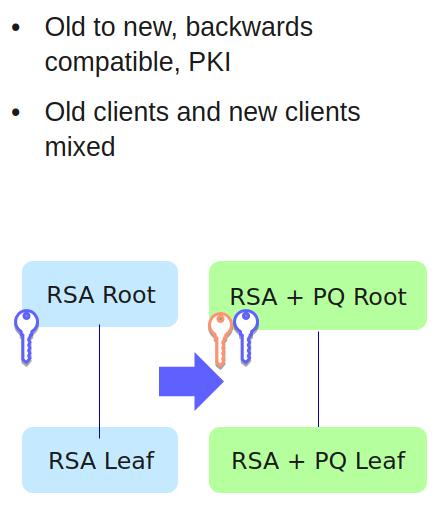
Chimera Certificates
Chimera X509 certificates are created as multiple public key algorithm certificates and allow the use of alternative keys and signing algorithms, as specified in ITU-T X509 (10/2019) clause 9.8.
The following is placed into certificate extensions:
-
Alternative public key
-
Alternative signature algorithm
-
Alternative signature value
Hence, the implementation does not need to affect current behavior and any new extension marked as non-critical can be processed by existing systems. Thus, classic algorithms and quantum-safe algorithms can live side-by-side until migration to quantum-safe PKIs is complete.
A Chimera Certificate Authority (CA) is an X509 CA with two key pairs and two signing algorithms, where a combination of classic algorithms and quantum-safe algorithms is used. The Alternative Signing Algorithm and the Alternative Certificate Signing Key in EJBCA are one of the quantum-safe algorithms ML-DSA or FALCON.
Note that until NIST publishes the final standards for the FALCON PQC algorithm (to be standardized with the name FN-DSA), the parameters, configurations, and other details are to be considered changeable. Using the algorithms should until then be for testing purposes only.
The self-signed certificate of a Chimera CA will have two signatures, as will any certificate issued by that CA. A Chimera CA is a regular X509 CA, with the following exceptions:
-
It is not possible to create a non-Chimera Sub CA (that is, a Sub CA with only one classic public key and one classic signing algorithm) under a Chimera Root CA.
-
It is not possible to create a Chimera Sub CA under a non-Chimera Root CA.
The following certificate extensions and OIDs are used for Chimera certificates:
|
Extension |
OID |
|---|---|
|
id-ce-subjectAltPublicKeyInfo |
2.5.29.72 |
|
id-ce-altSignatureAlgorithm |
2.5.29.73 |
|
id-ce-altSignatureValue |
2.5.29.74 |
As specified in ITU-T X509 (10/2019) clause 7.2.2, when a Chimera certificate is created, the altSignatureValue value will be the result of excluding the signature component and the altSignatureValue extension, while including all other DER-encoded parts in the alternative signature. The native signature value will then be the result of all DER-encoded parts, including the subjectAltPublicKeyInfo, the altSignatureAlgorithm, and the altSignatureValue extensions. This also means that a relying party will have to re-DER-encode the certificate, depending on whether they have migrated to PQC systems or not, in order for a validation to succeed.
Related Content
For information on how to create a Chimera CA, see Creating a Chimera CA.