
This overview provides information on what crypto tokens are, what they do and also lists crypto token fields.
For more information about how to manage crypto tokens, see Crypto Tokens Operations.
Description
Historically the term crypto token denotes the differentiation of a smart keycard and a slot reader, where the card and the slot from which it is read are not permanent.
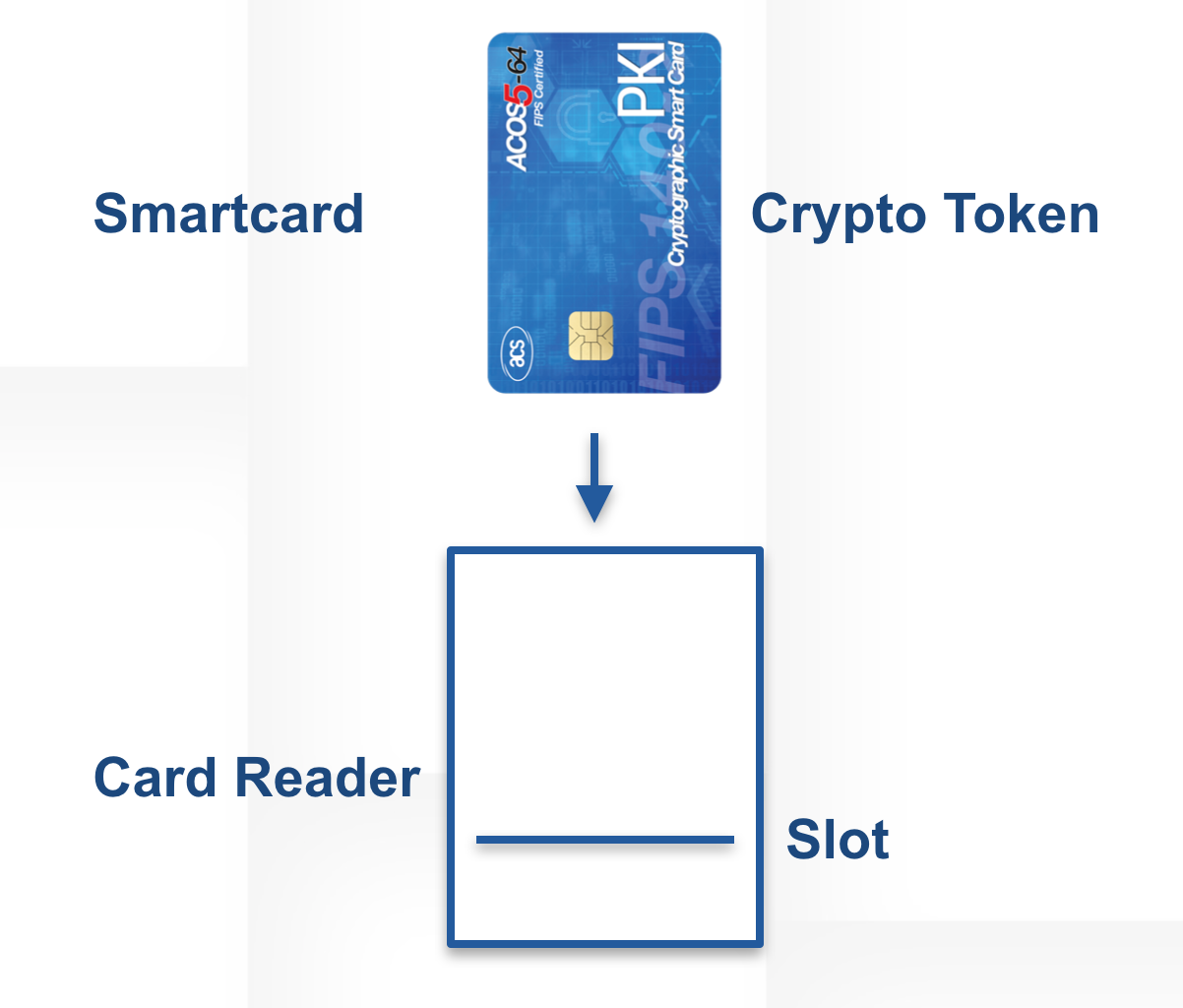
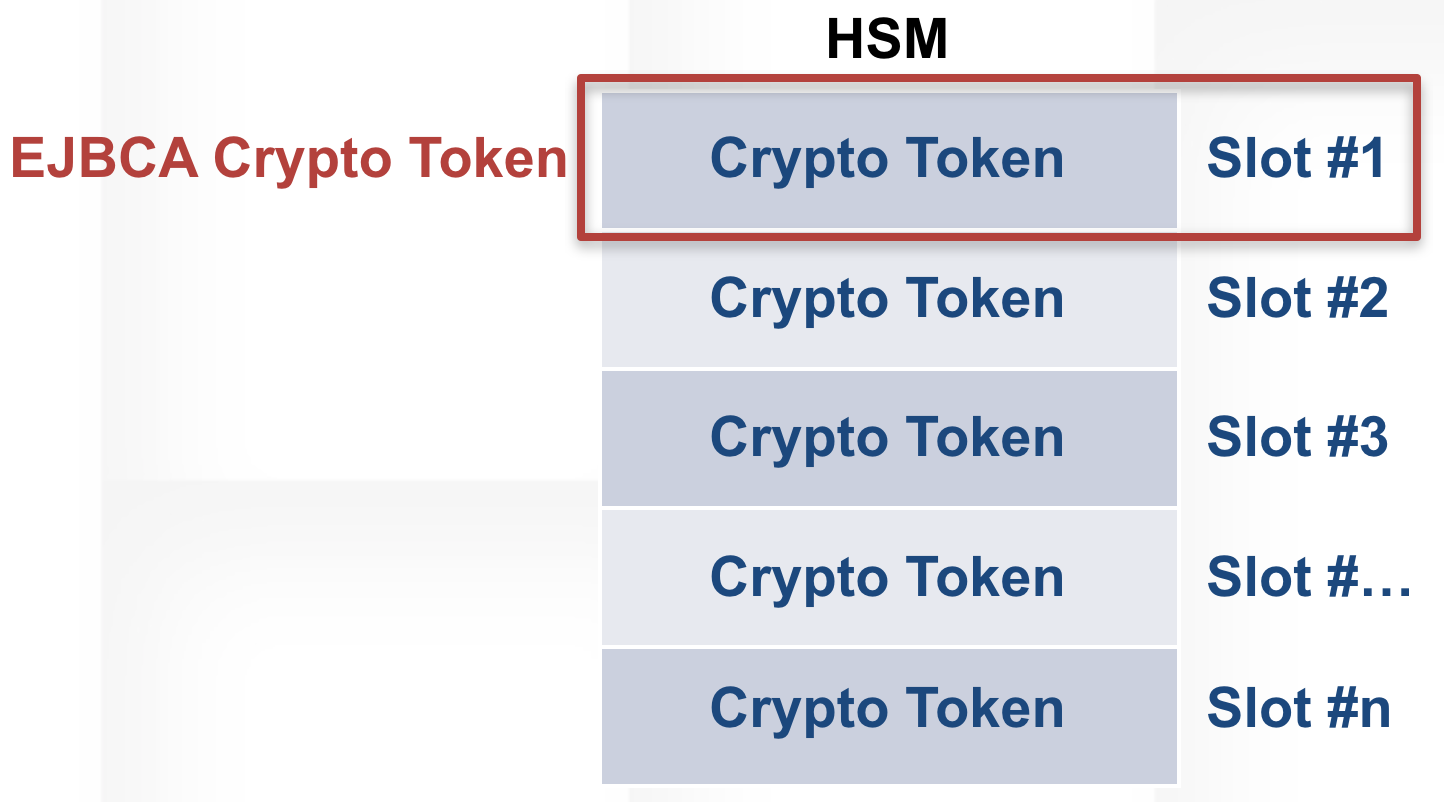
As the modern HSM became widely used, this model has become dated, but the terminology remains. The modern crypto token most often remains in the same memory area of the HSM (the two being one and the same), though while crypto token labels and slot indexes are always constant, slot numbering may vary. In EJBCA, the term crypto token means an area of memory containing keys, whether this is an HSM slot or a soft keystore created locally.
Usage
Common for all EJBCA crypto tokens is that:
-
A crypto token may exist on one and only one slot.
-
A crypto token may contain any number of keypairs and aliases.
To this end, crypto tokens have several different applications in EJBCA:
-
Contained within CAs for signing certificates and CRLs. For more information, see Certificate Authority Overview.
-
Referred to by OCSP Responders to sign OCSP replies. For more information, see OCSP Responders.
-
Used to authenticate TLS communication between EJBCA nodes. For more information, see Remote Authenticators Overview.
Crypto Token Fields
Common Fields
Common fields for all crypto tokens:
|
Field |
Description |
|---|---|
|
Name |
A user-friendly name for the Crypto Token. |
|
Type |
The underlying cryptographic provider for the token. Options include standard PKCS#11 HSM slot mappings, Soft PKCS#12 keystores stored in the database, and cloud keystores including Google Cloud KMS, AWS KMS, and Azure Key Vault. |
|
Authentication Code |
The credential used to activate the token and authorize cryptographic operations. Depending on the token type, this is a PKCS#11 slot PIN, a soft keystore password, or cloud credentials. For Google Cloud KMS, this is replaced by the Service Account Key (JSON) file or text. |
|
Repeat Authentication Code |
Confirmation of the authentication code. Must match the value entered in Authentication Code. Not applicable for token types that use file-based or uploaded credentials (such as Google Cloud KMS). |
|
Auto-activation |
Select to encrypt and store the authentication code (or service account key for Google Cloud KMS) in the database, keeping the crypto token continuously active across restarts. For Pkcs11NgCryptoToken tokens, auto-activation also automatically reinitializes the PKCS#11 library if it becomes deinitialized. This is useful for Network HSMs (NetHSMs) whose client libraries do not automatically reconnect after a connection failure. Because PKCS#11 provides no standard mechanism to detect connection loss, connection failures are detected heuristically based on error codes returned by the PKCS#11 library. |
|
Allow export of private keys |
If selected, EJBCA will not try to prevent Soft Crypto Token keystore export. |
|
Use explicit ECC parameters (ICAO CSCA and DS certificates) |
Select to use the explicit ECC parameters. If cleared, the parameters are ignored. Note that this is only applicable for ePassport ICAO CSCA and DS certificates. Enabling “Use explicit ECC parameters” may cause ECDSA key generation and certificate enrollment to fail in REST API flows. |
PKCS#11 Fields
ENTERPRISE
In addition to the common fields, the following fields are available if you have chosen to create a PKCS#11 crypto token:
|
Field |
Description |
|---|---|
|
PKCS#11 Library |
PKCS#11 shared library configured as available in conf/web.properties. |
|
PKCS#11 Reference Type |
Type of a slot reference described by the PKCS#11 Reference (Id, Index or Label). |
|
PKCS#11 Reference |
PKCS#11 slot number, index or label. |
|
PCKS#11 Attribute File |
If required, this is a PKCS#11 attribute file configured as available in conf/web.properties. Note that this should only be required for non-common HSMs. |
PKCS#11 may require additional configuration of your application server, see Application Servers.
For more information on PKCS#11 properties, see Hardware Security Modules (HSM). A unique Crypto Token identifier is generated when the token is created.
Azure Key Vault Fields
ENTERPRISE
EJBCA supports using Microsoft's Azure cloud platform's Key Vault service as a crypto token. For information on how to configure your Key Vault service, refer to the Microsoft Azure Key Vault documentation.
In addition to the common fields, when using Azure Key vault the following fields are available in EJBCA:
|
Field |
Description |
|---|---|
|
Key Vault Type |
Select the key vault type you have purchased from Microsoft.
|
|
Key Vault Name |
The name selected when the Azure Key Vault was created. |
|
Key Vault Client ID |
The Azure Application ID for a service principal that has permission to perform operations against this Key Vault instance. |
|
Key Vault Public Key Authentication |
Select to authenticate to Azure Key Vault using a key/certificate pair from an Internal Key Binding. Leave this option cleared to use an application secret for Key Vault authentication. |
|
Key Vault Binding Name |
Only displayed if Key Vault Public Key Authentication is selected. Select the Remote Authenticator containing the key and certificate to be used to authenticate to Key Vault. The certificate for the selected Internal Key Binding should be uploaded to Azure as an authentication method for the service principal specified in the Key Vault Client ID field above. |
AWS KMS Fields
ENTERPRISE
EJBCA supports using Amazon's cloud platform's Key Management service as a crypto token. For information on how to configure your AWS KMS service, refer to the AWS documentation.
In addition to the common fields, when using AWS KMS the following fields are available in EJBCA:
|
Field |
Description |
|---|---|
|
AWS KMS Authentication Type |
Select the authentication method you would like to use to access your AWS KMS instance:
|
|
Region |
The AWS region in which your KMS instance is hosted. |
|
Access Key ID |
The ID of the key created for the user account that will be used to authenticate to KMS. |
|
Authentication Code |
The secret value of the key created for the user account that will be used to authenticate to KMS. |
AWS KMS Access Policy
The following rights are required for the IAM User account or Role that will be used to access the KMS. A Policy should be created with the following rights and assigned to the User or Role:
-
List
-
ListAliases
-
-
Read
-
GetPublicKey
-
-
Write
-
CreateAlias
-
CreateKey
-
ScheduleKeyDeletion
-
Sign
-
Google Cloud KMS Fields
ENTERPRISE
EJBCA supports using Google Cloud Key Management Service (Cloud KMS) as a crypto token. For information on how to configure Cloud KMS, refer to the Google Cloud KMS documentation.
A Google Cloud KMS crypto token uses the asymmetric keys in one Cloud KMS key ring. The alias of a key pair in EJBCA is the name of the key in the key ring. Keys are created and destroyed in Google Cloud, for example in the Google Cloud Console, since this requires administrative permissions in Google Cloud. Generating and removing key pairs from EJBCA is not supported.
In addition to the common fields, when using Google Cloud KMS the following fields are available in EJBCA:
|
Field |
Description |
|---|---|
|
Project ID |
The ID of the Google Cloud project that contains the key ring. |
|
Location |
The location of the key ring, for example |
|
Key Ring |
The name of the Cloud KMS key ring that contains the keys of the crypto token. |
|
Endpoint |
The Cloud KMS API endpoint, in the form Change this only if using a regional endpoint (for example, |
|
Service Account Key (JSON) |
The JSON key file of the Google Cloud service account that will be used to authenticate to Cloud KMS. The content of the key file is the authentication code of the crypto token, and replaces the Authentication Code and Repeat Authentication Code fields. If Auto-activation is selected, the key is stored (encrypted) in the database. Otherwise the key file must be selected each time the crypto token is activated, in the list of crypto tokens or on the CA Activation page. When editing an existing crypto token, leave this field empty to keep the current key. |
Google Cloud KMS Access Policy
The following permissions are required for the service account that will be used to access Cloud KMS. Grant them on the key ring, or on the project:
-
List
-
cloudkms.cryptoKeys.list -
cloudkms.cryptoKeyVersions.list
-
-
Read
-
cloudkms.cryptoKeyVersions.viewPublicKey
-
-
Use
-
cloudkms.cryptoKeyVersions.useToSign -
cloudkms.cryptoKeyVersions.useToDecrypt(only required for decryption keys)
-
These permissions are included in the predefined roles Cloud KMS Viewer (roles/cloudkms.viewer) and Cloud KMS CryptoKey Signer/Verifier (roles/cloudkms.signerVerifier), and for decryption keys Cloud KMS CryptoKey Decrypter (roles/cloudkms.cryptoKeyDecrypter).
Crypto Token Authorization
For all authorized CA operations, authorization for underlying Crypto Token operations is implied. The minimum authorization required to create a CA is authorization to "view" and "use" (or "modify") a Crypto Token. Since modification of PKCS#11 Crypto Tokens can change the slot mapping, the same authorization for creation and modification is required.
The following lists the authorization rules:
|
Authorization Rule |
Description |
|---|---|
|
/cryptotoken/ |
Required for displaying the Crypto Token management in the Admin GUI. |
|
/cryptotoken/view/cryptoTokenId |
Required for viewing Crypto Token information and listing key pairs. |
|
/cryptotoken/use/cryptoTokenId |
Required for binding a Crypto Token to a CA. |
|
/cryptotoken/modify/ |
Required for creating or modifying a Crypto Token. |
|
/cryptotoken/delete/ |
Required for deletion of a Crypto Token. |
|
/cryptotoken/activate/cryptoTokenId |
Required for activation of a Crypto Token. |
|
/cryptotoken/deactivate/cryptoTokenId |
Required for de-activation of a Crypto Token. |
|
/cryptotoken/keys/generate/cryptoTokenId |
Required for key pair generation. |
|
/cryptotoken/keys/remove/cryptoTokenId |
Required for key pair removal. |
|
/cryptotoken/keys/test/cryptoTokenId |
Required for key pair testing. |