.png)
Enterprise
The Microsoft Signer, MS Signer, signs Windows files in Microsoft Authenticode format. It supports all existing file types handled by the MS Authenticode Signer and APPX Signer, and adds support for additional file formats.
Fully qualified class name: org.signserver.module.msauthcode.mssigner.MSSigner.
Overview
The MS Signer signs Windows-related files using Microsoft Authenticode format. It supports signing of a wide range of file types, such as portable executable files (.exe, .dll), Windows installers (.msi), and so on. For the full list of supported file types, see Supported File Types.
Known Limitations: MS Signer is under active development. Some file formats and configurations may not behave as expected in the current release.
Signatures can optionally include a timestamp from a Timestamp Authority (TSA) using the RFC#3161, or legacy Microsoft Authenticode format. For more information, see Timestamp Signer.
To download a sample configuration file for this Worker, see Sample Worker Configurations.
For information on the interfaces this Worker can be called through, see Supported Interfaces by Worker.
For a guide on signing code with the MS Signer, see Code Signing with Authenticode Signatures.
Supported File Types
The MS Signer supports signing the following file types:
|
Category |
File Type |
Extension(s) |
|---|---|---|
|
Portable Executable (PE) |
Windows Executable |
|
|
Dynamic Link Library |
|
|
|
Installation & Packaging |
Windows Package |
|
|
Microsoft Installer |
|
|
|
Cabinet file |
|
|
|
Catalog file |
|
|
|
Scripts |
PowerShell scripts |
|
|
Package Managers |
||
Available Worker Properties
MS Signer supports both Common Signer Properties and Worker-specific properties:
|
Property |
Default |
Description |
|---|---|---|
|
|
False |
(Optional) Specifies if the requester can override the program name by supplying it as a request metadata property. |
|
|
False |
(Optional) Specifies if the requester can override the program URL by supplying it as a request metadata property. |
|
|
SHA256 |
(Optional) Algorithm for the digest of the binary. |
|
|
True |
(Optional) If the digest of the response should be computed and logged. |
|
|
True |
(Optional) If the digest of the request should be computed and logged. |
|
|
utf-8 |
(Optional) Sets the character encoding when signing PowerShell scripts ( |
|
|
SHA256 |
Algorithm used to create the message digest (hash) of the response document to put in the log. |
|
|
SHA256 |
Algorithm used to create the message digest (hash) of the request document to put in the log. |
|
|
True |
(Optional) True if existing signature should be kept. |
|
|
None |
(Optional) Specifies the program name to embed in the signature. |
|
|
None |
(Optional) Specifies the program URL to embed in the signature. |
|
|
Depends on the signing key |
(Optional) Signature algorithm. The default depends on the signing key:
|
|
|
RFC3161 |
Specifies the timestamp format to use. Allowed values:
If the value AUTHENTICODE is set, a legacy Authenticode timestamp signer is assumed, rather than a standard RFC3161-compliant one. |
|
|
None |
Login password used if the TSA uses HTTP Basic Auth. Required if |
|
|
None |
(Optional) Specifies the URL of external (Authenticode or RFC#3161) time-stamp authority.
|
|
|
None |
(Optional) Specifies the login username used if the TSA uses HTTP Basic Auth. |
|
|
None |
(Optional) Worker ID or name of internal (Authenticode or RFC#3161) time-stamp signer in the same SignServer.
|
Request Metadata Properties
The MS Signer Worker can accept the following request metadata properties:
|
Property |
Description |
|---|---|
|
|
Option to specify that the supplied file is of a specific file type. The
All extensions for the supported file types are supported. Client Web Example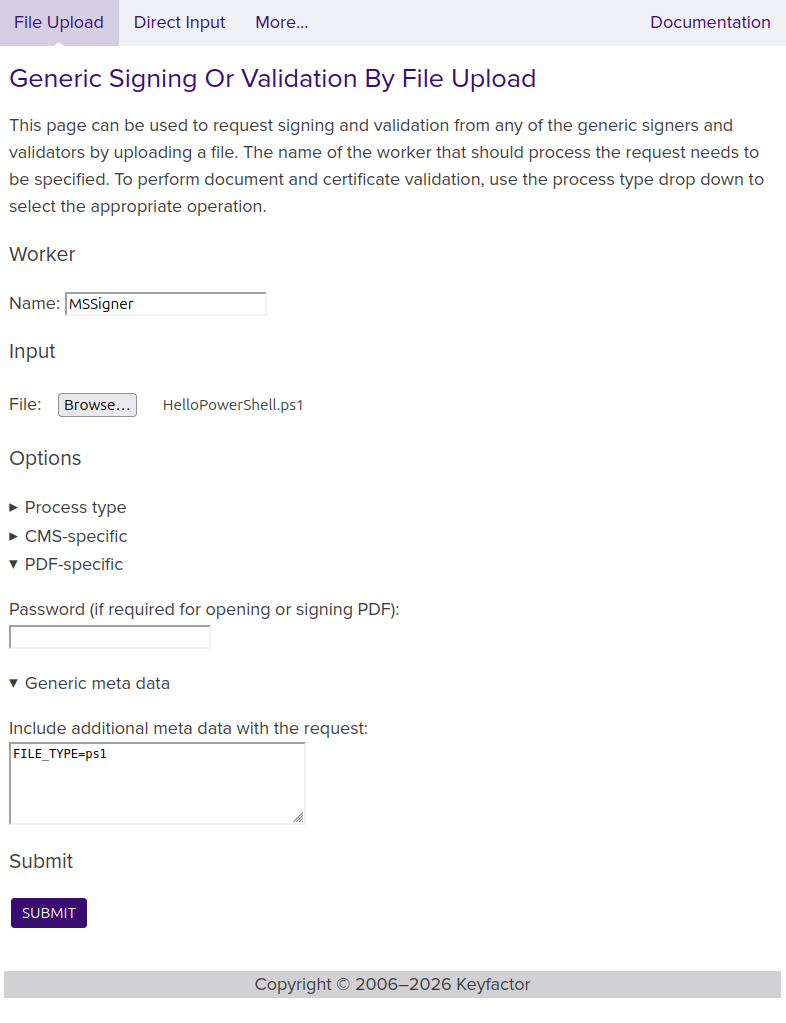
|
|
|
Program name text to use instead of the configured one (if any). Specifying an empty value removes the configured program name. Without |
|
|
Program URL to use instead of the configured one (if any). Specifying an empty value removes the configured program URL. Without |