.png)
A startup guide to deployment and basic configuration of the AgileSec ServiceNow VR Integration (ISG AgileSec Analytics Integration for ServiceNow Vulnerability Response Module) within your ServiceNow instance.
Prerequisites
The following are required to deploy the AgileSec ServiceNow VR Integration.
-
AgileSec Platform 2.2.0 or above installed
-
AgileSec Alerting Module enabled
-
ServiceNow Utah or Vancouver deployed
-
ServiceNow Vulnerability Response Module installed
-
Admin ServiceNow role for deployment of application and application files
Security Requirements
The following network configuration is required for the solution:
-
Network communications. Collecting Findings in AgileSec Analytics.
-
Port: 443
-
Protocol: HTTPS
-
Direction: From SNOW Server to AgileSec Analytics Server (via SNOW MID server)
-
Authentication: OAuth (recommended) or Basic
-
Install Application
As the ServiceNow platform admin, install the application InfoSec Global Integration for Vulnerability Response from the ServiceNow store.
After installation is successfully completed, the InfoSec Vulnerability Integration menu will be available in the navigator bar.
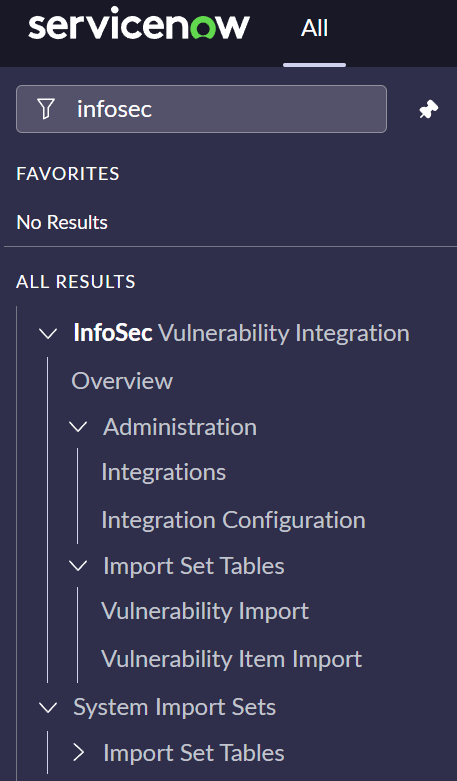
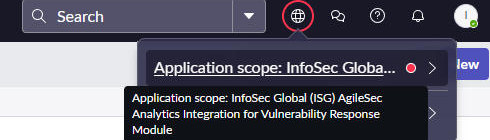
Note: If you do not see the integration menu after installation, change the application scope:
-
Go to InfoSec Global Application scope.
-
Change the application scope to InfoSec Global (ISG) AgileSec Analytics Integration for Vulnerability Response Module.
Configure Authentication
There are two authentication options:
-
OAuth (OAuth2)
-
Basic (username and password).
HIGHLY RECOMMENDED: Use OAuth authentication for integrations.
Recommended: Configure OAuth Authentication
-
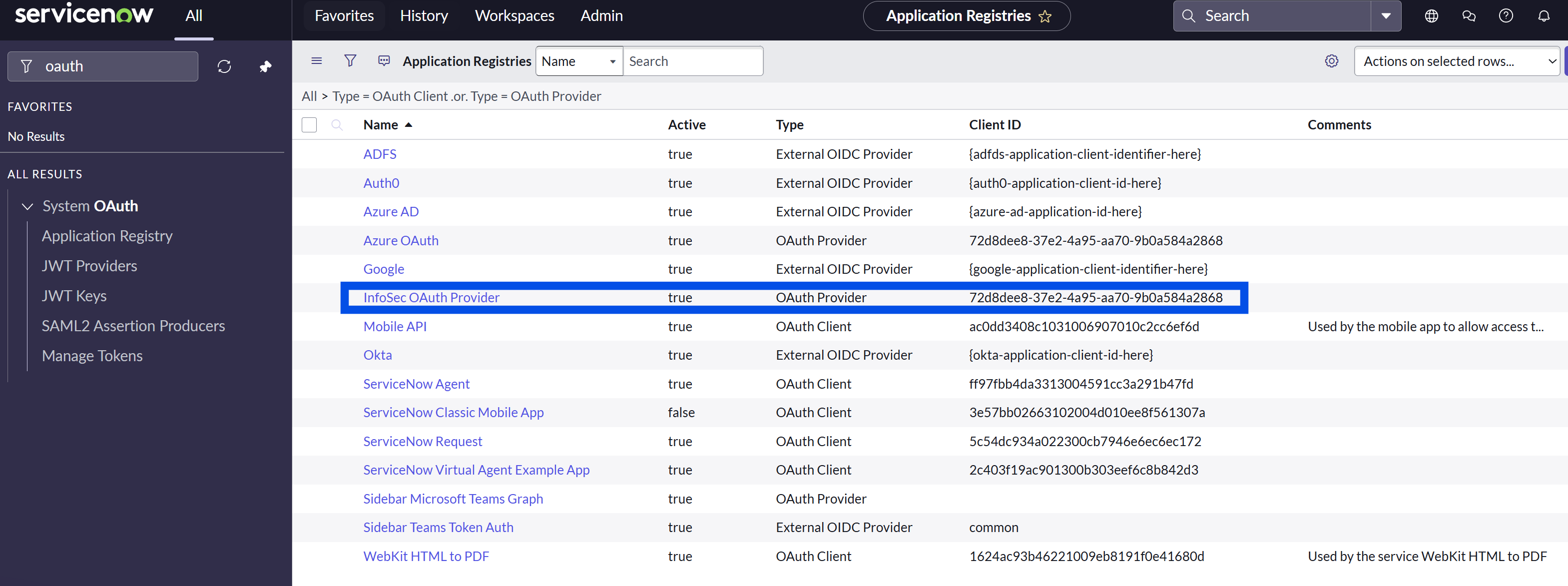
Navigate to System OAuth > Application Registry
-
Find the InfoSec OAuth Provider record.
-
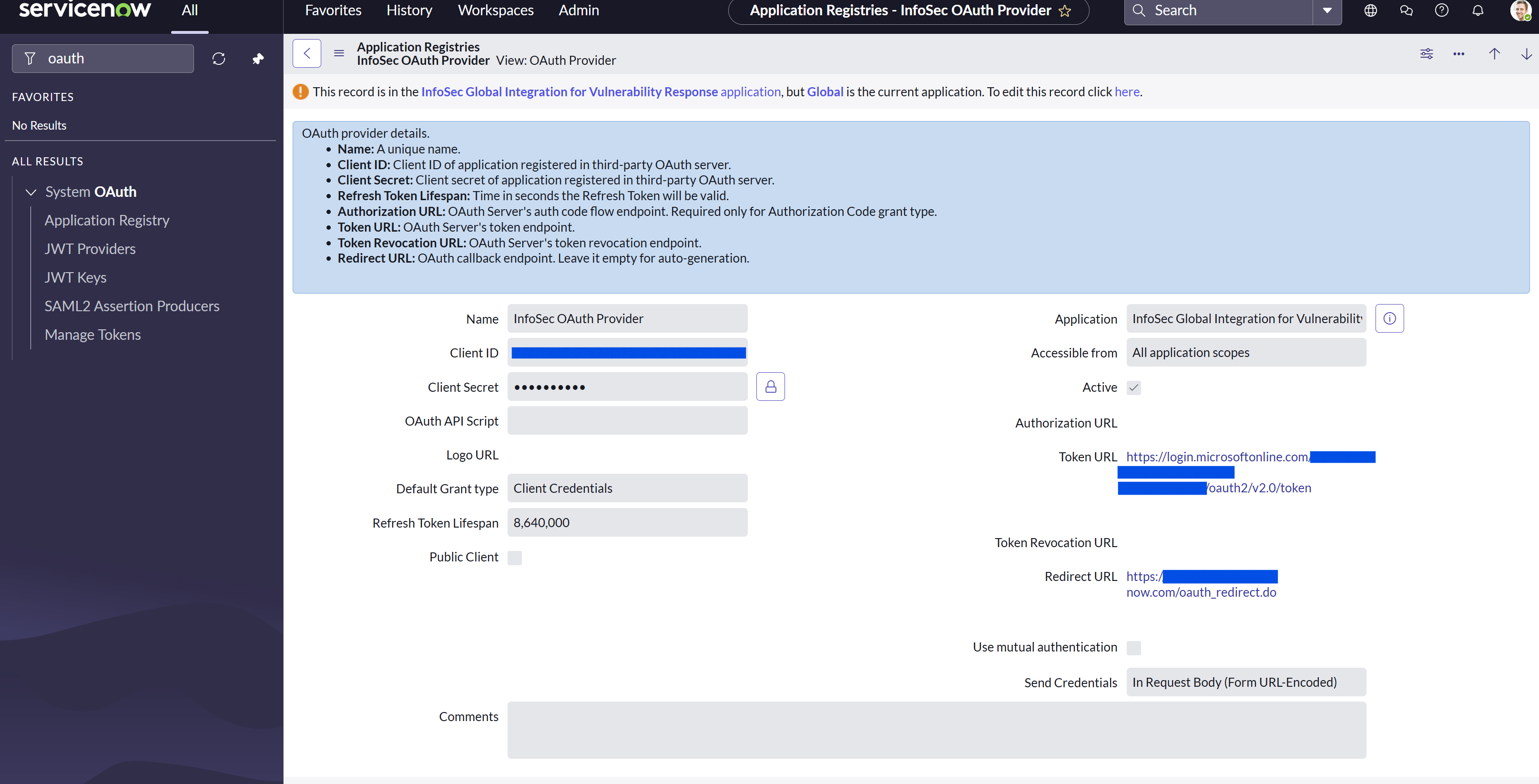
Edit the record and update the Client ID, Client Secret, Token URL, Redirect URL, and OAuth Entity Scope based on your setup.
-
After updating, navigate to IntegrationHub > Credentials, open record InfoSec OAuth Cred, and click on Related Link Get OAuth Token.
-
If the OAuth setup is correct, you will be able to generate an OAuth token. A pop-up window will open with a successful message indicating OAuth token flow was completed successfully.
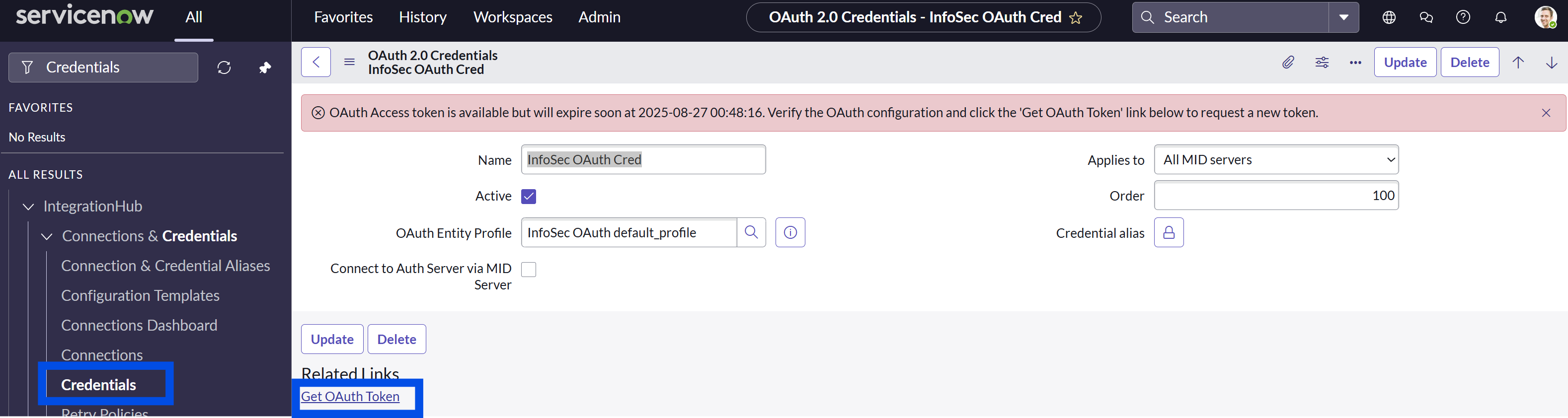
Note: The AgileSec ServiceNow integration will automatically regenerate the token for every requests made to the AgileSec Backend. Generating the Token from ServiceNow UI is only for testing purposes.
Configure Basic Authentication
This step is required only if integration authentication parameter auth_type is set to basic.
-
Search for
sys_auth_profile_basic.LIST. -
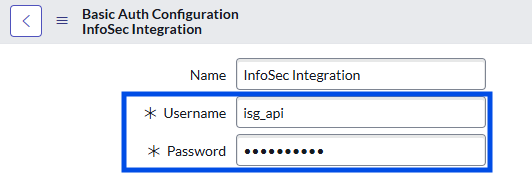
Find the basic auth configuration InfoSec Integration in table
sys_auth_profile_basic.

-
Edit the record and Update the Username and Password based on your setup
Configure Authentication Defaults
-
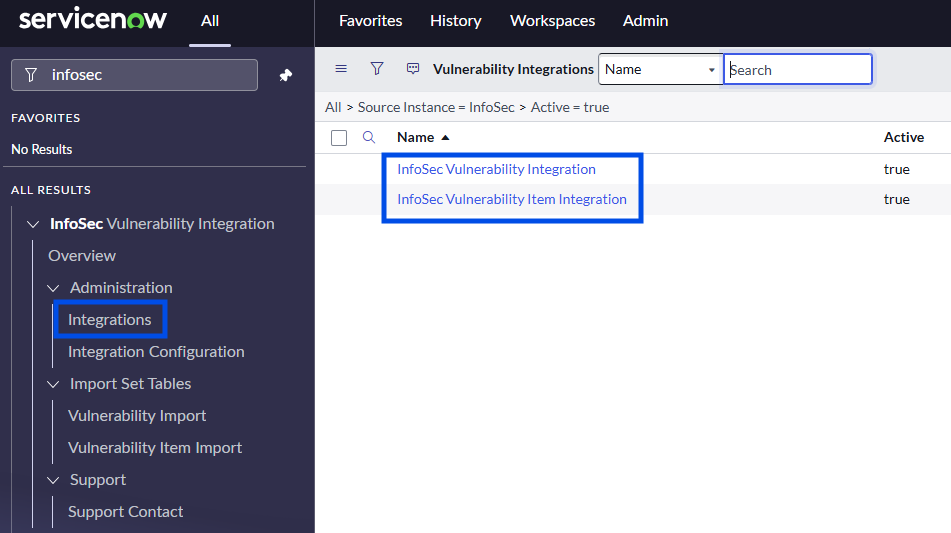
Navigate to InfoSec Vulnerability Integration> Administration>Integrations.
-
Open the integration record InfoSec Vulnerability Integration.
-
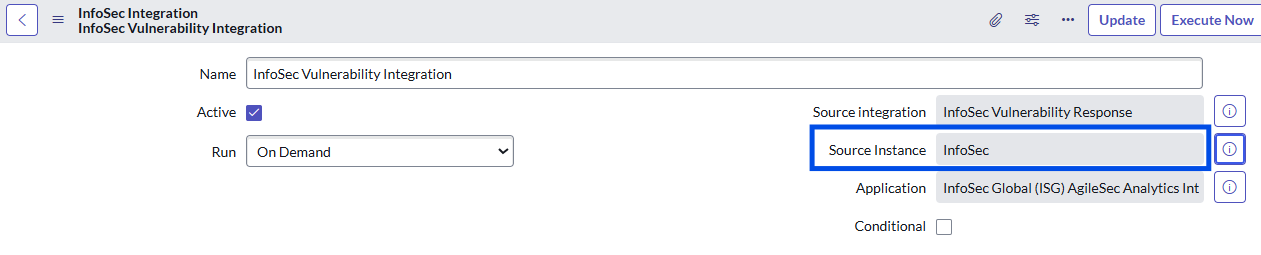
Open the Source Instance record.
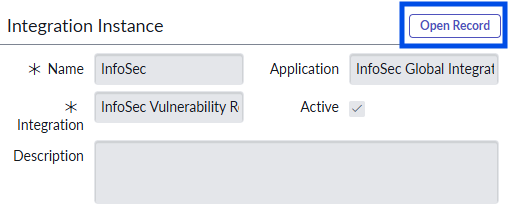
-
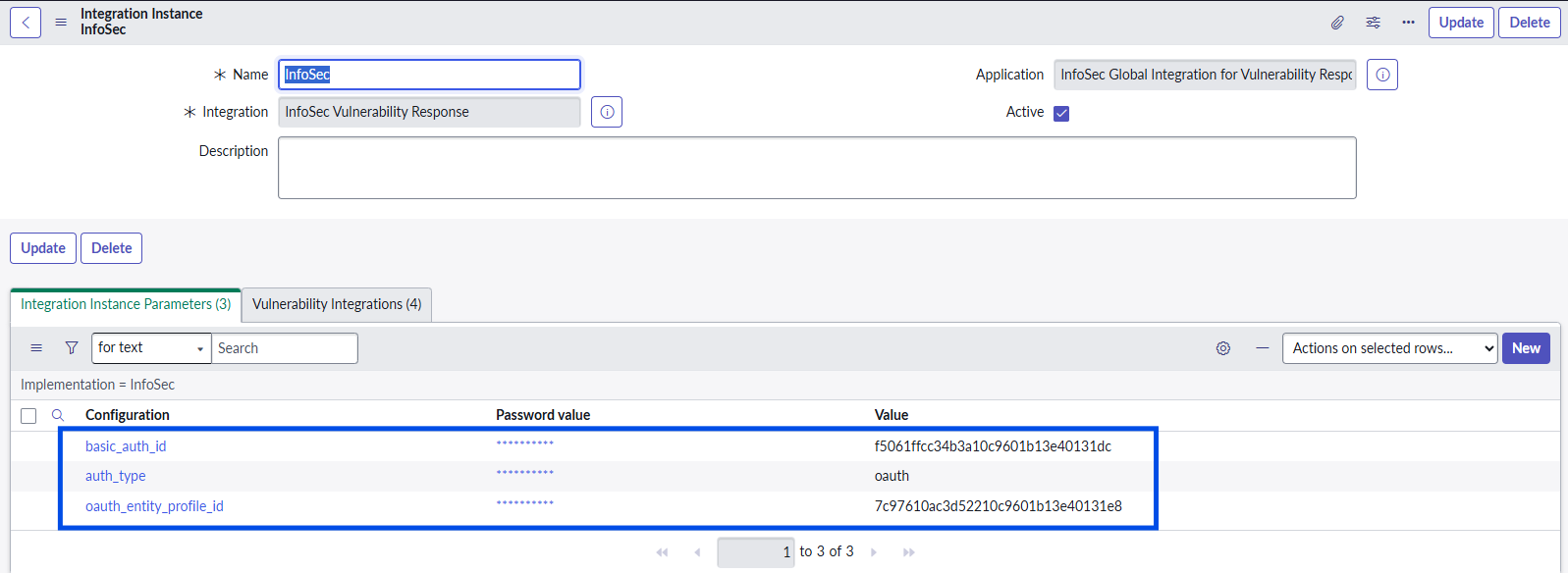
Edit the integration instance parameters
auth_typeandoauth_entity_profile_idorbasic_auth_idto configure the default authentication mechanism.
|
Parameter |
Value |
Description |
|---|---|---|
|
|
|
Select authentication type. Recommended: Set to “oauth” to use oauth. Set to "basic" to use basic auth (username and password). |
|
|
Your OAuth Entity Profile Id
|
Default OAuth authentication record (optional if using basic auth). The |
|
|
Your Basic Auth Config Id |
Default basic authentication record (optional if using OAuth). The |
Configure REST Endpoints for HTTP Methods
Configure AgileSec ServiceNow VR Integration to synchronize with the AgileSec Analytics Backend by setting the correct endpoint URL for each HTTP Method.
-
Navigate to InfoSec Vulnerability Integration> Administration> Integration Configuration.
-
Click InfoSec Vulnerability to edit.
-
Modify the HTTP Methods with specific information from your AgileSec Instance.

Cross Cluster Search Note
When using cross cluster search, multiple indexes should be included in the search such as /agilesec.<org_domain>.v3.alert-*,cluster-*:agilesec.<org_domain>.v3.alert-*/_search/agilesec.<org_domain>.v3.alert-*/_search, where
-
Important: Replace the dot in your organization’s
<org_domain>with an underscore. For example.kf-agilesec.com→kf-agilesec_com -
agilesec.<org_domain>.v3.alert-*targets the cryptographic alerts from the local cluster -
cluster*depends on naming scheme for clusters. We recommend naming all clusters asagilesec-<cluster region>. -
cluster*:agilesec.<org_domain>.v3.alert-*targets the cryptographic alerts from remote clusters
|
Name |
HTTP Method |
Example Endpoint |
|---|---|---|
|
Clear Scroll ID |
DELETE |
|
|
Get Vulnerabilities |
POST |
|
|
Get Vulnerability Items |
POST |
|
|
Get VIs from Scroll id |
POST |
|
Note: The exact endpoint may change depending on the deployment setup, including use of Load Balancers, Reverse Proxies, etc.
Optional: Set MID Server for HTTP Methods
If required, set the MID server used for the HTTP Methods.
-
Navigate to InfoSec Vulnerability Integration> Administration> Integration Configuration.
-
Click ISG Vulnerability to edit.
-
For each HTTP Method, under HTTP Request set the MID server.

Validation
Validate AgileSec ServiceNow integration is working as expected.
Test Connectivity
Test connectivity with the Test functionality on each HTTP Method to confirm the connection is successful. A 200 HTTP status indicates success; other HTTP statuses indicate errors.
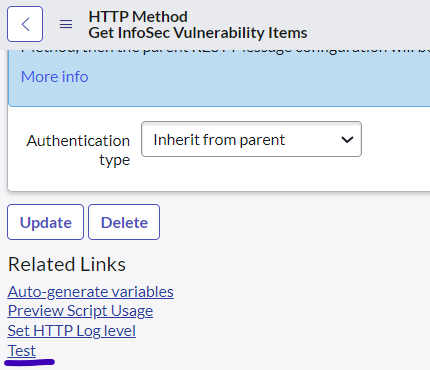
REST Message Tests
The following test cases validate REST Messages are working as expected:
|
ID |
Test |
Expected Result |
|---|---|---|
|
T1 |
Manually run the HTTP Method Get Vulnerabilities using "Test" Link |
The HTTP status shall return 200 with a Response containing several JSON elements. |
|
T2 |
Manually run the HTTP Method Get Vulnerability Items using "Test" Link |
The HTTP status shall return 200 with a Response containing several JSON elements. |
Troubleshooting
-
Verify the URL used for all HTTP Methods is accurate and corresponds to your instance.
-
Verify the user and credentials.
Integration Tests
Prior to running Integration tests, successfully run the REST Message Tests.
The following test cases validate Integrations are working as expected:
|
ID |
Test |
Expected Result |
|---|---|---|
|
T3 |
Manually run the Vulnerability Integration with the "Execute Now" Button. |
The Vulnerability Integration run shall report a success substate. |
|
T4 |
Manually run the Vulnerable Items Integration with the "Execute Now" Button. |
The Vulnerability Integration run shall report a success substate. |
Usage Tests
Prior to running Usage tests, successfully run the REST Message and Integrations Tests.
The following test cases will validate Usage is working as expected:
|
ID |
Test |
Expected Result |
|---|---|---|
|
T5 |
From Third-Party Vulnerability Entries, filter for Source=ISG and list the vulnerabilities. |
The list shall contain the cryptographic vulnerabilities associated with AgileSec Analytics. |
|
T6 |
From Vulnerable Items, filter for Source=ISG and list the vulnerable Items. |
The list shall contain the vulnerable items that are subject to cryptographic vulnerabilities reported by AgileSec Analytics. |
|
T7 |
From a selected Vulnerable Item, go to detections and open a given detection. |
The detection shall include the additional metadata reported by AgileSec Analytics about the location of the cryptographic vulnerability. |
Next Steps
Perform additional desired configuration (AgileSec ServiceNow VR: Configuration) or start using the integration (AgileSec ServiceNow VR: Operations) to access the cryptographic vulnerability, cryptographic vulnerable items and detections within your ServiceNow Vulnerability Response Module.