.png)
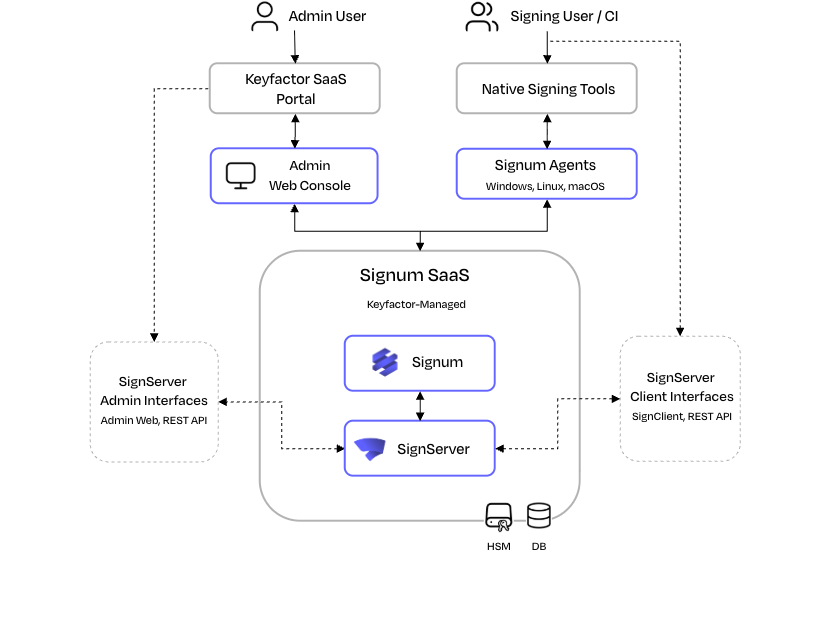
The following diagram shows how the components of Signum+ fit together. Signum+ is delivered as a managed SaaS, so the core services of the platform, including the HSM where signing keys live, run in a Keyfactor-managed cloud environment. The components that run in the customer environment are limited to the administrator's browser and the Signum Agent on each signing host.
Architecture Overview
The Signum+ architecture consists of four principal components: the server with the HSM, the Signum Agent, the signing tool running on the developer or build machine, and the user initiating the signing operation. These components form a chain through which every signing request must pass before a cryptographic operation is performed.
Admin & Client Users
The admin user is the person in your organization with permission to manage Signum: configuring users and groups, defining Policies, and reviewing audit events. The admin actions are performed in the Admin Web Console through a standard web browser. See User Management.
The client user is either a person signing interactively at a workstation or an automated service account running in a CI/CD pipeline. In both cases, the user must authenticate to the Agent before signing operations are permitted. Authentication is governed by the Domain configured for the Agent. For more information, see Domains.
Native Signing Tools
The signing tool is the platform-native application the user or build pipeline already uses to sign artifacts, for example, Microsoft SignTool on Windows or codesign on macOS. The signing tool has no direct awareness of Signum, as it interacts only with the Agent through the standard cryptographic interface for its platform.
For an overview of the interfaces and supported signing tools, see Interoperability.
For configuration examples, see How-to Guides.
Signum Agents
The Signum Agent is a lightweight service installed on each machine where signing takes place, such as a developer workstation or a CI/CD build runner. It is the only Signum component that runs in the customer environment.
The Agent exposes platform-native cryptographic interfaces to the local signing tool, making the remote HSM-backed key appear as a locally available key. When the signing tool requests a private key operation, the Agent intercepts it, authenticates the request to the Signum server, and returns the resulting signature. From the perspective of the signing tool, the operation is indistinguishable from a local signing operation.
For more information, see Signum Agents.
Signum Server
The Signum server and its Hardware Security Module (HSM) form the trust anchor and control plane of the system. They run entirely within the Keyfactor-managed SaaS environment.
The Signum server sits above the HSM and is responsible for policy enforcement, authentication, and audit logging. When a signing request arrives from an Agent, the server evaluates it against the policies configured by the administrator, checking who is signing, with which certificate, from which machine, and at what time. If the request satisfies all policy conditions, the server instructs the HSM to perform the signing operation.
Using SignServer with Signum
SignServer extends Signum's signing capabilities with more advanced features. With SignServer, keys are shared between both Signum and SignServer, simplifying key management by keeping all key material in the HSM.
The Signum Agent connects to SignServer rather than the default HSM, forwarding signing requests for processing. The existing signing tools and workflows continue to work without modification.
Depending on the use case, you may need to complete administrative tasks in both the Signum Admin Web Console and the SignServer Admin Web.
For more information, see Using SignServer with Signum.
Signing Request Flow
When a signing tool invokes a key operation, the following sequence occurs:
-
The Agent receives the request through its platform-native cryptographic interface and identifies the signing user based on the active session credentials.
-
The Agent forwards the request to the Signum server over a secure connection, along with the identity of the user, the certificate being used, and metadata about the signing machine.
-
The server evaluates this information against the configured policies. If all policy conditions are satisfied, the server instructs the HSM to perform the signing operation using the appropriate private key.
-
The HSM computes the signature and returns it to the server, which passes it back through the Agent to the signing tool.
Every step in this flow is recorded in the Signum audit log. Agent activity can additionally be exported to a Syslog server or to Splunk.