.png)
Enterprise
The uTrust HSM is the next generation Utimaco HSMs after the CryptoServer. From a PKCS#11 perspective, it works similar to the CryptoServer.
A firmware package called Quantum Protect adds support for post-quantum cryptography (PQC). Quantum Protect is available both for the simulator and for physical uTrust HSM devices. Supported post-quantum algorithms include ML-DSA and LMS.
The integration with PQC algorithms uses PKCS#11 vendor-defined mechanisms and is only supported with PKCS#11.
Installation and Configuration
Follow the installation and setup instructions provided by Utimaco for your uTrust HSM or simulator environment.
When using the simulator, initialize a slot before creating keys. The following example initializes slot 1 and configures Security Officer (SO) and User PINs:
./p11tool2 slot=1 Login=ADMIN,/etc/utimaco/ADMIN_SIM.key InitToken=xsmP44uygSxAvSdrZBeV
./p11tool2 slot=1 LoginSO=xsmP44uygSxAvSdrZBeV SetPIN=xsmP44uygSxAvSdrZBeV,foo123qwe
./p11tool2 slot=1 LoginSO=foo123qwe InitPIN=f00123qw
./p11tool2 slot=1 LoginUser=f00123qw SetPIN=f00123qw,foo123qwe
Using the HSM
You can manage keys and perform cryptographic operations either through the EJBCA Administration UI or using the P11NG CLI.
P11NG CLI
Example P11NG CLI Commands:
./p11ng-cli.sh showinfo --lib-file /etc/utimaco/libcs_pkcs11_R3.so
./p11ng-cli.sh listslots --lib-file /etc/utimaco/libcs_pkcs11_R3.so
./p11ng-cli.sh showtokeninfo --lib-file /etc/utimaco/libcs_pkcs11_R3.so --slot 1
./p11ng-cli.sh listobjects --lib-file /etc/utimaco/libcs_pkcs11_R3.so --slot-ref SLOT_NUMBER --slot 1 --password foo123qwe
./p11ng-cli.sh generatekeypair --lib-file /etc/utimaco/libcs_pkcs11_R3.so --slot-ref SLOT_NUMBER --slot 1 --alias mldsa44 --key-spec ML-DSA-44 --password foo123qwe
./p11ng-cli.sh generatekeypair --lib-file /etc/utimaco/libcs_pkcs11_R3.so --slot-ref SLOT_NUMBER --slot 1 --alias rsa2048 --key-spec RSA2048
./p11ng-cli.sh generatekeypair --lib-file /etc/utimaco/libcs_pkcs11_R3.so --slot-ref SLOT_NUMBER --slot 1 --alias ecp256 --key-spec P-256
./p11ng-cli.sh listkeypairs --lib-file /etc/utimaco/libcs_pkcs11_R3.so --slot-ref SLOT_NUMBER --slot 1
./p11ng-cli.sh signperformancetest --lib-file /etc/utimaco/libcs_pkcs11_R3.so --slot 1 --alias mldsa44 --signature-algorithm ML-DSA-44 --time-limit 5000
In the Admin UI it looks like this, if the PKCS#11 driver is installed i one of the default locations in EJBCA.
EJBCA Admin UI
If the PKCS#11 driver is installed in one of the default library locations recognized by EJBCA, the HSM can be configured directly from the Admin UI when creating a Crypto Token.
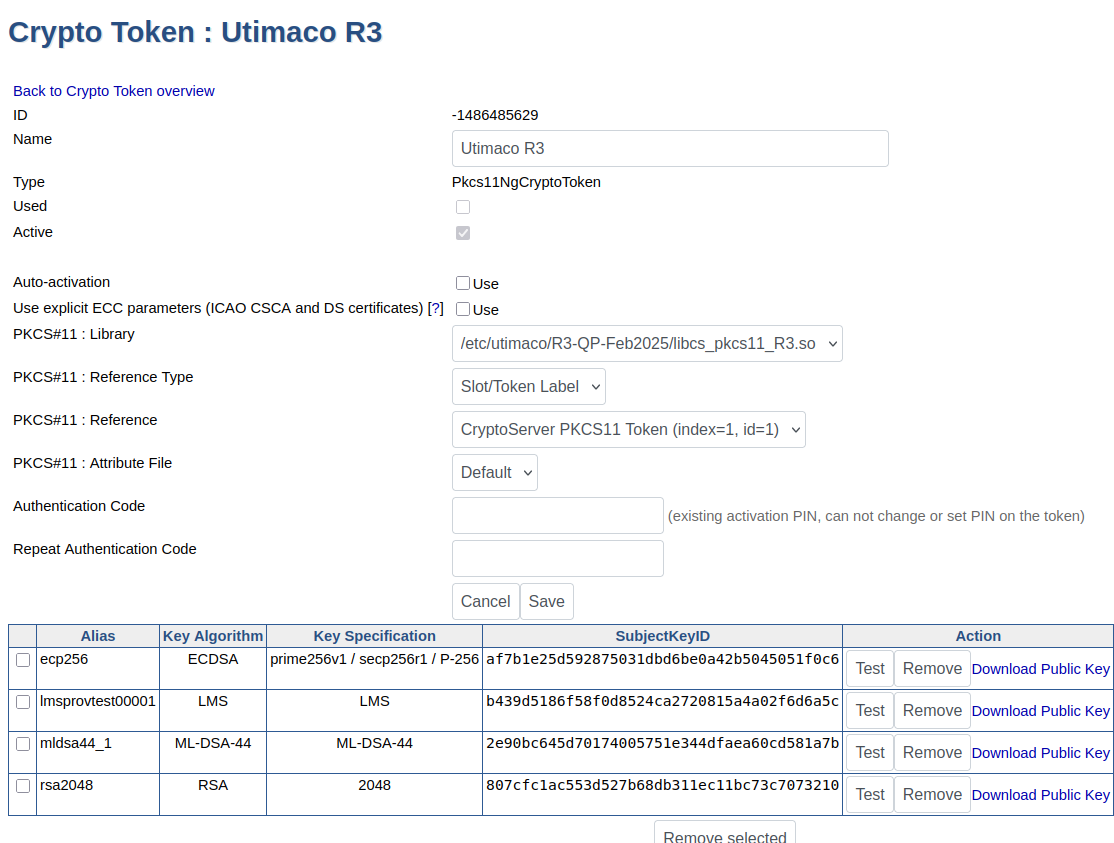
For more information about crypto tokens, used for storing cryptographic keys in EJBCA, see Crypto Tokens Overview.