.png)
The Agents tab lists every Signum Agent that has connected to this deployment. Use it to verify Signum Agents are online, check version currency, inspect authentication history, and manage per-Agent settings.
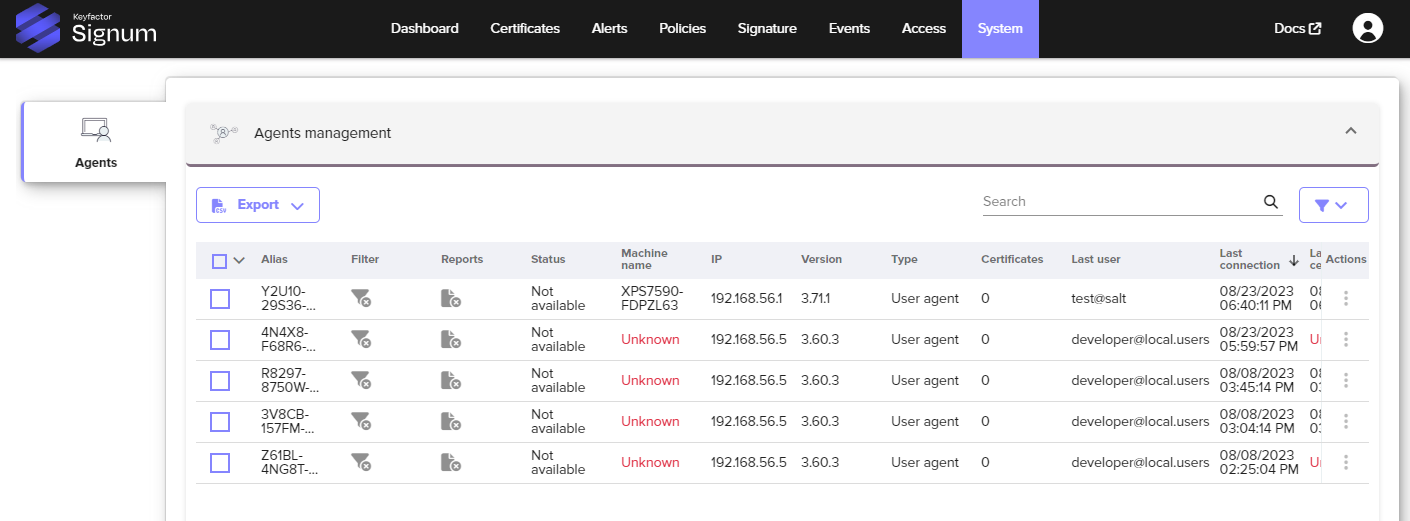
Agent List
Each row in the Agent list represents one installed Agent instance.
|
Column |
Description |
|---|---|
|
Alias |
The unique name assigned to this Agent, set during installation. |
|
Filter |
When enabled, the Agent suppresses signing requests from applications that are not associated with any policy before they reach the server. This reduces unnecessary event log entries and server traffic in environments where many applications run alongside signing tools. Disable filtering if you need a complete record of all signing attempts, including those from unconfigured applications. |
|
Reports |
When enabled, the Agent periodically sends a report to the server listing all certificates installed on the machine's certificate store, including their thumbprints. Useful for auditing which signing certificates are present across your fleet. To enable this by default for all newly installed Agents, contact Keyfactor Support. |
|
Machine name |
The hostname of the machine where the Agent is installed. |
|
IP |
The IP address of the machine at the time of last connection. |
|
Version |
The installed version of the Signum Agent. Agents that are significantly behind the current version may lack support for newer policy features. |
|
Type |
Whether the Agent is running in User mode (interactive, browser-based login) or Server mode (headless, certificate or credential-based authentication). |
|
Last User & Use |
The username and timestamp of the most recent signing operation on this Agent. Times are in UTC. |
The Certificates column is not used in Signum deployments and can be disregarded.
Agent Detail View
Clicking on an Agent in the list opens its detail view, which has four tabs:
Machine Information
Displays the hardware and OS details of the machine where the Agent is installed: hostname, operating system, platform, and Agent version. Use this to confirm the correct machine is registered and to identify Agents running outdated versions.
General Information
Shows recent session activity for this Agent. Click View recent events to open the Events log pre-filtered to show only events from this specific Agent. This is useful for diagnosing signing failures or reviewing activity for a particular machine without manually filtering the full event log.
The session time is reported in UTC.
Certificates
Lists the certificates associated with this Agent.
Signum Users
Lists every user that has authenticated to this Agent, along with the time of their most recent session. Use this to verify the correct users are connecting to a given machine, or to investigate unexpected authentication activity.