.png)
The User Management screen allows for the management of users that have access to and can perform actions in the Signum SaaS Portal.
Signum supports a default integration with Keyfactor Customer Portal identities so that product roles can be created and managed in the Customer Portal. This is in addition to the roles that can be configured in Signum directly. This gives users an easy way to begin using Signum without having to connect an external identity provider to the initial deployment.
It is still possible to instead configure a new Domain in Signum for connecting multiple external organization IDPs. For more information, see Domains.
Customer Portal users can be assigned three different default Product Roles for Signum:
-
Admin
-
User
-
Viewer
The abilities of each role are defined in the following table:
|
Product Role |
Permissions |
|---|---|
|
Signum Admin |
The Admin is the highest level of permissions in Signum. For more information, see Signum Administrator Functions. The Admin is a member of the “Default Signing Policy” created on first deployment. If all default settings remain the same, any users added to this role are members of the default policy, and the Admin group is added by default. |
|
Signum User |
The User has no assigned Signum role. The User cannot access the Admin Web Console and can only be assigned to policies. The User is a member of the “Default Signing Policy” created on first deployment. If all default settings remain the same, any users added to this role are members of the default policy, and the Admin group is added by default. |
|
Signum Viewer |
The Viewer can only view information in the Signum Admin Web, such as certificates and events. The Viewer role is editable by Admins, and originally-configured permissions can be adjusted. |
Product Roles with SignServer
With Signum+, the Admin role in Signum also includes Admin and Auditor permissions in your SignServer deployment. The Signum User and Viewer roles do not have SignServer role permissions.
For more information on the SignServer roles, see Administration Web Roles in the SignServer documentation.
Signum Administrator Functions
The Signum Administrator is a special type of role in Signum that Keyfactor configures during deployment on behalf of the user. Keyfactor can add and remove users from the Signum Administrator role with a ticket created by contacting support@keyfactor.com.
The following functions only the Signum Administrator can perform:
-
Creating Roles
-
Creating Certificate Groups
-
Creating Domains
-
Viewing the System Logs
-
Viewing the Agent Management Console
The Signum Administrator role user(s) cannot be assigned to other roles.
Manage Product Roles and Portal Privileges
From the User Management screen, you can manage user privileges.
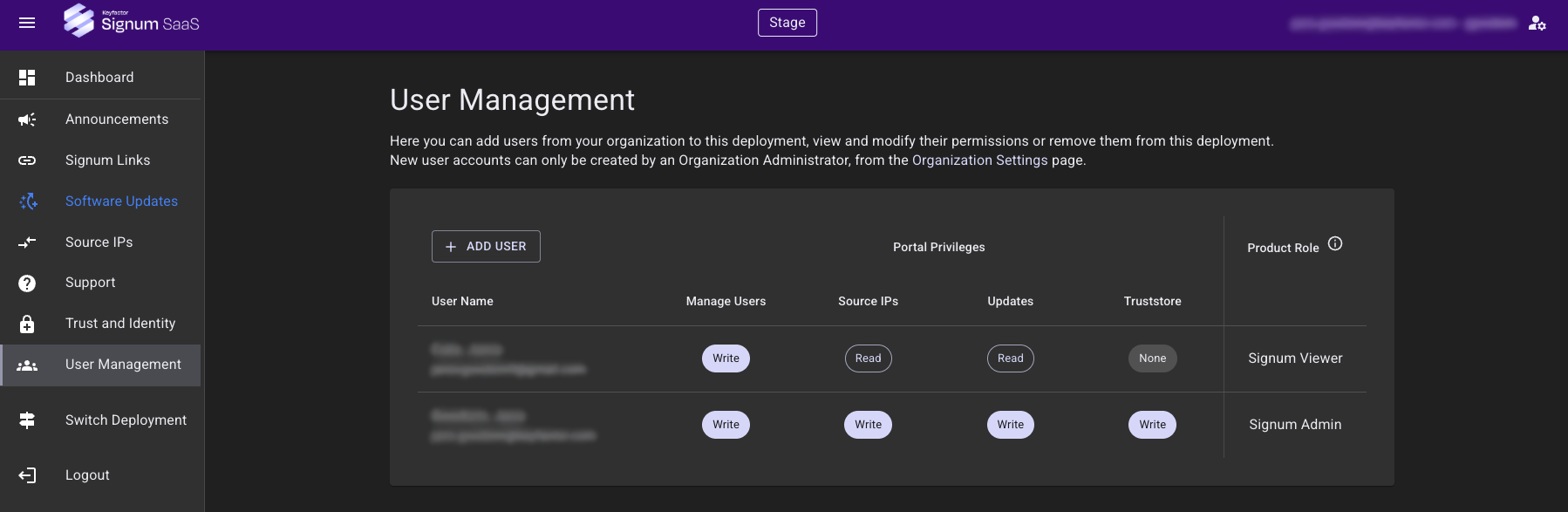
User accounts can only be created and managed by a Signum Administrator. To add a new user to the deployment, the user first needs to be added at the Organization level. See Using the the Organizations Feature.
To edit user privileges, click on the User Name to open a editing dialog:
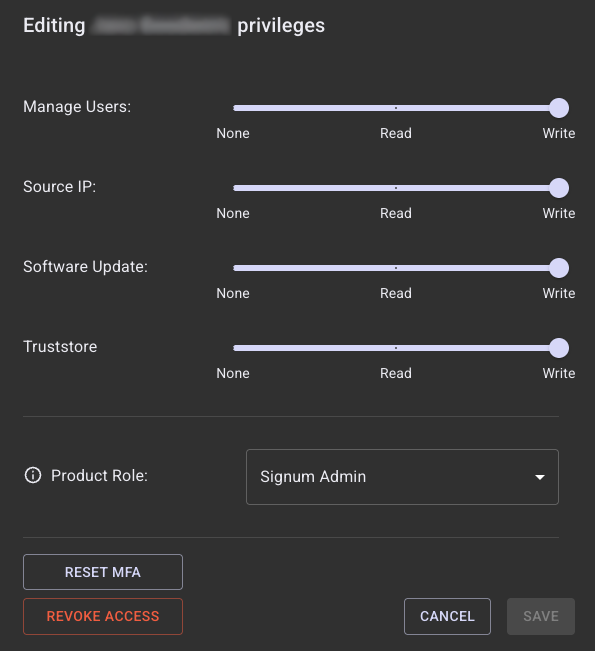
In this dialog, you can:
-
Adjust the permission to view, edit, or restrict access to Manage Users, Source IP, Software Update, and Truststore.
-
Change the Product Role.
-
Reset the Multi-Factor Authentication.
-
Revoke access entirely from the deployment.
Click Save after making the changes.
Additional Signum Features
In addition to the functionality included in the Admin Web Console, Keyfactor can also configure a user's SMTP or Syslog server for alerting and events respectively. To configure this functionality, open a Keyfactor support request.