.png)
The Universal Orchestrator framework connects the Software Appliance to Keyfactor Command, thereby enabling Keyfactor Command to manage certificates across systems.
This specific extension allows Keyfactor Command to manage the HSM Luna client certificate on the Software Appliance.
Capabilities:
-
Registers the inventory of HSM Luna client certificate with Keyfactor Command.
-
Automatically detects the Luna client certificate on the Software Appliance.
-
Supports only on-device key generation for re-enrollment of the Luna client certificate.
Prerequisites:
-
In Keyfactor Command the certificate store type must be created.
-
Configuration of the Orchestrator connection in the Software Appliance’s Webconf interface.
The certificate store type in Keyfactor Command must be created before
configuring the connection in the Software Appliance’s Webconf.
This ensures that the HsmLunaAppliance capability is already recognized when the Orchestrator is registered with Command.
Configuring the Certificate Store Type in Keyfactor Command
The Keyfactor Command administrator must create the HsmLunaAppliance certificate store type, which determines what operations can be performed.
This only needs to be done once per Command instance.
Supported Operations:
-
Discovery:
Automatically locate the Thales Luna HSM client certificate on the Software Appliance. -
Inventory:
Report the Luna client certificate details to Command. -
ODKG: On Device Key Generation used to re-enroll a new certificate while keeping the private key on the appliance.
Not supported Operations:
-
Add:
The Thales Luna HSM client certificate is added through discovery, not added manually. -
Remove:
The Thales Luna HSM client certificate cannot be manually removed through Command. -
Create:
This function could be used to create a new certificate store on the appliance.
Supported Key Types for On-Device Key Generation:
|
Key Type |
Key |
|---|---|
|
RSA Keys |
|
|
ECC Keys (Elliptic Curve) |
|
|
EdDSA Keys: |
|
Software Appliances running Luna Driver versions 10.4.0, or 10.5.1
only support RSA 2048-bit key generation regardless of the requested key type.
Upgrade to a newer driver version for full key type support.
The generation of CSRs for TCT drivers (currently versions 7.13.2 and 7.15.1) is not supported, so the entire ODKG does not work in these cases.
Certificate Store Type Configuration Details:
The Command Administrator must create a storage type with the following settings:
Basic Settings:
-
Name:
HsmLunaAppliance -
Short Name:
HsmLunaAppliance -
Capability: (leave empty)
-
Supports Add:
NO(unchecked) -
Supports Remove:
NO(unchecked) -
Supports Discovery:
YES(checked) -
Supports Re-enrollment:
YES(checked) -
Supports Create:
NO(unchecked) -
Needs Server:
NO(unchecked) -
Blueprint Allowed:
NO(unchecked) -
Uses PowerShell:
NO(unchecked) -
Requires Store Password:
NO(unchecked) -
Supports Entry Password:
NO(unchecked)
Advanced Settings:
-
Supports Custom Alias:
Forbidden -
Private Key Handling:
Required -
Certificate Format:
PEM -
PFX Password Style:
Default
Custom Fields:
-
None required
Entry Parameters:
One entry parameter is required for ECC key generation:
Parameter Name: usePrimeCurve
Display Name: Use Prime256v1 Curve
Type: Boolean
Default Value: false
When Keyfactor Command requests generation of a 256-bit ECC key, it
specifies the key size but not the specific curve. Since both prime256v1 and
secp256k1 use 256-bit keys, this parameter determines which curve to use.
Values:
-
true: Useprime256v1curve -
false: Usesecp256k1curve
This parameter only applies to 256-bit ECC keys. It has no effect on RSA keys
or ECC keys of other sizes.
Validation Options:
-
When entry has a private key:
Ignore -
When adding an entry:
Hidden -
When removing an entry:
Hidden -
When generating keys on device:
Required
Configuring the Connection on the Software Appliance in Webconf
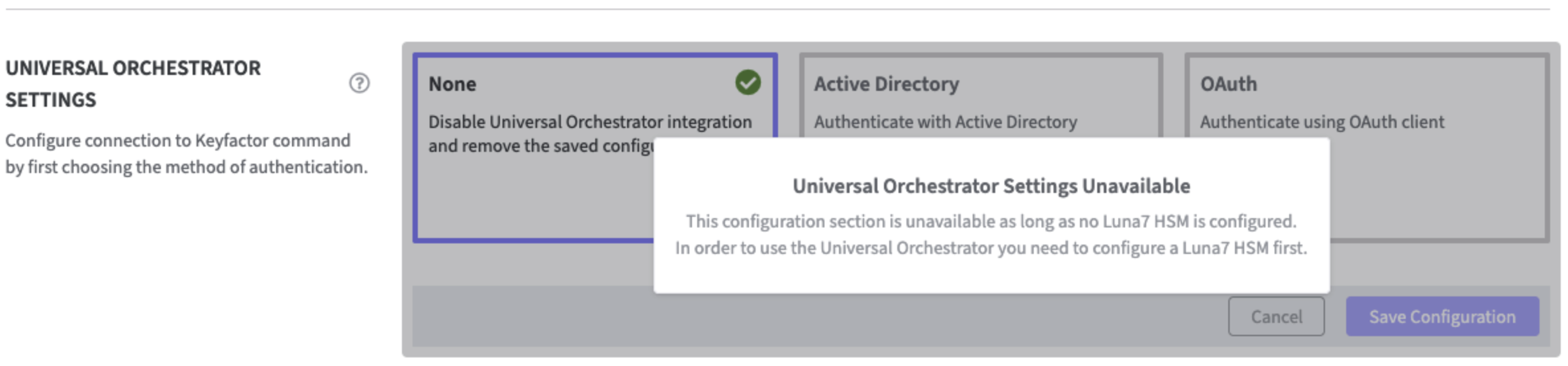
The Universal Orchestrator can only be configured if Thales Luna HSM is enabledThales Luna HSM; otherwise, a modal dialog box will appear that halts the process.
-
Log in to your Software Appliance and open the Services page.
-
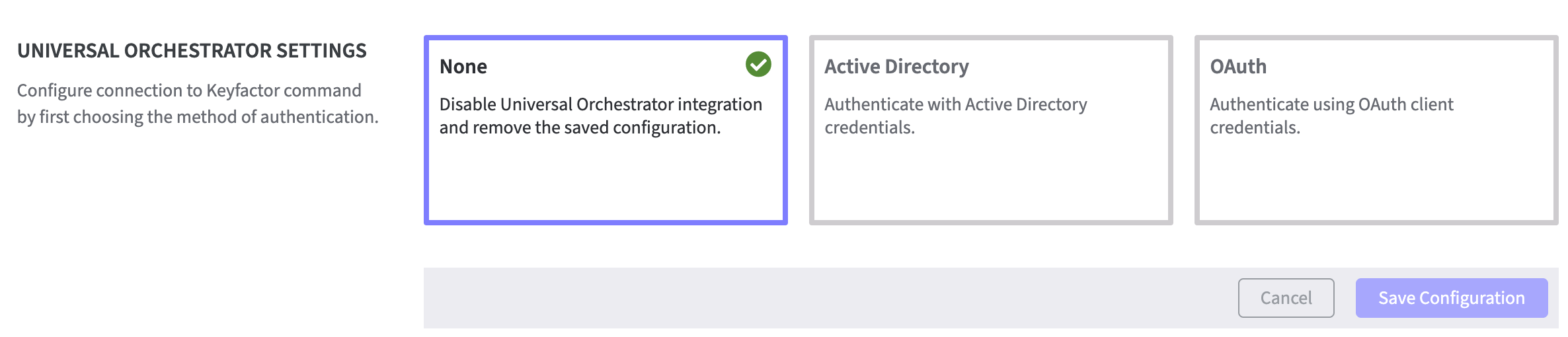
In the Universal Orchestrator Settings select the appropriate authentication method.
-
None
Disables integration with Universal Orchestrator. -
Active Directory (AD)
Authenticates using Windows Active Directory credentials. -
OAuth
Authenticate using OAuth client credentials.
-
Click for Universal Orchestrator Configuration with Active Directory.
Click for Universal Orchestrator Configuration with OAuth.
Orchestrator Management
After configuring both:
-
the certificate store type
-
the orchestrator connection are configured
Create Certificate Stores in Command using Discovery
The certificate stores in Command can be created using the Discovery feature.
Each certificate store represents the HSM Luna client certificate location on one appliance.
-
Log into Keyfactor Command.
-
Navigate to Locations > Certificate Stores.
-
Run a Discovery Job to automatically detect the Luna client certificate.
-
Once discovery is complete, the certificate can be automatically created using the management option.
Refer to Certificate Stores for further information.